SlideMagic Blog

Frequent updates about all things presentations since 2008. Subscribe to never miss a post.

RSS
all posts

Category Software

·Colors

Creative commons Flickr search

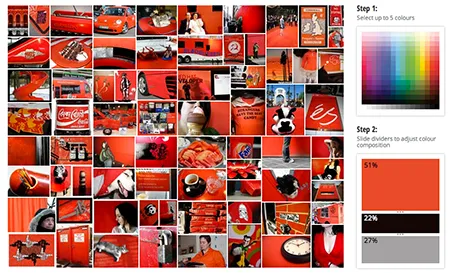
TinEye Labs has developed a cool image search engine. Select multiple colors (unlike Google image search), and the tool will mine 10 million Flickr images with a creative commons license (unlike Google image search).

Image by Mitali Mokerjee

·Data visualization

Fonts in Excel

A reader sent me a question the other day: what font to use in Excel instead of the boring and over-used Calibri/Arial?

I think there is not much to gain from using custom fonts in Excel. Readability is requirement number one, and the standard ones deliver. Moreover, Excel sheets are often emailed around to multiple people, and changing fonts creates compatibility issues.

The biggest opportunity to make Excel sheets look better is in the layout of your worksheets and typography. Subtle use of bold, carefully selecting the language you use, grouping similar items together, subtle grey box fills, etc. With a few little adjustments you can make your Excel sheet look like a nicely formated page out of an annual report.

·PowerPoint

Excel to recover from a PPT crash

PowerPoint 2011 for Mac does not work well with Apple’s Time Machine backup system. You cannot change the backup timing, so my machine always tries to backup during Israeli office hours (night time US), and guess what, one of the few files that needs a backup is the presentation file I have open right now in PowerPoint. While I am sure there is some sort of file conflict mechanism in place, it is not very effective and I had PowerPoint crashing on me numerous times.

What to do about it? This is a relatively friendly crash, your program is not stuck, it just refuses to save your work (with a frequent autosave setting, that should be about 10 minutes of work). Now here is a nice trick to rescue that chart: select all objects on the page, hit copy, and paste them in an empty Excel sheet. Force quit PowerPoint, re-open, copy the objects in Excel and paste them back in. You just saved yourself from having to redo that 15 layer animation.

·Images

Aspect ratios and image fills

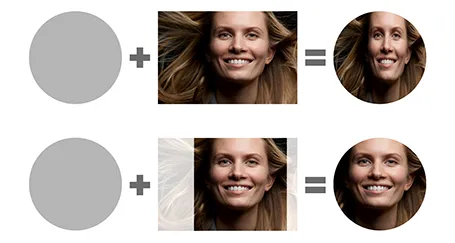
PowerPoint distorts the aspect ratio of images when you use them to fill a shape. To work around the issue, you need to crop the picture in the aspect ratio of your target shape. In the example of the circle below, that is a square.

I use PhotoShop to crop my pictures. You can also use the PowerPoint crop function itself and right-click, save as image.

·Keynote

Popular posts in 2012

Here are some posts that people have been reading a lot on my blog in 2012:

For me it is interesting to see that almost none of these posts were written in 2012, and that pretty much all of them are about technical PowerPoint software skills (there is a correlation here, as my posts have evolved a bit over the years). Presumably this is the result of people Googling when they are stuck in PowerPoint.

Anyway, hopefully these posts are useful if you missed them the first time around.

·Gadgets

Google Presentations review

As part of my attempts to write a PowerPoint killer I am researching all the presentation apps that are currently available. Today, I have Google Presentations a test drive.

Web apps have come a long way, and the overall user experience is pretty much the same as local software: snappy and fast (that is, if you are connected to the Internet). Right-clicking, dragging, drop downs, it all works. Google Presentations is integrated into the Google Drive environment which makes accessing and sharing files really easy.
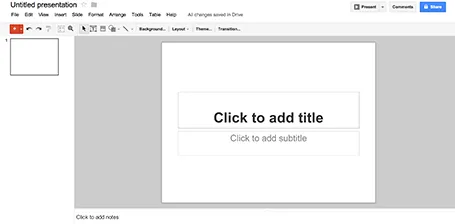
While I think that PowerPoint is too bloated with features, Google Presentations is still at the other extreme of the spectrum. Here are the things I a missing:

  • Big, big problem: you cannot crop images
  • Poor integration of data charts (you need to create the chart in a Google Spreadsheet and then copy it across as an image
  • If you create custom templates, everyone can see and use them

Google is making huge improvements in the design of its software, gmail, Google+, mobile apps all look fantastic now. Google Spreadsheets are already a workable alternative to Microsoft Excel sheets. With some additional features, Google Presentations can be come a credible PowerPoint alternative as well.


·Keynote

Wireframing in Keynote

I have started to wireframe my PowerPoint/Keynote killer in… Keynote. Presentation design software is excellent to make mock up web sites or mobile applications, no need for special software. You have all the shapes at your disposal and can add basic interactivity with hotlinks that point to other slides in your deck. You can design icons yourself or use standard packs such as these, or these to make things look even more real.

·Keynote

PowerPoint killer?

Now that my book is nearing completion I am switching attention to a much bigger side project, I might have the initial idea for software that can be a PowerPoint and Keynote killer. Many have tried before me, and all of them have more or less failed, so I need to be careful. I keep the idea under wraps for the moment (sorry), but what I can reveal are the fundamental flaws in slideware that I want to take out:

  1. The bloated programs have their roots in 1980s mouse-based drawing software
  2. Templates are technology- or graphics- rather than business content-driven

Things are very early at the moment, and I am trying to get a handle on the budget and timing aspects of a project and start to look into possible design partners (UI, backend). Let me know if you think that there are design studios out there that I should be aware of, especially those that have experience with visual/slide apps on desktop and mobile. You can send me a message via the contact field in my website.

I hope that this post will be the beginning of a solution for death by PowerPoint, rather than a note in the margin like Fermat’s last theorem

·PowerPoint

Prevent PowerPoint from crashing

I have Microsoft Office software open on a Mac for 10 hours a day and while the program is very stable, there are a few occasions where it can crash. I have my theories why some of these happen, but even if they are just superstition, I would recommend anyone to set a very aggressive autosave window (5 minutes or less) and hit save before going into specific actions.

  • If Dropbox (and probably Box as well) start syncing a file that you have open in PowerPoint you are at risk. Especially when they are large and saving takes more than a second. You can see the Dropbox icon moving when it is syncing, to be save cancel sync for the time that you are editing
  • The same problem (and in a much bigger way) is Apple Time Machine backup. If Time Machine backs up a big PowerPoint file while you have it open you go down. Stop Time Machine backup, or install a utility that enables you to control when backups are happening. (There are many of them here, I have not tried these, so at your own risk)
  • Rapid clicking and editing of data charts, open one, edit one, close one, change one. Excel might get confused, is waiting for some input from PowerPoint, who is waiting for input for Excel. Always hit save before and after major data chart manipulations.
·Keynote

Give your eyes a break

When someone emails you a PowerPoint presentation, PowerPoint remembers the screen size that was last used. If that version was created on a small laptop, the slides will show up as tiny rectangles on a big desktop monitor.

All the time I see people making edits to presentations in tiny tiles. Why not give your eyes a break and scale up the slide to fit the page? Getting rid of toolbars, the speaker notes field, and reducing the outline on the left will deliver some more screen real estate.