SlideMagic Blog

Frequent updates about all things presentations since 2008. Subscribe to never miss a post.

RSS
all posts

Category Gadgets

·Gadgets

Stains on MBP Retina display

I have a recent 15" MacBook Pro with Retina display and the anti-reflective coating of the screen comes of, like described in this thread on the Apple support forum. I owned many Macs before without screen problems, and I have not changed my hand washing, food consumption, domestic cleaning habits. Does any of you suffer from this? If so, please add your voice to the discussion thread.

·Gadgets

PPT Roomba

SlideProof is a neat PowerPoint plug in that cleans your presentation of common small mistakes - automatically. Misaligned boxes, titles, wrong page numbers, you name it.  A bit like the Roomba vacuum clean robot, a spell checker on steroids. You have complete control over the changes though, so nothing unexpected will happen to your slides, which is crucial since my guess is that most of the vacuum cleaning of presentations will happen just before the live presentation.

Fixing small mistakes might not be crucial to get your message across, but it does make a huge difference in the overall impression you leave behind. A bit like polishing your shoes.

SlideProof only runs Windows so I did not have a chance to test drive it myself (I work on the Mac platform). Please share your experiences in the comments if you managed to check it out.

·Gadgets

Adobe Voice

Adobe launched a new iPad app, Adobe Voice, that enables you to create narrated story videos. There are many apps that help you build animated videos, but this is one of the best I have seen.

  • It is incredibly simple to use (unlike most of Adobe software), with a beautiful user interface that breaks the conventional approach to video editing
  • It comes with dozens of pre-set story lines: tell what happened, follow a hero’s journey, share a growth moment, promote an idea, etc. Once a story line has been selected, the app prompts the user on each slide with a question to answer (why did the hero set out on his journey?).
  • After recording the audio, you can add images, icons, or text
  • The app comes with a large library of background templates and sounds.

There is an 80/20 rule here, in 20% of the time, you get your video 80% right. Still if you want to get to 100% perfection (something that you are confident to share professionally), you need to get put in the other 80% of the effort. Prepare your visuals and images, and prepare your script.

It is cute that this app was developed for iPad, but for professional use Adobe should create a browser version as well for desktop. It can have the exact UI (except for resizing of images etc.). It is a bit tricky to extract your creation out of your iPad at the moment, and usually people do not have their image databanks stored on iPad.

Continue reading →
·Gadgets

Two screens

There are two adjustments in my IT setup that hugely increased my productivity: 1) move to a huge monitor, 2) add another monitor making a total of 3 screens: 2 big ones, 1 small one.

In this article, it is argued that 2 screens actually reduce productivity. I agree if you use the second one to check on your email, facebook, and Twitter streams. If you use the second screen for a different version of your presentation with comments, or the directory with the images you are using, a multi screen set up is a life saver.

Employees in large companies find it difficult to be productive, and when you look at people sitting in large open plan offices staring at tiny lap top screens, you understand why.

·Gadgets

Is the tablet love affair over?

A partner in VC firm Andreesen Horrowitz confesses that his love affair with the tablet is over. People will stick to a desktop device the laptop and a pocket device, the phone (which will get slightly bigger).

Putting things in context of presentation design (leaving the consumer world aside for a minute):

  1. I think tablets are here to stay for managers that need to view documents, but do not make edits beyond small corrections
  2. Serious presentation design work will never work on a small touch screen (maybe a similar statement to that of IBM estimating the world market for computers). One, there is the physical constraint, but more importantly, I think you need that space, that big screen, that calmness, to think/focus and create beautiful presentations
  3. One thing that the tablet has done is change user interface design forever: I predict most new desktop software will slowly migrate to a tablet-like interface (simple, big buttons).
  4. I think we are likely to see another big innovation in laptop user interface design. Either very large touch screens (still, the distance to the screen will be an issue for a workable user interface), or giant touch pads (maybe integrated with a keyboard) that allow us to scroll through information Minority Report-style.
  5. Document creation and design software is too complicated and a left-over of ideas from the 1980s. Enterprise documents can be much simpler/uniform while still being effective and distinctive (watch this space). So the innovation in enterprise computing/communication might be in software, not hardware.
Continue reading →
·Creativity

Scribling

I keep on looking for a good electronic solution for note taking, doodling, and scribbling. None of them are perfect. A new option has been added recently.

A good note taking solution needs to combine a number of things:

  1. No paper to keep
  2. Natural writing interface
  3. Good filing and search
  4. Minimal hardware to carry
  5. A simple user interface

See my highly sophisticated analysis below.
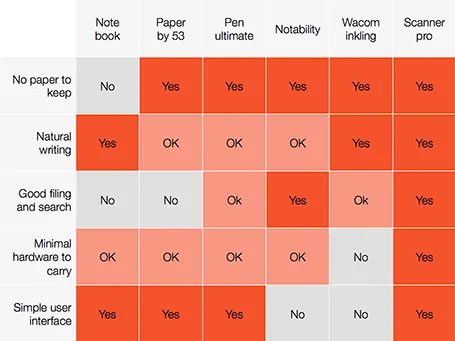
The new option is a smartphone-based scanner. Scanner Pro is a brilliant app. It takes photos, and lets you easily crop the image. You can keep the image as a photograph or flatten it to bold, fax black and white. Then upload the scan to Dropbox or Google Drive where you can store and search things.

So the best note taking might be scribbling on a piece of paper, scanning it, and throwing away the paper.

PS: earlier review of the Inkling, Penultimate,Paper and styli (?) for iPad.

·Delivery

Minority report screen

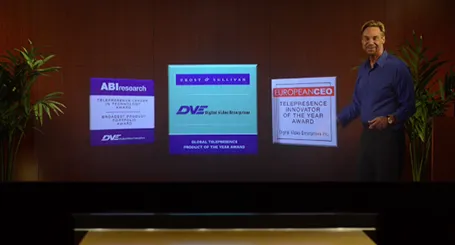
See this presentation screen by DVE Telepresence (auto-play alert), it allows you to move PowerPoint slide objects in the style of the film Minority Report. What do you think? I am afraid that more sophisticated screen technology will not turn humans into better story tellers.

What would be useful though is to have a technology that allows you to write on a transparent whiteboard in front of an audience where technology takes care of mirroring your writing, so it becomes readable by both you and the audience.

Secondly, having a camera hidden inside a screen is great for creating natural eye contact.

·Gadgets

Designing on a MacBook Pro

After a second hard disk crash (long live Dropbox) I decided to write off my 17" MacBook Pro, and upgrade to the new 15" one with a retina display.

Buying a new computer used to generate the same level of excitement people experience when upgrading their mobile phones today. Used to, because buying a new computer now mainly is buying a new utility. Re-install your apps, sync Dropbox, and things are pretty much business as usual (albeit a bit faster).

This 15" retina display though slowly lured me into something I have not done in years: sit in a sofa and do serious design work. The amount of screen my laptop covers is tiny compared to my Thunderbolt screen (you see this when dragging a laptop window across), but the incredible pixel density makes the whole experience wonderful.

·Delivery

Crappy screen, crappy impression

When you invite people over in your office and you run a pitch presentation on a 10 year old screen with a stretched aspect ratio, pixelated images, and burned in colours you are not leaving a very good impression.

LCD screens are not very expensive today, and the right cables plus a bit of tweaking with screen and laptop settings will give a razor sharp picture. Maybe it is time for a meeting room upgrade.

Other quick wins: removing used coffee cups, empty cookie boxes, de-greasing the screen remote, eliminating chewed-on pens and used stationary, open the windows.

First impressions count.

·Colors

iOS7 and PowerPoint templates

Most PowerPoint template designers think that what you put on the empty template page sets the look and feel of the presentation. Gradients, watermarks, logos, color bands. I have long been arguing that the template can just be a blank white page, what sets the look and feel is your approach to how your design the slides: what shapes, what colors.

The new iOS7 is a good example. Icons that looked great in iOS6 now look dated instantly in iOS7. The design philosophy has changed, without new logos, or repeated graphical elements on the page. It is the combined power of the new iOS7-ready icons that together create that new fresh layout.

So in PowerPoint, pick your colors, your fonts, your approach to shadows and gradients and you can use a simple blank page as your PowerPoint template.