SlideMagic Blog

Frequent updates about all things presentations since 2008. Subscribe to never miss a post.

RSS
·Colors

Lighter variants of your presentation color

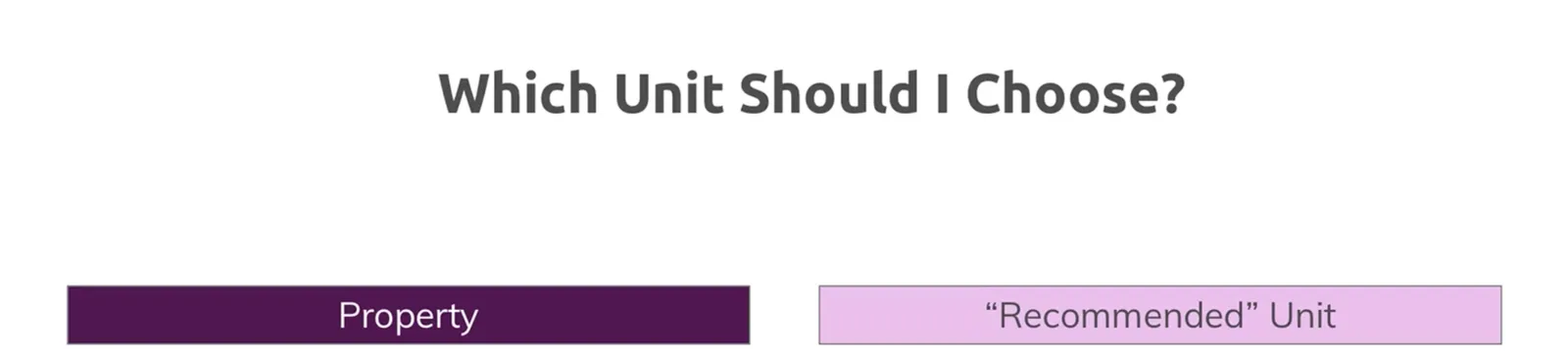
I ran into this slide (fragment) presented on an online course site the other day (I now digest tons of these to refresh my coding skills):

It shows a common problem in PowerPoint: you picked a nice theme colour (deep purple in this case) and you need variants of it. (This presenter figured out that too many colours makes your slide deck cluttered, hence SlideMagic only allows one :-) ).

The default model to make colour changes is to modify its brightness. It almost always work to make things darker, the other way around though can create a problem for very saturated colours. You don’t notice the saturation level at dark levels, but on brighter variants, that elegant purple becomes cute/bright pink.

The solution: change colour saturation as well as brightness. This post on my blog from 10 years ago (what?) describes it:

PowerPoint 2010 gives you the option of a spectrum of different shades of the same color. This is great to design charts with a consistent color scheme.

However, if your template contains colors that are highly saturated, the suggested lighter shades of your color will be too bright to use as neutral color nuances. Here is how you can fix it. (Click on the image for a larger picture.).

Create a new base color by reducing the saturation (in laymen’s speak: make it more grey). Open the color in your color template (format shape/fill/solid fill/color/more colors)Switch the color model from RGB (red, green, blue) to HSL (hue, saturation, luminance).Reduce the (S)aturation value, while keeping all other variables the same.Use a lighter shade of this new base color insteadand save this as a new color in your color template.

Continue reading →

Freelancing and career stability

Now and then I get people considering a career change asking me about life as a freelance consultant. “Isn’t that a very uncertain profession, when compared to someone in a permanent position?”

My answer: not really. Yes, you need to get your first clients/projects, but if you do good work, clients will refer you to other clients, and clients will come back. A person in a permanent position has one employer (who can go through reorganisations and other fun things you do not control), whereas you can hedge and spread the risk among multiple “employers”.

There are a number of things to consider though:

  • The biggest one: do great work. As small independent business, you depend on word of mouth advertising. A beautiful website, massive SEO efforts, might get you the first inquiry, but then people want recommendations. You simply write off an unfortunate purchase of a $5 book that was not great, a 1-month consulting project is different. Most internet marketing has very low funnel rates, freelancers rely on 95% conversion.
  • While the downside for a good freelancer is limited, the upside is probably limited as well. It is hard to scale a bespoke service business. You want to add a second person and not dilute your offering, that person probably needs to be as good as you, and as a result will need to be paid as well as you. Two times the revenue, two times the cost, the same profit. For my own presentation design business, I realised 1 employee (myself) was a great business model, and 50 probably is. But the role of making sure that 49 people have enough work and do it well, is a very different one from helping clients yourself. In short, as a freelancer, you are likely to pretty much the same thing in a few years from now as yo do today, albeit better and a bit faster. In a big corporation, you can go up the ladder and do different things every couple of years.
  • There are things that freelancers often overlook in their pricing: pensions, disability insurance, etc. etc. All this protection that a regular employment position usually offers.
Continue reading →

Working on slide searching and tagging

Some of the world’s major artists got popular because they documented their life and motivations for their work in letters (Van Gogh etc.). Maybe the same will happen with this blog, and my journey from helping 1 client at a time to get better presentations, to hopefully thousands/millions eventually.

So finally, finally, I got a tool in my hands that I wish I had 5 years ago already:

  • Create slide layouts and variations super quickly
  • All in a consistent format
  • Some way to store and organise all the original files, PowerPoint conversions and slide image thumbs (in different formats)
  • A way to tag, describe, and search slides, and also organise, slide, and dice this “meta data”

This was the “easy” part, but a required step to get on to the next phase. How do you actually best describe slides, what slides are related, what suggestions for other slides should you give a user.

My current setup is one big playground. The number of templates is now double that of the current paid Shopify store. I am changing things and experimenting with instant feedback (whether searches are relevant, how much time it takes to complete them.

For most content on the web, and documents in corporate databases, you can use a Google approach to slides: you get a dozen links or video thumbs, and a human eye can quickly go through the clutter and find that document she is looking for. For slide layouts, this is not good enough.

Continue reading →
·Layout

Against the light

In the early 1990s at McKinsey, presentation design was actually document production. Hand-written sheets of paper would be entered into a computer by full time graphics designers. Each word, each line, each graph. Then the whole thing would be printed and bound in books.

I remember the final quality check of the Amsterdam office manager: holding the pages against a strong light to see whether the titles, footers, page numbers, and margins of the slides lined up. You were in trouble if they didn’t.

Getting these basics right is very hard in today’s PowerPoint, If you copy and paste slides between masters, the alignment of objects will be off. If you change screen sizes (from narrow to wide screen and back), things go all over the place. Or, if you use/buy other people’s templates, they won’t fit well in your company’s slide layout. This is not PowerPoint’s fault, any software that needs to give total design freedom to its users will have this side effect.

I went through this the hard way myself, as I am making the slides of my “old” template store compatible with the new format of SlideMagic 2.0. Hundreds of slides that require small corrections to get things to line up properly.

With SlideMagic, professional designers might complain about the lack of flexibility in layouts, the rest of us will be extremely happy with how easy it is to tweak templates, screen sizes, and copy slides between presentations.

Photo by Bank Phrom on Unsplash

·Investor presentation

It makes sense, but it does not

I have been in many of these types of presentations:

Some of the reasons why the overall conclusion of a presentation does not make sense, while the individual slides do:

  • Maybe the people, the organisation, and its culture is not the right environment to make a plan happen. Who is going to do it?
  • The probability curve: on average, normally speaking, the strategy makes sense. But what if things start deviating from the average. What is the potential downside and could it be catastrophic to the compony?
  • The self-fulfilling prophecy. Yes, the deck has 50 slides, discussing 50 different aspects of the idea, but when you look at it, they all depend on ver few (maybe even one) assumption about the market outlook, a valuation of a company, etc. That assumption could be wrong.

Unlike for big companies, for tiny startups the opposite could be true. The slides might not all make sense, but the team is fantastic, the downside is not that big, and an angel investor is willing to bet on that one big assumption.

Photo by dylan nolte on Unsplash

·Software

Slidemagic 1.0 templates merged into 2.0

I am working hard to get rid of the Shopify template store with its shopping carts that are great for buying t-shirts, but not convenient for downloading presentation templates.

As a first step, I have now merged most of the slides of the Shopify store into the SlideMagic 2.0 database. Beta testers who go to the web site, see the templates alongside the new ones generated by the app without noticing the difference.

For 80% of the slides, I could easily convert them to .magic (the boxy ones). These slides appear in the template store with both a .magic and .ppt download option (the .ppt conversion is generated by my software, rather than the manual adjustments for screen size etc.). For the other 20%, I have uploaded the .ppt file without a .magic option. If you are just after .ppt downloads (hopefully you will change your mind at some time), you can use the template store without noticing the difference.

Users that access the slide database from within the SlideMagic app will not see the PowerPoint-only options.

So, hopefully I can retire the Shopify site soon, and I will migrate the subscribers to the new site. And, this exercise gave me some insights into what shapes I should add to SlideMagic, and what shapes are actually not required at all.

This is all a bit of a ramble by a product manager who is trying to justify and integrate past product decisions :-) What it means in practice:

  • You signed up for the SlideMagic template store in the past: you can access the same templates, but also new ones
  • You signed up for the new SlideMagic 2.0 app: you will have access to a great set of templates that are super easy to customise and don’t even miss the PowerPoint-only ones. (And, all your work can be converted to PowerPoint at the press of a button)
Continue reading →

Beta: related slides

For sites such Amazon or Netflix, ‘related products’ searches have become reliable and useful. On my Shopify platform it was very difficult to implement a link to “related slides”. Now that I have acquired the required coding skills, I looked around at other out-of-the-box search solutions (even with the help of some suggestions by blog readers), but I have not found something that could work for me in SlideMagic 2.0.

I think a good search algorithm is absolutely crucial for a slide template engine. Simplistic tag searches are not useful. “Here is another slide about "‘strategy’). You need to take into account how a slide looks, what message it should carry, what audience it is relevant for, etc. etc. And then in addition, bring in how popular a slide is.

I am breaking my head on finding a good way to index slides and make them accessible in search, both on the web interface, but more importantly inside the desktop app.

Today, I completed a very first version to get the basics working. Still far from perfect, but already better than the Shopify site. Next up is a refinement of the tags, the tagging structure, and the user interface. And of course: getting the performance right.

This has not been incorporated in the desktop app yet, I am using the web site as a playground for ideas at the moment.

Work in progress.

Any Office add-in experts out there?

I am trying to create an add-in that brings the SlideMagic 2.0 template store right into PowerPoint: search for slides, “click”, and the layout appears in your document. I thought that new Office APIs would make this really easy. I have a web server already up and running, the only thing is to move to the task pane at the right of the PowerPoint screen.

Googling around, the tricky bit seems to be the final step: inserting the slide template into the user’s presentation. The PowerPoint version of the Office API seems to be really limited. The furthest I can push it is to open a brand new presentation inside PowerPoint with the selected template(s) in it, the user then needs to copy them across as a final step.

Maybe one of my readers can point me to a solution? (Or maybe encourage Microsoft to expose this feature in their API, it will open up a whole raft of possibly very useful PowerPoint plug ins I think).

Obviously, I can dive into the world of hardcore manipulating of XML/PPTX files, but I am not sure whether that investment in time and effort is worth it.

Photo by Randy Laybourne on Unsplash

Boxifying...

The philosophy behind SlideMagic is to save making everyday presentations:

  • A bank of useful templates (still small, but growing rapidly now)
  • A clever search algorithm
  • A proprietary UI to make obvious changes to slides at lightning speed (with the option to convert to PowerPoint)
  • A simple framework to make all slides look uniform and consistent with corporate branding

But there is one other important component: simplifying (call it “boxifying”?) layouts.

Shapes and layouts that are great for drawing on paper or a whiteboard, are harder to get right and look good on a computer, think circles, arrows, curved lines. Professional designers know how to space text out evenly, add white space, line up the 7 levels perfectly on a circle at even distances. For the rest of us, this is a lot harder, or maybe even impossible. Not everyone has that eye for design, you know your slide looks bad, but you somehow cannot pin down why.

Another problem with these “sketch shapes” is that they are not ver efficient to hold text. Try adding long words in a circle shape and you run into problems. (The Japanese figured out a way to create square water melons so more of them would fit in a fridge).

And maybe you have that eye for design, then you still need to invest all that time to get your shapes and layouts right. Time that is worth it if you are designing your annual sales team kick off keynote address, time that is definitely not worth it when bashing out the quarterly numbers for a quick review meeting with the team.

Continue reading →

200+ template file now in 16:9

The Shopify platform is cumbersome for digital downloads, having to put slides through a shopping cart all the time. I am working on a better solution: integrating the “old” template store into the SlideMagic 2.0 platform.

In the mean time, I now have converted the file with 200+ templates from 4:3 into 16:9 format as well, you can find it here. Subscribers can download it for free.