SlideMagic Blog

Frequent updates about all things presentations since 2008. Subscribe to never miss a post.

RSS
all posts

Category SlideMagic

·SlideMagic

Free SlideMagic Pro for students

SlideMagic Pro (including PowerPoint and PDF conversions) will be available free for students! I have just updated the web site and its pricing page. To apply, create a free account, verify your email, and visit www.slidemagic.com/web/student. At the moment, application processing is partly manual, but in a week from now, the automated system will go live, where students from certain countries can directly log in to the web site of their academic institutions, after which SlideMagic Pro gets turned on instantly. Watch this space.

·SlideMagic

Windows app close issue fixed

V37 of SlideMagic had an issue on Windows: closing the last window with the top right ‘X’ did not completely close the app process and as a result, SlideMagic would not reopen again. This issue has been patched in V39 which should automatically install.

You can force an installation in 2 ways

  1. Reboot your machine to close V37. Run SlideMagic V37, wait for 5 seconds until the ‘update available’ notification appears. Close SlideMagic V37 via the ‘Exit’ command in the file dropdown manu. Restart SlideMagic which should now start as V39.
  2. Or download and install the latest version from slidemagic.com

This issue does not apply to Mac users.

·SlideMagic

Free student plan for SlideMagic

SlideMagic will be offered for free to students. I am working to set up a partnership with a student validation service to create a streamlined automated signup process. In the meantime readers of the blog can already apply for a free SlideMagic membership:

  • Create a regular free SlideMagic account with your school/university email address
  • Verify that email
  • Visit this link to apply for a free subscription

This process is still partly manual, so response will not be instant. Student memberships will run until Aug 31, after which you need to apply for a new one.

·SlideMagic

Print bug fixed

For users who print their decks on physical paper, I patched a bug that was caused by the underlying software platform ‘Electron’. Everything should work now. Windows users might get a message that the developer SlideMagic is ‘unknown’. You can safely ignore that, I am working on getting rid of this warning. At your service.

·SlideMagic

SlideMagic 2.6.34

I pushed a new update of SlideMagic yesterday with security patches. The app should update itself automatically on your machines. Let me know if you encounter any issues.

·Concepts

Scaling of data charts in SlideMagic

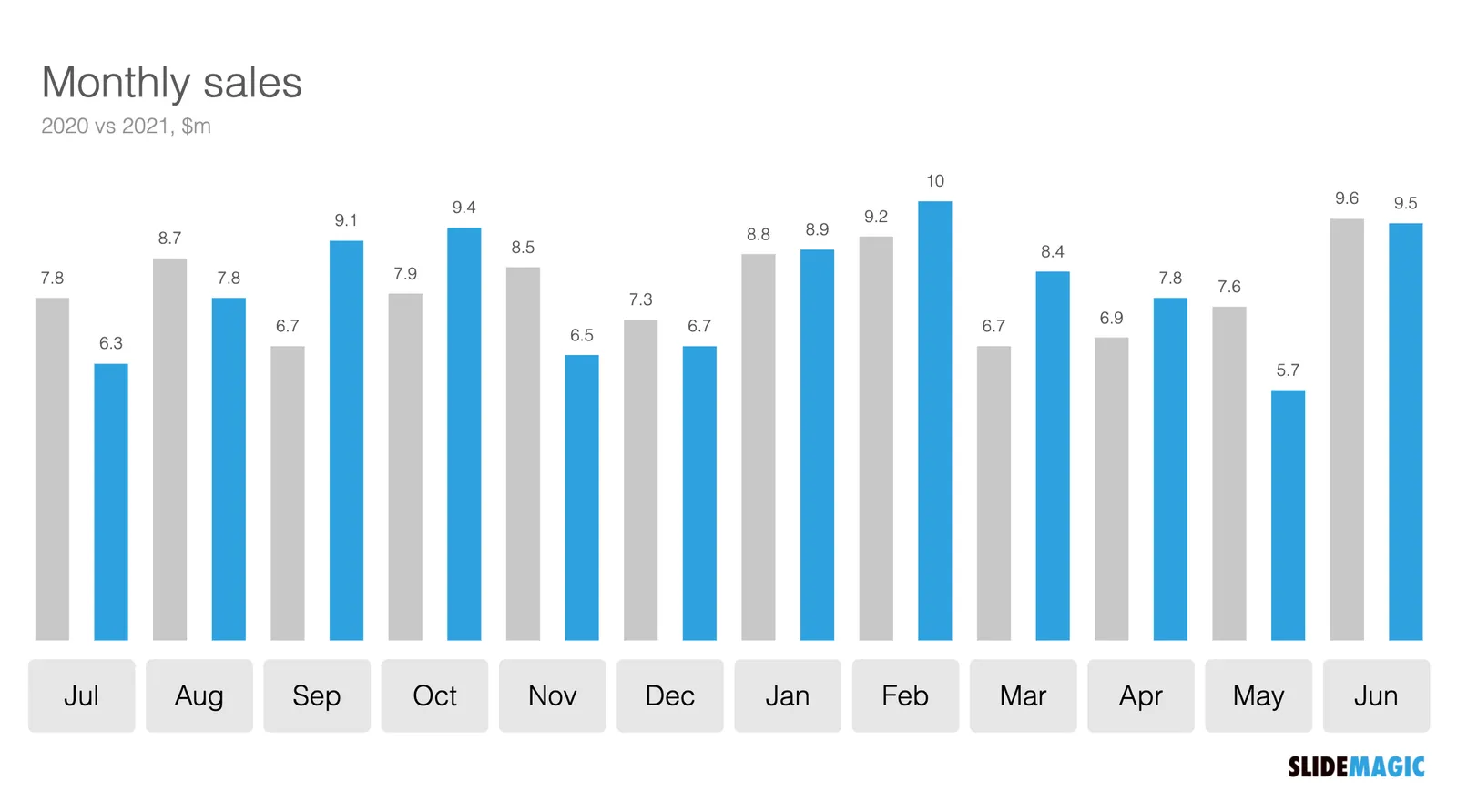
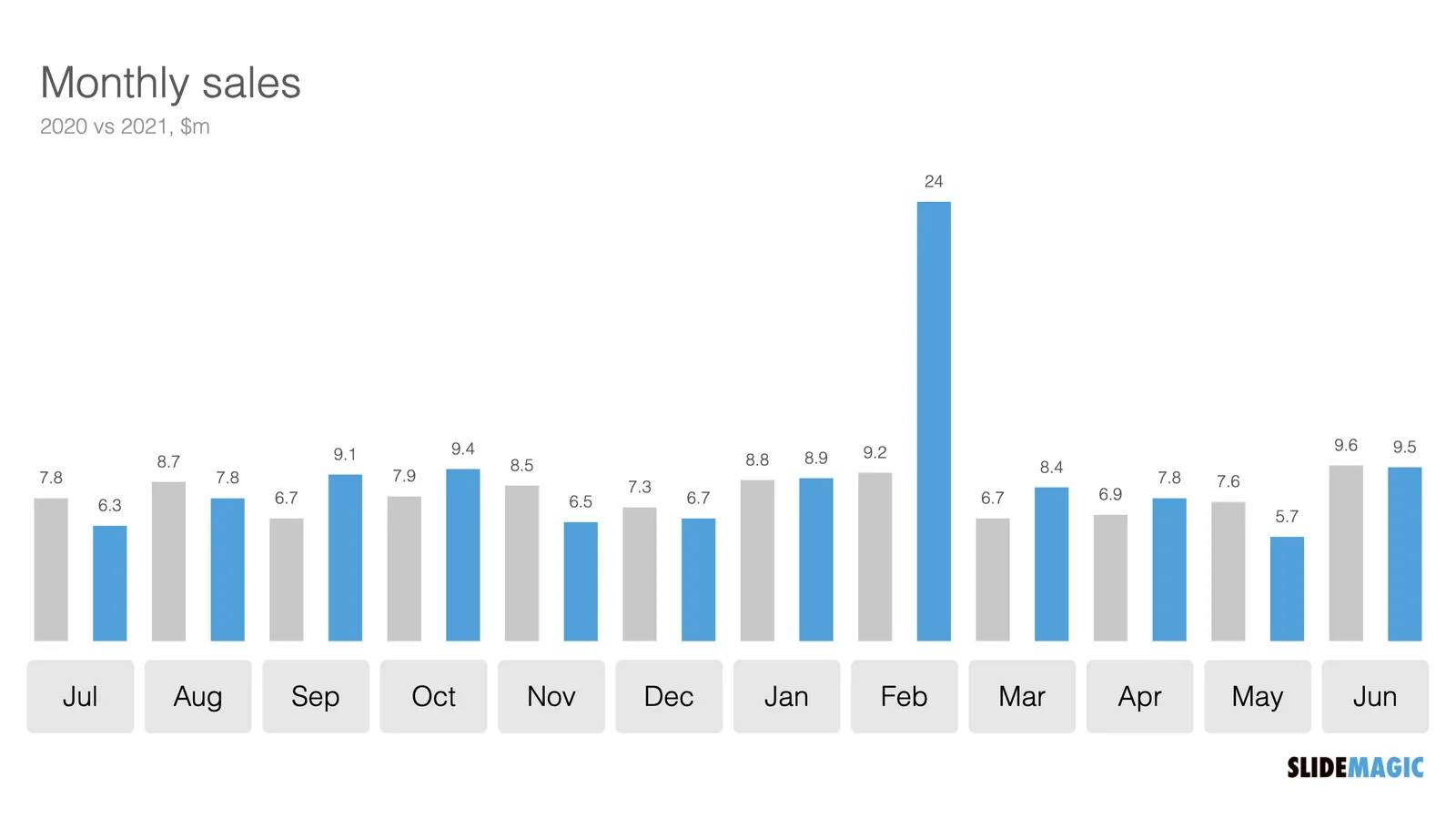
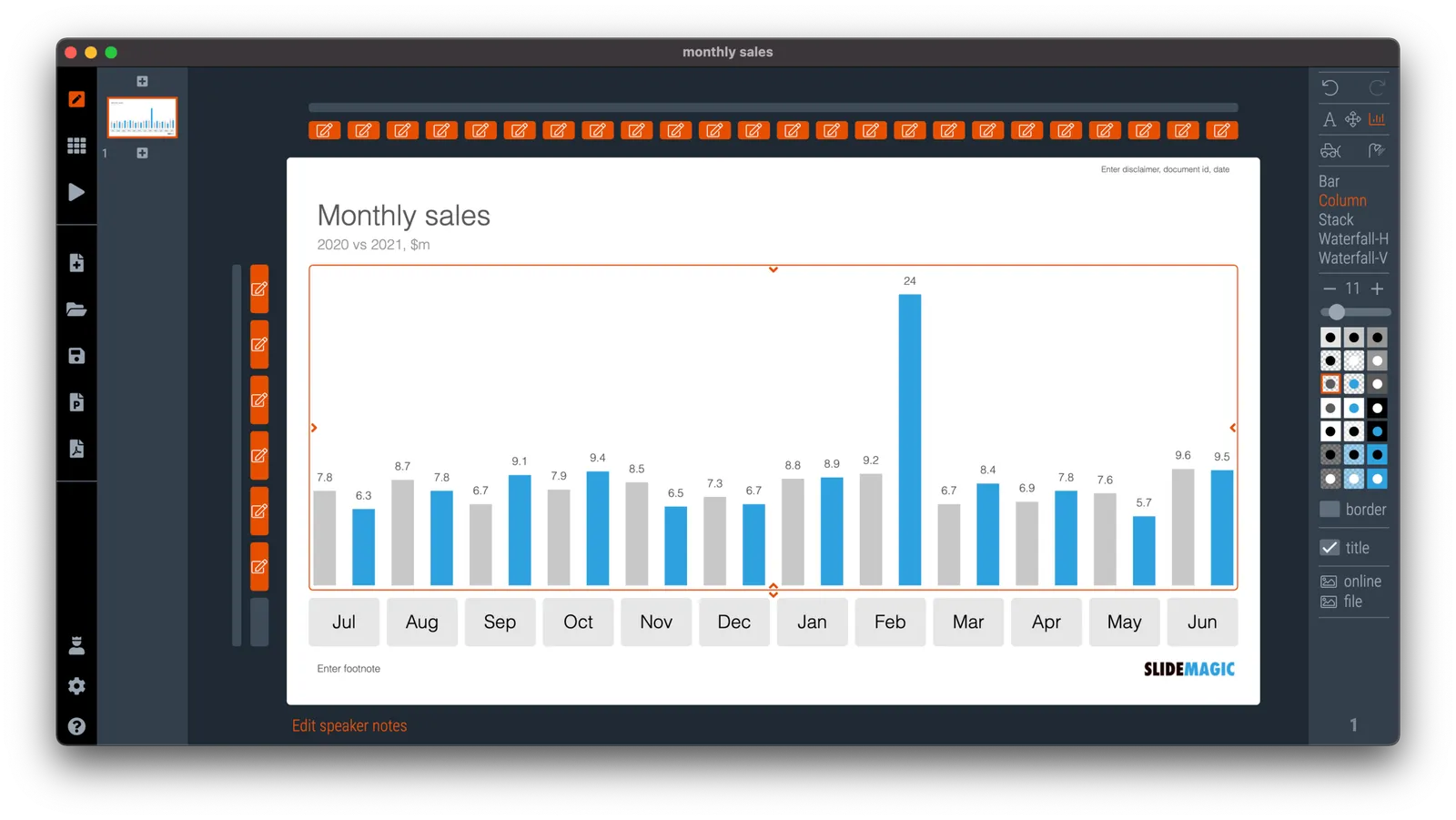
In SlideMagic, you do not have to worry about picking the right scale for your data chart. The entire chart adjusts itself to the numbers you type in. See the example below:

To make sure that a consistent scale is used for your entire chart, you need to place all your data points in one shape, instead of using multiple shapes for example for each month.

P.S. I have added this monthly sales comparison chart to the SlideMagic slide library so you can easily use it in your own presentations as well. Search in the app for ‘sales’ and it will pop up.

·SlideMagic

Server move

I will be getting back to writing blog posts as we are slowly moving towards autumn.

Over the past weeks, I have been preparing a switch of cloud infrastructure provider for SlideMagic to Amazon AWS. The second (stealth) project I am working on requires a very high level of security that could not be delivered by the existing platform. It is amazing what infrastructures you can put together in 2021 at the click of a button.

I have just switched the SlideMagic backend over to the new servers (sweaty palms…) and everything seems to be working OK. I know that there many pioneer users among the readers of this blog, if you spot anything unusual happening, please reach out to me at jan at slidemagic dot com.

·Data visualization

Leaving the math to your audience

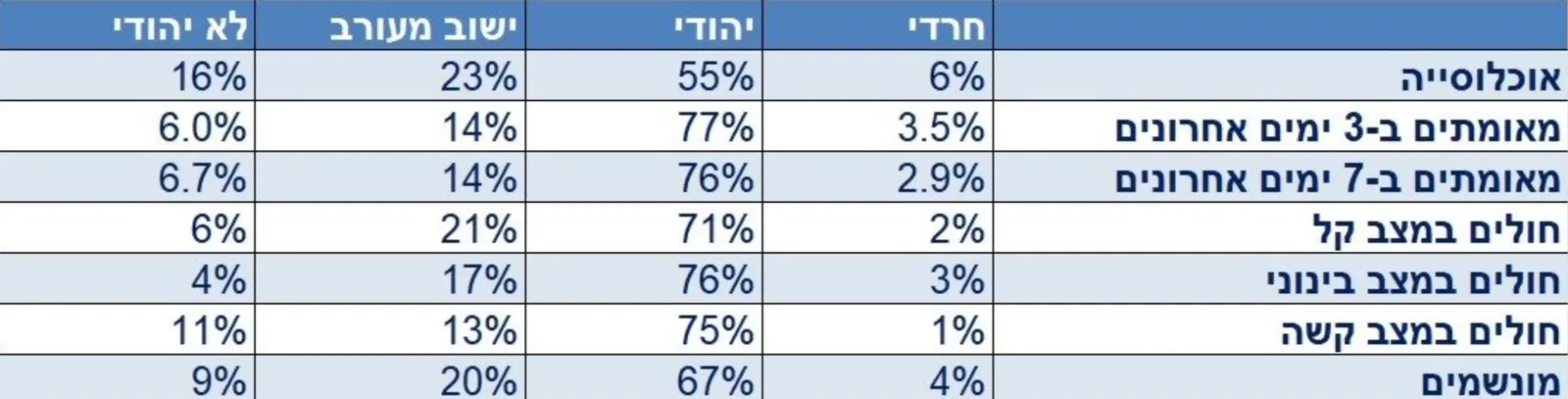
It is raining COVID statistics in Israel as we are the first country in the world to deal with a post-vaccination outbreak. Below is one table that was released by the Ministry of Health (I found it here).

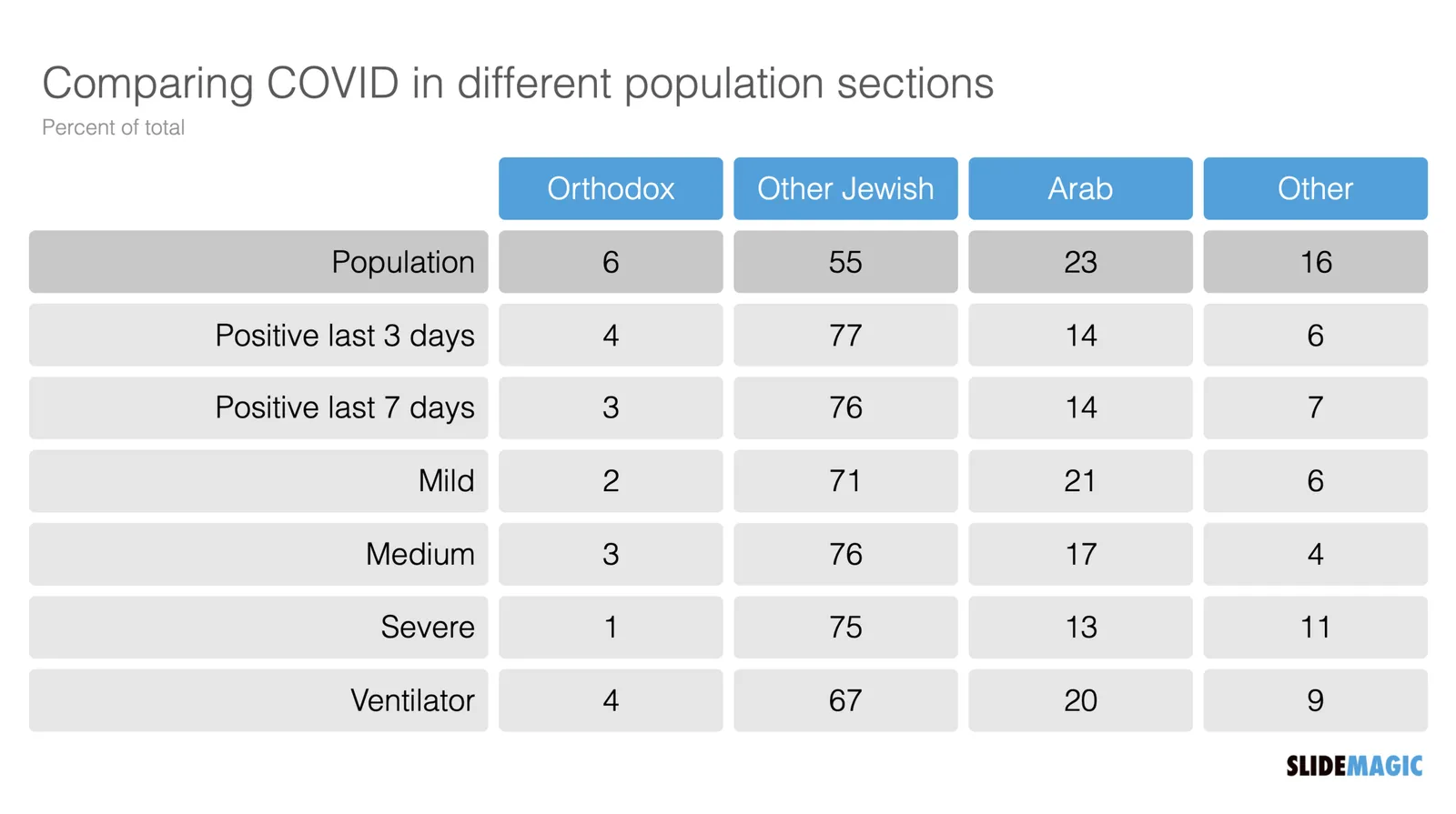
I have translated it in a quick SlideMagic chart (it always puts a big smile on my face to see how quickly this can be done).

But this data is horrendous to understand. Percent of what? What is 100%? The audience is left to do the math themselves. Compare the categories to the breakdown of the population, look at differences between 3 and 7 days ago, look at the ratio between mild to severe, etc. etc.

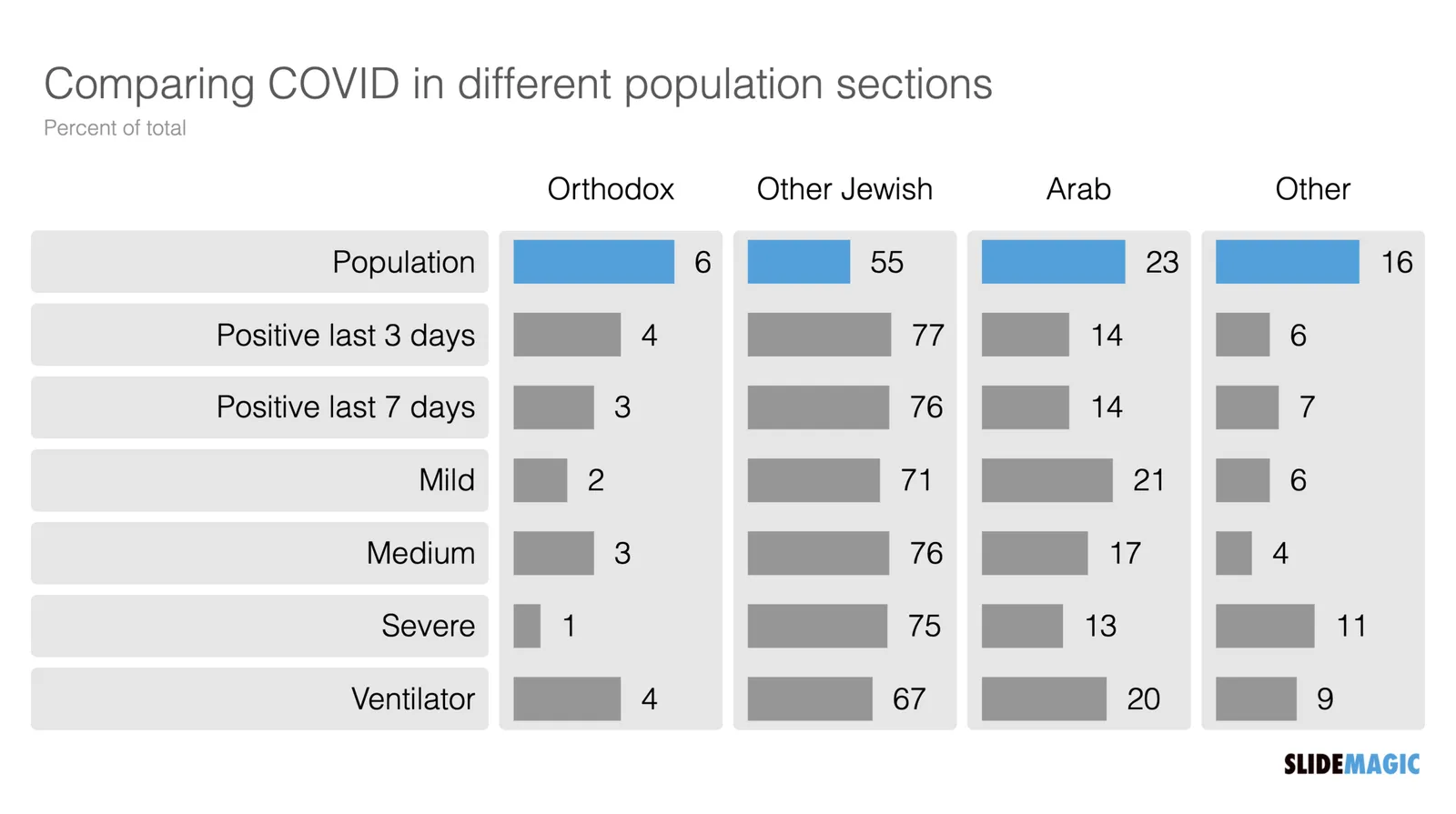
Using bars instead of numbers (another smile) makes things a bit clearer.

But in this case, it would have been clearer to release the data in absolute numbers and let people construct their own charts.

I have added the charts above to the SlideMagic library, search for COVID in the app and the slides will show up (see the search here).

·Templates

Different levels in presentation templates

A “presentation template” is usually a PowerPoint file that new employees receive on their first they of work. There is more to a presentation template I think.

  1. Your corporate visual communication style/culture

    • Consulting firms: lots of complicated diagrams and frameworks, meant for solving a problem rather than presenting
    • Investment banks: dense text and tables with graphs, meant for reading rather than presenting
    • Consumer goods company: product packaging shots and bullets
    • University: list of bullets
    • Etc. etc.
  2. The actual software file that holds the basis layouts, logo, and colours (this is the one you get on the first day of your employment)

  3. Running versions of important presentation documents that get constantly updated and tweaked

    • Sales presentations, each for a different lead or a different customer segment
    • Quarterly results presentations with - well - different quarterly results
    • Strategic planning presentations, each one for a different product group
    • Etc. etc.

Most of the day-to-day presentation work in companies is in step 3, the tweaking of existing documents to update it for the latest sales meeting or board meeting. These presentations are in fact the “templates”, not the empty file.

In most presentation design software the tweaking of an existing slide is tricky and over time a slide degrades after many iterations where users insert the wrong fonts, colours, and trip up a decent slide layout that worked for 5 boxes, but not for 6. (“Template rot”).

The above is true for both existing corporate presentations and shiny new templates purchased online. The latter look amazing fresh off the press, but it shows when a non-designer tried to fit it to her needs.

Continue reading →
·SlideMagic

Your presentation "secret weapon"

We are doing some SlideMagic user interviews and the term “secret weapon” came up. One user, somewhere in a big office tower, is a lone user of SlideMagic and uses the build-in PowerPoint conversion to share slides with colleagues. People start to notice the difference in the slide the person produces.

Here are some situations where you can use SlideMagic as a secret weapon, a starting point for setting up the beginning of your presentation. Most of these slides are very time consuming to set up in PowerPoint or Keynote:

  • A perfectly lined up, massive grid of logos (you finished the 10 x 4 grid, and now you need to move to 7 x 6 because you got 2 more logos)
  • Data tables with bar charts that need to line up (oops, 12 rows instead of 10)
  • 2x2, 3x3 matrices, other consulting style matrices
  • A diagram with boxes that are connected with arrows
  • A team chart where all the headshots need to have more or less the same size, with the “eye line” at the same height

Nobody needs to know / find out that you use SlideMagic, but we would not mind if you spread the secret…

Photo by Joshua J. Cotten on Unsplash