SlideMagic Blog

Frequent updates about all things presentations since 2008. Subscribe to never miss a post.

RSS
all posts

Category Software

·PowerPoint

Device proliferation: email PDFs instead of PPTXs

It is better to email a PDF of your presentation than the original PPTX PowerPoint file.

  1. Fonts get rendered correctly, even if the receiving party does not have them installed on their computer. This is especially true now that more and more people are starting to use Macs and are running PowerPoint for Mac, an application that does not allow font embedding.
  2. Many people open PPTX files on their Blackberry. A PDF is your safest bet that everything renders correctly.
  3. Many people use Gmail as their email system (hiding a gmail address behind what looks like a regular domain). In Gmail, you have the option to view a file rather than downloading and opening it. When you select view, the document gets opened in Google Docs, which is not very good at rendering PowerPoint files (not only fonts go wrong, but entire shapes can go missing)
  4. A PDF opens nicer and cleaner than a PPTX that lands in you the slide edit mode.
  5. PDF file sizes are usually a lot smaller than PPTX file sizes.

The consequence of all this is that you should think twice about using animations in your slides. I switch more and more to just copying a slide and building content page by page, so it will show correctly in PDF format.

·Images

Using hand drawn graphics in slides

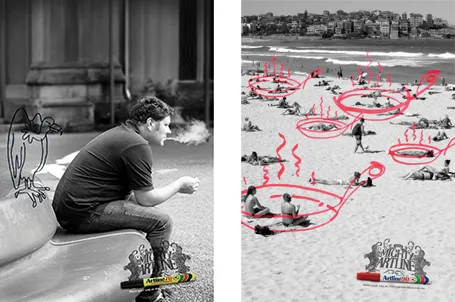
Hand drawn graphics can work great together with images in slides. As an example, see these ads below. (I am not sure whether these ads do a good job in selling markers, they are great though in warning you to take care of your health).

It is possible to draw shapes using a mouse or a drawing pad in PowerPoint, but I always find it hard to replicate that marker effect. Instead, I scan in real hand writing using a scanner, and then kill the white background with the Photoshop color range filter.

·Delivery

Sync narrative and visuals in web presentations

Online presentation sharing services such as SlideShare allow you to upload an audio track alongside your slides. You need to make sure that the narrative is exactly in sync with the visuals.

I have seen (heard) examples where the audio presenter starts talking about data or concepts that are not present on the visual in front of you. As a result, the brain starts to wander off, looking for missing pieces of information on the slide.

When talking to a live audience in person, you can draw the attention from the visual back to you. An exact sync is less important, and it is easy to fit in a slide story. During a short web presentation with audio, your audience is using the narrative as an explanation of the slides. Make sure they are lined up.

Sometimes, when you are short in time, that might actually mean inserting a slide with some quick (very short) bullets (did I just write that?) or a short sentence to support your side story. Something like: “Case example: 22% cost savings”

·PowerPoint

Making Gmail more Zen

We sit almost our entire day behind a screen, and most applications we run are an ugly collection of screen clutter. Clutter and distractions are creativity killers. Gmail is incredibly useful, but also incredibly ugly. Here is a partial solution, Ansel Santosa has designed minimalist Gmail a Chrome extension that let’s you switch off unwanted features.

·PowerPoint

Observations after Apple's keynote

Through a series of live bloggers and buffering live streams I managed to catch most of Apple’s keynote yesterday (you can now watch the Apple keynote video here). The presentation covered a lot and dot all is relevant for presentation design. Here are some points that struck me.

  • A move to more minimalist productivity applications. First Internet browsers started cutting screen clutter, now it is the turn of other applications. The new Lion operating system will have a standard full screen mode into it.
  • A move away from the file system that was created in the 1980s, where you had to remember file names, locations, worry about saving frequently, and make sure not to overwrite versions. The iCloud syncing service will make files available on all connected devices. Lion seems to support a sophisticated version management system so you do no to saving your files with extension 1, 2, 3, etc. (does it only work in iWork or also in Microsoft Office?), and applications now remember how you left things when you closed them down.
  • A move back to keyboard and touchpad short cuts. Back in the 1990s I would know almost all keyboard short cuts available. With the advent of the mouse, I forgot all of them, just using arrow keys and mouse clicks. That is changing again. More and more menu navigation is going through short cuts.

It was interesting to see how the whole presentation still worked well despite a reduced role of Steve Jobs. Good slide design, careful script writing, and practice-practice-practice turns everyone into a great presenter.

·PowerPoint

A new way to use LEGO in your slides

Recently, I needed to find a good visualization of modularity in a presentation. Lego is a nice concept, but maybe a bit cliché. Not if you use this really cool LEGO design tool: LEGO Digital Designer. It is a full 3D design environment in which you can create any LEGO object you want, and even submit it to LEGO to buy a box with the pieces plus a build instruction. It comes with a large online library where people can upload and download designs.

Here is an example of the Empire State Building. You switch on an animation of how the building is built up as the bricks fly in from all directions. Great stuff.

If you are in to LEGO, here are some earlier posts about it. Christoph Niemann uses LEGO to model New York city. This ad visualizes the power of imagination that kids have, but grown ups seem to have lost.

·Colors

Color management in PowerPoint 2011 for Mac

Slowly I am working around some of the shortcomings that PowerPoint 2011 for Mac has in comparison to PowerPoint 2010 for Windows, and get to enjoy some of the advantages of the Mac platform. One of them is color management.

Built-in to a Mac is a powerful color management picker:

  • With a magnifying glass, you can copy the color of any element on screen and add it as a color to your palette. For example, you can take the colors from your corporate logo to create a matching PowerPoint color scheme. In Windows, I had to rely on other applications (Photoshop, Paint) to do this.
  • Your color palettes are stored across applications, so you set them in PowerPoint, they are available in Photoshop, Keynote, and any other applications you are using.

See this extensive post on robinwood.com on how to use the Mac color picking tool. Thank you Andrew Marritt for pointing me to this.

·PowerPoint

PowerPoint feature wish list for Microsoft

My wish list of features to be included in PowerPoint. Feel free to add your own in the comments.

PowerPoint 2011 for Mac

  • Custom font embed (available in PPT 2010)
  • Ability to set custom theme fonts (available in PPT 2010)
  • Selection pane (available in PPT 2010)
  • Define custom grid spacing (available in PPT 2010)
  • Ability to lock the static grid

PowerPoint 2010 for Windows

  • Better integration with photo browsers (available in PPT 2011)
  • Included weights in font selection menu (available in PPT 2011)
·PowerPoint

VMware acquires SlideRocket

VMware acquired in-the-cloud PowerPoint alternative SlideRocket. Up until now, VMware focused on virtualization infrastructure, it’s software can be used to create multiple virtual computers on one hardware platform. Many of you might be running a Windows PC inside a Mac using this technology (VMware Fusion).

It is not completely clear what the strategic intent of VMware is. Will it try to go up one level from basic infrastructure and start offering cloud applications competing directly with Microsoft? Or does it want to use it for something else?

The big issue with alternatives to PowerPoint is the installed base of corporate users that over the years has learned how to work with it. But maybe the extra financial power of VMware enables SlideRocket to get a shot at doing to PowerPoint what Microsoft Word did to WordPerfect?

·PowerPoint

Microsoft Office 2011 Service Pack 1 (version 14.1)

Microsoft posted its first Office 2011 for Mac update yesterday, and as I can see now, it took care of the instability issues in PowerPoint 2011 that I have been complaining about (fingers crossed). Still, there is a long feature wish list for SP2 to bring it at par with the Windows version, of which custom font embedding sits at #1. See my earlier review of PowerPoint 2011 for Mac.