

Hand drawn graphics can work great together with images in slides. As an example, see these ads below. (I am not sure whether these ads do a good job in selling markers, they are great though in warning you to take care of your health).
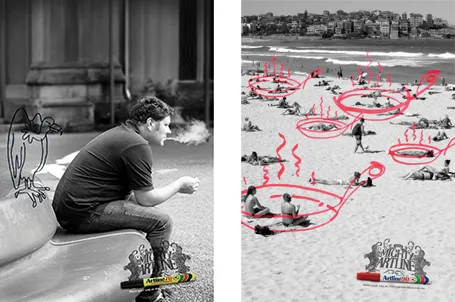
It is possible to draw shapes using a mouse or a drawing pad in PowerPoint, but I always find it hard to replicate that marker effect. Instead, I scan in real hand writing using a scanner, and then kill the white background with the Photoshop color range filter.
2 comments
Or as Herve mentioned, it resembles good old overhead projector times :).
To create such handwritten graphics in PowerPoint, I use combination of drawing on paper + scan + Adobe Illustrator (for vectorizing) + PPT. It's a bit time consuming but the effect looks great and I get PPT editable graphics thanks to vector format.
Not sure current slideware allows such editions while running though softwares like GIMP and PS should allow you to redesign your slides with pen like tools.
It's fun to see how something that used to be common is now made more complicated with brand new technologies. :)