SlideMagic Blog

Frequent updates about all things presentations since 2008. Subscribe to never miss a post.

RSS
all posts

Category Software

·Software

Is it just me?

Years ago I started SlideMagic 1.0 “brain washed” by “modern” application design: cloud, tablet-friendly, SAAS, an always up to date version of software running in the browser.

Bit by bit, I am reverting to a 1990s setup for SlideMagic 2.0, focused on a desktop application with a selected cloud-tweaks:

  • Design apps need to be super snappy and fast, latency because of saving stuff in a database that sits at the other end of the world is not ideal
  • Presentations do get edited on planes that still do not have 100% WiFi coverage
  • Presenting a presentation on a screen that is dependent on a live internet connection is risky, yes even in 2019.
  • Having multiple windows on a screen and copying, pasting, dragging things across is actually useful (not yet implemented in SlideMagic 2.0). It is funny to see the developer discussion on bulletin boards where people are waking up to the challenges of managing multiple windows of the same application. Something web designers usually do not have to do.
  • Storing things in a tried and trusted local file system solves security headaches and is good set up for when creating documents: finding things, copying, pasting. (Long-term storage and archiving is a different story)

Photo by Matthew M on Unsplash

·Software

Stress-testing monitors

A critical feature of any presentation app is the management of screens when presenting for a live audience. The presentation needs to show up on the big screen, and if possible, the presenter windows with the slide count, next slide preview, and timer needs to pop up on the secondary monitor.

Messing with monitors under the stressful time pressure of standing in front of a waiting audience requires serious stress testing. I am now doing this for SlideMagic 2.0. Pulling out monitor cords mid-presentation, sticking them back in, closing windows. I removed many bugs, but there are still a few left (the dual operating system set up is causing some additional challenges).

Soon, I will have ironed them out all. But as a precaution, I might not go as far as PowerPoint or Keynote where the user does not see the presenter and audience windows explicitly. I will leave them visible as non-maximised windows so the user can find them and move them around if Murphy’s Law strikes.

To be continued.

·Software

App update

Apologies for the quiet blog this week. I am extremely busy ironing out the SlideMagic 2.0 app. This week the focus is on tightening the integration with the Windows and Mac operating systems:

  • Designing app and file icons that look good and stand out next to other desktop icons (clutter)
  • Linking those icons with the ‘.magic’ file extension on a computer
  • Making sure double clicking icons, recent files, recent files in the dock, etc. works
  • Certifying the app both with Apple and with a certification agency for Windows so that double clicking an installer does not generate scary security warnings
  • Adding SSL security to file downloads
  • Accept-cookie banners, and other regulatory issues

To be continued. Beta testers can check in now and then to download a later version of the installer, I am putting a new one up almost every day now.

·SlideMagic

(Careful) beta test for both Mac and Windows

I am ready to release a useable version of SlideMagic 2.0 to a very small group of users. There is an app for both Windows and Mac. If you are interested, you can sign up here: http://cloud.slidemagic.com/beta/apply, and I will let you know in the coming days (maybe week) if you made it to the very first beta test group.

In the not too distant future, there will be a broad/no application beta test program, but at the moment I am keeping things small to make sure I have the bandwidth to support early users.

Photo by Abbie Bernet on Unsplash

·Software

How I brought my coding skills back up from the 1990s

This list of resources might come in handy for anyone who is considering learning how to code from scratch, or like me, wants to get back into things again. Your objective could be

  1. to land a job as a developer,
  2. have a startup idea and you want to build it, at least build a prototype in a low risk way without the pressure and money required to hire professional developers
  3. you just feel a bit technology illiterate and want to acquire basic coding skills just as an interest.

For me it started actually with number 3, that slowly turned into objective 2. Back in the 1980s and 1990s, you could simple turn on a computer enter a few lines of simple code and get a computer to do things. Now there is actually a bit more ‘overhead’ required before you have a basic piece of code running that can take an input and do something with it.

Option 1. and 2. are very different. Being a developer inside a huge organisation, and at the receiving of incoming feature requests by others is different from building a project that is really yours. Option 1 can actually be very similar to a regular admin job (a ‘cog wheel’ inside a big machine).

Thinking a bit ahead, I think that ultimately I will not be the person to keep un coding SlideMagic if it ever becomes a big and successful operation, but I am convinced that it is very hard (maybe impossible) to run a technology company if you yourself are completely illiterate in the world of coding.

Continue reading →
·Software

Sketch - Photoshop killer

I am (was) a casual Photoshop user. Now and then, I need a tool like this to take a background out of an image, or project een image on a 3D object such as a well.

For more than a decade, I have been pulling my hairs out every time I tried to use the program. I am a pretty skilled computer / software user, but I never managed to get over the dip of becoming an efficient user. In addition, the hefty subscription charge that was introduced does not really make sense for light users such as me.

Now, in my role as coder of my own presentation design app, I actually need a PS-like tool again to manage images that need very precise dimensions and DPIs (something irrelevant in PowerPoint). An inability to create a simple background image that scales on retina displays @2X in less than half hour with the final blow.

So I tried Sketch and everything was done within 5 minutes without the need for any tutorial. Creating the background, adding text, adding shapes, scaling, exporting. Highly recommended!

Sketch is a role model for SlideMagic. The software was started as a graduation project (actually by a student of the same university I got my Computer Science degree), and then moved slowly but surely over the course of a decade to become a market leader.

·SlideMagic

App update

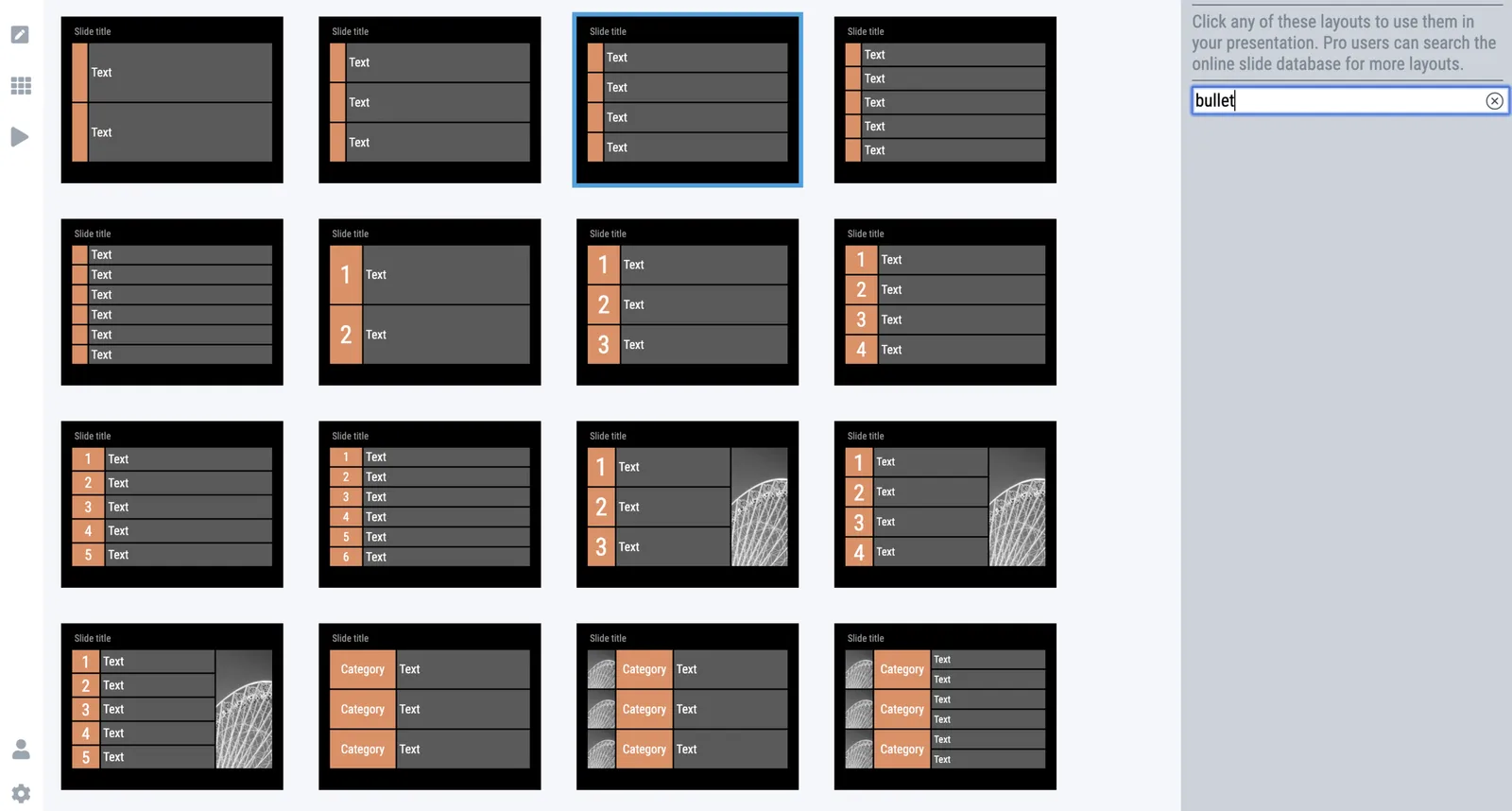
It took me a few days after the holiday to get back into my own code again (scary how fast you forget things). But I am on a roll again. A major achievement for a 1990s computer scientist is that I got the SlideMagic server running: you can log in as a user to activate the pro features (probably spotless and instant PDF and PowerPoint conversion) and equally important, access to a much broader searchable layout database. The latter works now as well, the server responds with dynamically generated slide suggestions based on search keywords.

The next challenge will be to 1) expand the slide layout database, and make the search suggestions smarter, and 2) to make the user signup/login robust. For most developers, 2) is easy (this is coding 101) and 1) is hard (this requires 25 years of slide design experience). For me it is the other way around.

Photo by Markus Spiske on Unsplash

·PowerPoint

Accurately cropping images

Cropping an image accurately can be tricky, especially when PowerPoint is trying really hard to suggest possible cuts alongside snap lines it thinks are useful. My solution, drag the image to a huge size (without distorting its aspect ratio), crop, and shrink it down again.

Photo by Morgan Harris on Unsplash

·SlideMagic

App update

I am posting a bit less frequent these days since all my posts originate directly from the work I do day to day, and presentation design work has pretty much dropped to zero at the moment…

So what is happening with SlideMagic 2.0? I pretty much completed the desktop app but still think it is not ready for public release as small bugs continue to pop up, and I keep on discovering tiny, but annoying usability issues for which I do not need the help of others to discover them. The feature set is frozen, but experience is super important for a presentation design app (the big issue with version 1.0).

Hunting tiny bugs is not the most inspiring things to do, so I split my day now between this, and the next challenge: creating a template “store” with a smart search engine that integrates tightly with the app (unlike the current Shopify site). Technically, this is a lot simpler than the complex desktop app that I created, but for me it is a bigger challenge as I need to dive into the world of server design, which did not really exist when I graduated in Computer Science in 1992.

The potential upside should be interesting though, as this is the final barrier for me to go all out in thinking about what technology can do to help make the creation of presentations easy. Again, I will start with the tinkering approach, slowly iterating towards a product that is useful (which involves backing out of a lot of dead end alleys.

Continue reading →
·Software

Animations in user interfaces

I usually don’t put animations in my presentations, they don’t add much, and in web interfaces I find them mostly annoying. I just discovered an exception: the tile or story view of presentation software. If you add or remove slides from the grid in one “bang” (instantly rendering the sequence of slides), your brain gets confused and does not seem to understand what just happened.

I have something else to learn…

Photo by DESIGNECOLOGIST on Unsplash