

SlideMagic Blog

Frequent updates about all things presentations since 2008. Subscribe to never miss a post.

RSS
all posts

Category PowerPoint

·PowerPoint

Photoshop for presentation designers

Photoshop is growing on me, after having confused me for many years. Photoshop is catering to multiple audiences. Professional photographers need the sophisticated tools for correcting camera images. Advertising designers need the engine for creating complex layer compositions.

What is useful for presentation designers? (search help in Photoshop for exact instructions how to find them):

  • The magic wand to remove image backgrounds (the Microsoft PowerPoint option is really poor)
  • Image size and canvas adjustments to get to the exact right size of an image at 300DPI
  • Content-aware fill to extent backgrounds
  • Content-aware extend to extend backgrounds
  • The spot healing tool to fix extended backgrounds
  • The color-replace function to change colors that are slightly off (i.e., make orange red)
  • And (a bit advanced) the vanishing point filter to put text on 3D objects

Whenever a new version of Photoshop is released, I am not so much looking forward to more features, but better implementation of existing ones.

What features have I missed?
·PowerPoint

In defense of the maligned PowerPoint

Tim Harford is defending PowerPoint in the light of the recently formed Anti PowerPoint Party. I agree. He argues that PowerPoint is a tool used poorly. The link to the article.

·PowerPoint

Presentations on tablets

I am increasingly interested in designing documents for tablets. They could work great in one-on-one meetings (or even stand alone). I have not found the right platform to develop them yet though.

PDFs do not always work (especially when converted using the Microsoft Office plug in) and show up within the frame of the iPad PDF reader (menu bars, chart thumbnails).

HTML5 looks promising. Onswipe aims to be an HTML5 publishing platform for magazines that also could be useful for presentations. If you visit the Marie Claire web site on an iPad for example you see what it can do (it looks like an app, but it is a regular HTML page). But you also see the limitations. A browser-based environment makes page switching slow, and again, you still have the navigation frameworks of the browser application.

Custom apps. Over the past weeks, I taught myself Adobe InDesign, and loaded up software that can turn Adobe InDesign files into custom iPad apps. My computer science background is trying to convince me actually download the entire IOS 4.3 SDK to have a look inside to see what it takes to program an iPad app from scratch. It is a heavy-handed approach though.

Do you have experience with this? Let us know in the comments.

·PowerPoint

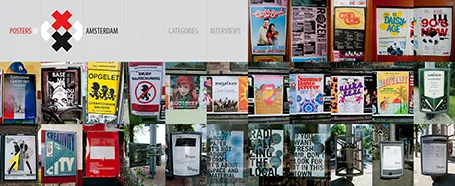
Posters in Amsterdam

The summer is here: time to slow down a bit and look around for design inspiration. The site Posters in Amsterdam by Jarr Geerlings enables you to walk around the city without physically going there.

·McKinsey

Presenting the slide

A decade ago when I just started my career at McKinsey, I always was very excited when I was asked to “present the slide” to the CEO of a client. Presenting the slide: the slide was primary, the presenter was secondary. There is nothing wrong with that. When designing your slide deck, just realize that this is the audience setting you are designing for.

·Investor presentation

Boring structure = boring presentation

Going systematically through the branches of your organization diagram is not the best way to get visitors from abroad excited about your company.

When you make a biographical movie, it is recommended to spend a bit more time on the period in the life of the artist where she delivered those stunning pieces of sculpture.

Following the sections of that business plan template you found online literally will not encourage investors to write you the check you want.

·PowerPoint

Making good diagrams in PowerPoint

This presentation contains some useful guidelines for making diagrams. Thank you Alessandra for pointing it out to me.

How to make Awesome Diagrams for your slides

·PowerPoint

Too many benefits = no benefits

Marketing managers always want to make sure that every single benefit and feature makes it on to “the benefits slide”. ROI. Low cost. Flexible. Scalable. Effective. Efficient. Affordable. Listing more benefits means spending less slide real estate on each individual one (words, visuals). Your remarkable story gets diluted into a generic cloud of buzz words that people find on just about every other benefits slide that they have seen.

You conformed. Marketing managers expect this benefits slide. Customers recognize it as: “hey, here comes the benefits slide”. Everyone follows the script. Presenter presents. Audience does a quick email check. The usual stuff.

Benefits are all about standing out from the competition. Let your benefits slide stand out as well and focus it on what is really different about your company and your product.

·Investor presentation

Surprise? Hardly anyone reads annual reports

An interesting post by investor relations consultant Dominic Jones: very few bother to read a company’s annual reports.

It is easy to understand why. Annual accounts consist of 2 parts. One, the financial data. This is read by those who need them (analysts). Two, an attempt by the company to sell its strategy to investors. Here is why this section does not work:

  • The pages are written in a verbose PR style, full of buzzwords and cliches.
  • The pages contain verbal description of financial data that is much better displayed in graph or table form. “Europe grew by 5%, Asia grew by 10%”
  • Long-hand text does not work very well to communicate business strategy, and the annual report is no exception
  • The slick, polished, permanent look of the annual report instantly reduces its credibility. The audience likes real, genuine, authentic stories.

A lot of money is invested in the layout, design, and printing of these annual report. Is this money not better spend by improving the quality of that earnings announcement presentation PDF that everyone IS reading?

·PowerPoint

Speaking "live" in NY on 26 July

I will be in New York the last of week of July to speak at a number of events (well, 2 actually). My presentation at the Netherlands-America Foundation is open to the public. Details to register are here. This is a not-for profit event, the proceeds of the small entrance fee will go to support the goal of the foundation. The presentation will be in English.