

I keep on looking for a good electronic solution for note taking, doodling, and scribbling. None of them are perfect. A new option has been added recently.
A good note taking solution needs to combine a number of things:
- No paper to keep
- Natural writing interface
- Good filing and search
- Minimal hardware to carry
- A simple user interface
See my highly sophisticated analysis below.
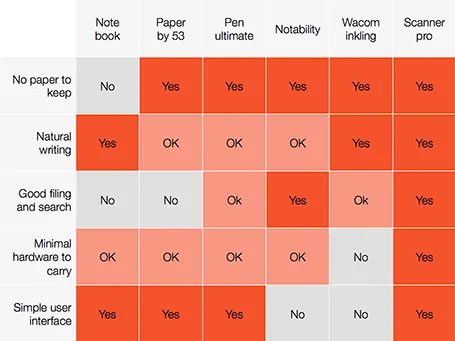
The new option is a smartphone-based scanner. Scanner Pro is a brilliant app. It takes photos, and lets you easily crop the image. You can keep the image as a photograph or flatten it to bold, fax black and white. Then upload the scan to Dropbox or Google Drive where you can store and search things.
So the best note taking might be scribbling on a piece of paper, scanning it, and throwing away the paper.
PS: earlier review of the Inkling, Penultimate,Paper and styli (?) for iPad.