SlideMagic Blog

Frequent updates about all things presentations since 2008. Subscribe to never miss a post.

RSS
all posts

Category Delivery

·PowerPoint

How to add captions in PowerPoint, as you speak

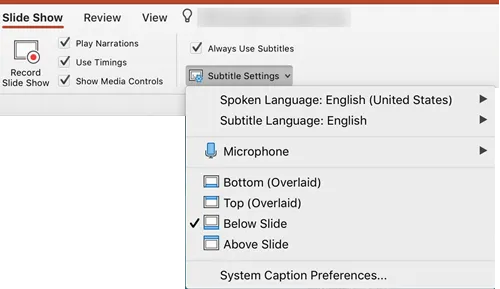
I did not realise PowerPoint could do this: put captions or subtitles on your slide live, while you speak into a microphone. Instructions how to get this work can be found here.

Photo by Immo Wegmann on Unsplash

·Delivery

When you got your story really memorised

Some more learning from last week’s music performance. When you think you have something memorised, you actually still have a long way to go.

Here is the process I went through with a pretty simple song, still it took time:

  1. Hit the right chords when reading the chord letters on a piece of paper
  2. Hit the right chords when starting the song from scratch, without paper
  3. Consistently getting the chords inversions and finger positioning right (rather than making them up each time you remember to place a chord)
  4. Being able to do the above with random interruptions, without starting from the start: a mistake (by you or a band member), a quick start-stop to rehearse a certain piece
  5. Not thinking at all about chords anymore, just hitting the right thing based on the lyrics, music you hear around you.

When you wing a story on the fly, prompted by a slide that you see on the projector, you are at stage 1 when it comes to presentation preparation, and have 4 more steps to go.

Photo by Wes Hicks on Unsplash

·Delivery

Getting your focus before a presentation

This weekend and family and me joined a professional group of musicians to give a performance on stage. It was interesting to watch how the band leader made sure all of us delivered the best of our abilities, all which apply to the world of delivering presentations as well:

  • The confidence boost to the singer who wakes up with a sore throat the day of the performance: reminding her (based on decades of experience) that when the body has to perform, it will (and it did.
  • Spotting and eliminating small logistics hick ups that do not matter in a rehearsal but can kill the flow of a live performance. Have water available to clear dry throats, making sure nobody trips over cables, and pulls out cables of instruments, where do people stand and move, where do people go when they are not part of a song, how do transitions between songs happen.
  • And finally, a small rerun of the set lists in a quiet room. Just focusing on the list of songs (which you already know) for a second is like rerunning a 30 minute rehearsal in your head, the mind gets the right focus.

Image credit: @yulesh

·Software

Stress-testing monitors

A critical feature of any presentation app is the management of screens when presenting for a live audience. The presentation needs to show up on the big screen, and if possible, the presenter windows with the slide count, next slide preview, and timer needs to pop up on the secondary monitor.

Messing with monitors under the stressful time pressure of standing in front of a waiting audience requires serious stress testing. I am now doing this for SlideMagic 2.0. Pulling out monitor cords mid-presentation, sticking them back in, closing windows. I removed many bugs, but there are still a few left (the dual operating system set up is causing some additional challenges).

Soon, I will have ironed them out all. But as a precaution, I might not go as far as PowerPoint or Keynote where the user does not see the presenter and audience windows explicitly. I will leave them visible as non-maximised windows so the user can find them and move them around if Murphy’s Law strikes.

To be continued.

·Delivery

Yes, I know...

The first few seconds of any presentation, the audience is not really paying attention to what you say, but rather checks out who the speaker in front of them is. Wow, that is a bright pink shirt, is she senior, he seems nervous…

A major distractor is vocal accents: where is she from? Often, accents can be so heavy that they start reminding us of characters in movies and/or other stereotypes. Yes, this is not politically correct, but you cannot help the brain making that connection.

I often “apologise” for that Dutch accent in a short opening intro explaining where I am from. If you are a French engineer, with a heave French accent, maybe you should acknowledge it with a smile and move on.

Photo by Titouan on Unsplash

·Delivery

Live audience questions

In a huge keynote, audience questions are almost impossible. The practicalities of picking who can ask a question, getting a microphone to the person. The lottery of whether the question will actually be interesting or relevant, and/or whether the person is actually good at asking to the point questions. And what if no one actually responds to the famous speaker inviting questions?

Dedicated smartphone apps (or even Twitter) seem to solve part of these problems. Users have to be brief, don’t interrupt the live presentation, people can upvote things, and you can pre-populate question to get people started.

I have seen them in action. Often the questions are projected on a huge screen behind the speaker. But, that constantly changing huge screen is actually distracting, there is even a possibility of “background vandalism” for controversial speakers, and most of the times, the questions are actually ignored.

A solution? Use the system, but don’t put the questions on the main screen. Answer at least one question. But most importantly, use the questions that pop up to make other conference presentations more relevant. Questions are live feedback about what the audience actually wants to hear. If it cannot be used now, maybe it can help the next session.

Photo by Camylla Battani on Unsplash

·Delivery

Buzzwords from poor language?

Any business gathering, in any language is filled with hollow - English - buzzwords. Part of this is to blame on executives who want to show of by using “fancy” words. But a big part I think is simply people learning the new universal language in business: “Business English”.

Business English is spoken by non-native English speakers, unlike proper English, it has a very small vocabulary and people are in need of finding words/verbs/concepts to express common things. You hear others speak Business English, you read documents online in Business English, you see YouTube videos in Business English. And hey you learn, this is how you communicate.

Business language and culture are also deeply linked I think. Overhearing a conference room discussion as an outsider might soon completely ridiculous in terms of buzzword use, but to everyone on the inside, these are just verbal shortcuts that sound perfectly normal, and everyone knows exactly what everyone means.

The challenge is to be aware of this when you start talking to people outside of this inner circle.

Cover image by Jakob Owens on Unsplash

·Delivery

The smartphone snap

People re-use slides for different audiences. And 10 years ago, you would still be able to skip a few slides quickly when they contain confidential information if - by accident - you forgot to delete the product roadmap that you used in last week’s Board meeting. (Or you forgot to mark them as “hidden”).

The smart phone with super high resolution cameras means that nothing is safe anymore. There is the accidental smartphone snap, but also the professional “slide harvesters” diligently recording every slide in your deck. An HD video just needs a millisecond to capture the slide that is being skipped.

Here are some other confidentiality pitfalls to watch out for:

  • Data that still sits in the underlying Excel sheets, even when you take the data labels of your chart
  • Hidden slides in presentation mode that are there for everyone to see when you send a PowerPoint file
  • Speaker notes
  • Collaborator comments
  • File names or URL names that can still persist in a document even after its is PDF-ed
  • Tiny footnotes that give away important information

Cover image by Ben White on Unsplash

·Story

Presentation = agenda

In some cases, a stand up presentation is an emotional story telling performance that moves your audience to do something they did not know they wanted to do 60 minutes before.

However, not every presentation is like this. The majority of slides are presented in small conference rooms, the “trenches” of the economy, where middle management tries to get a decision agreed in the middle of opposing viewpoints, office politics, and interpersonal meeting dynamics.

In these meetings your deck is actually the agenda for that meeting. Make sure things get discussed, make sure people have the facts, make sure the right trade offs are presented, and make sure a decision is made in the end.

Think about this when putting your deck together. Which facts are obvious, which facts are disputed, what info is counter intuitive, what is likely to spark a big debate, what not, etc. etc.

The presenter is telling a story, but also orchestrating a number of humans.

Cover image by Vincent van Zalinge on Unsplash

·Delivery

Take the junior analyst to the CEO meeting?

Yesterday’s meeting blog post made me think of an other topic: junior analysts (lots of them among my readers) and whether they should go to the meeting with the CEO or not.

During the early years of my McKinsey career, there were many, many occasions, where I did not get to go to meetings where my work would be presented, and it was explained to me that too many people in the room would harm the meeting dynamics. A valid point: sitting in a huge conference room full of consultants does not create the atmosphere for a candid discussion about strategy.

But there were other concerns my seniors might have had:

  • The junior analyst might not be able to present the slides, not having the right “CEO language”, going of on a tangent, explaining how he did the analysis, without the so what
  • And even if we did not let the junior analyst present, he might come in with odd remarks that throws the discussion in the wrong direction, vent his uncomfortable feeling with the broad assumptions that were made in the analysis (that were actually justified), thereby undermining the credibility of the whole deck.

If you are just starting out as a consultant, it is worth your while thinking about the above.

But there are advantages of taking a junior member to these meetings now and then (feel free to use the following with your seniors):

  • Taking turns makes sure that the entire 15 people team does not sit in the room at once
  • Analysts can actually learn a ton from these meetings that will make the whole team perform better:
    • You see how these analyses are actually used
    • You get to learn that CEO presentation skill that you can put to work even when presenting to more junior clients
    • You might come in handy when a very detailed question about the data comes up
    • You get credibility with your client team members
    • You will get a motivation boost
    • You will need less time briefing to follow up on next steps
    • (Junior analysts are always good at serving coffee, making copies when needed)
Continue reading →