

SlideMagic Blog

Frequent updates about all things presentations since 2008. Subscribe to never miss a post.

RSS
all posts

Category Delivery

·Software

Skipping the presenter mode

Presentation software like PowerPoint or SlideMagic have 2 modes: one for slide editing, and one for showing the presentation to an audience. In video calls, I often see the presenter leaving the presentation in edit mode. The slide is visible, but with all the edit controls around, plus grid lines and other markings. On the side is a list of thumbnails of all the slides in the presentation. For the presenter, this can be handy. She knows the deck in and out and can quickly jump around the slides.
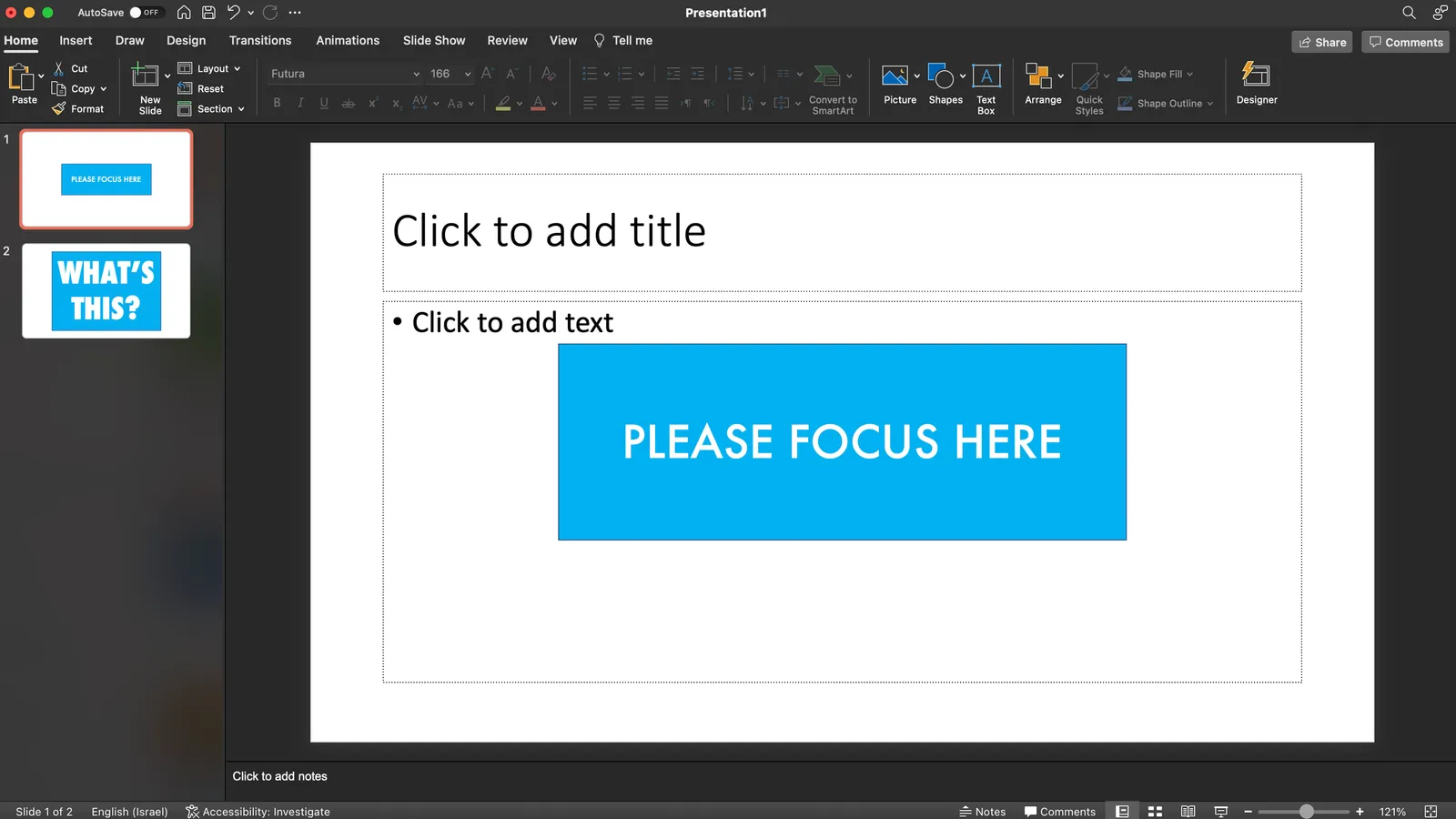
For the audience it is confusing.

  • The slide in edit mode looks unfinished.
  • Often the thumbnails on the left are so big that you could actually read them, distracting attention away from the main slide.

In SlideMagic, presentation view creates 2 separate windows: one for the slide to be shown to the audience, one with the controls for the presenter. So in Zoom, or other video conference tools, you can share just the slide, while staying in full control of the presentation in a window that is not visible to the audience.

·Delivery

"The hidden benefits of stage fright"

A nice video by Adam Neely who talks about stage fright from a musician’s perpsective:

·Delivery

The excitement indicator

You probably have a generic pitch deck that you have been using over and over again. You eyeball the slides before emailing to yet another potential client or investor. If you have given this presentation a thousand times, it is worth to have a look at each slide and ask yourself the question, are you excited to present it, do you want to surprise the audience with this unexpected insight?

If the answer is “yes”, keep it in, if not, considering taking it out. Here are examples of slides that can provoke a luke warm response…

  • Repetitions. You have already explained on slide 4 that “X” was a major issue, and now on slide 14, you introduce your product feature that kills this issue. No need to explain that issue again, and you probably notice that in your presentation you tend to apologize for this slide: “ah, yes, as I said before…”
  • Feature check lists. If your products has all the standard features that are expected from an offering in this product category, there is no need to walk through each single one of them. You are probably dreading having to go through these 5 slides (here is the user profile, here is the contact book, etc. etc.)
  • Historical baggage. In the early days, talking about your company foundation used to be really exciting. Now, 5 years later, that slide has become sort of dense, and the opening of the new office 3 months ago does not really add anything to the story anymore.
Continue reading →
·Layout

Presenting for the phone camera

Over the past 2 weeks I have visited 2 large conferences in the fields of software and healthcare (apologies for the lower posting frequency here). During the latter, I witnessed something I have not really seen before: the presentation for the phone camera.

Companies get 13 minute presentation slots which are filled with sequences of slides loaded with scientific data. The presenter flicks through them at super high speed, I could barely read their headlines.

The audience does not seem to mind. Each slide is captured with a smartphone camera and saved for viewing later, back in the office. The more data on a drug’s efficacy and safety the better. Large pharma companies seeking to buy molecules, competitors wanting to check in on the market, countries seeking inspiration for their own research, and investors wondering where to invest their money are totally happy with the approach.

·Delivery

Zelensky changes world leaders' minds in a 5 minute video call

A very interesting background story in the Washington Post how Zelensky changed seasoned politicians’ minds in a 5 minute video call

After a perfunctory debate, the presidents and prime ministers quickly approved sanctions on Russian President Vladimir Putin, Foreign Minister Sergey Lavrov and some of Russia’s biggest banks. Talk of barring Russia from the global financial messaging system known as SWIFT, however, stalled amid skepticism on the part of Scholz and the leaders of Austria, Italy and Cyprus, according to officials familiar with the deliberations who spoke on the condition of anonymity to discuss the sensitive negotiations.

Then Ukrainian President Volodymyr Zelensky dialed into the meeting via teleconference with a bracing appeal that left some of the world-weary politicians with watery eyes. In just five minutes, Zelensky — speaking from the battlefield of Kyiv — pleaded with European leaders for an honest assessment of his country’s ambition to join the European Union and for genuine help in its fight with the Russian invaders. Ukraine needed its neighbors to step up with food, ammunition, fuel, sanctions, all of it.

“It was extremely, extremely emotional,” said a European official briefed on the call. “He was essentially saying, ‘Look, we are here dying for European ideals.’” Before ending the video call, Zelensky told the gathering matter-of-factly that it might be the last time they saw him alive, according to a senior European official who was present.

We can all learn from a presenter like this.

·Delivery

Tape vs disk

Exactly my view as well:

Videos and podcasts are sequential tapes, text is a hard disk where you can access specific sections instantly. The first is great for a story, the latter is better for a quick reference.

Think about this for your pitch presentation as well, both have different advantages

  • A short introduction video (sequential):

    • Gives a glimpse of who you are as a person/CEO, especially useful in the absence of personal meetings
    • Enables you to re-record your elevator pitch until you get it absolutely right, live presentations are a one-shot game
    • Eliminates storyline hiccups and tangents that you might not spot when shuffling slides in a deck.
  • A short pitch deck:

    • Is the “graphical business card” of your idea, the look and feel
    • Enables people to skip through your story very quickly, especially useful for investors who are deeply specialized in a particular field
    • Allows quick repeat access to reference slides: key metrics, team bios, current investor profiles, etc.
    • Can be viewed on mobile devices on the go without the need for audio
·Delivery

Audience - stage (mis)match

The COVID pandemic has put big performances with live audiences on hold. Some companies continue to produce them: big sets, with spectacular music, light effects, and eager presentation hosts, just without the audience. A good example are the launches of the new 2022 Formula 1 race cars that are happening now. Big drum rolls, no audience. The space in which the presenters are sitting (huge production hall), and in which the audience is viewing (small room) do not match.

The opposite is true for a number of YouTubers that have moved beyond the ‘kitchen studio’. For example: online guitar teachers. They create a simple but highly professional video background environment by carefully selecting objects and lighting. The result is a setting that matches that of the audience. You are sort of sitting in the same room.

·Delivery

The anchorman in the days of Zoom

Up until the early 2000s, TV programs in The Netherlands would be announced by an ‘anchorman’, often a woman (Dutch people can refresh their memory here).

I was reminded of them by watching a number of high schools pitching themselves to my son via Zoom. Some schools had a fully prepared introduction video, linked by a pre-recorded ‘anchorman’. Others had a live anchorman that connected the various videos together.

The latter approach worked much better in my opinion, creating a stronger bond with the audience. But you got to rehearse that switching between anchorman, slide show, and video stream though. In the 1980s, this was the job of the TV control room…

·Delivery

The... ...prof... ...writes... ...the... ....point...

Academics and other teachers like to write out their points in full sentences on black boards, so that students can copy them in their notebooks. This could actually be useful, the slowly spoken sentence, combined with the hand writing, gets burnt in memory easier. Also, that sentence becomes a sort of mental placeholder on the big collection of black boards. To refer back to it, you can simply circle the sentence, and the text itself reminds the audience what is meant, but more importantly, it is that “geographic location” of memories around that sentence that creates the right context.

As I ‘sat’ through’ a 1.5 hour video on encryption technology of an academic lecture last week, the teacher took it to the extreme though: not making his big point before starting to write it down…. “That… makes… it….”, what will it be “possible” or “impossible”?

I would pop the suspense, before writing things down…

·Delivery

The interviewer who wants you to shine

Unless you are a politician, powerful CEO, or another controversial person, most interviewers for podcast, video interviews, TV interviews, conference panels probably want you to shine on stage. She is likely a media pro, you are not appearing on screen every day.

A good interviewer has a little chat with you before the show, gets a quick ideas of the interesting points you can share with the audience, and then will proceed to give you the best possible setup question to tell your story.

In this friendly environment, you can patiently wait for the question to finish, and deliver the punch line that you might have practiced before (practice it a lot in order to be spontaneous). No need to jump in early, deviate from the question, or be surprised because you did not see the question coming and need to think about the answer after you started answering the question.

In some sales or investor pitches, the role of this friendly interviewer might be the person you convinced of your story, and now needs to sell it to her superiors. Help her out if you can.