SlideMagic Blog

Frequent updates about all things presentations since 2008. Subscribe to never miss a post.

RSS
all posts

Category Cartoons

·Cartoons

Cartoons need to be huge

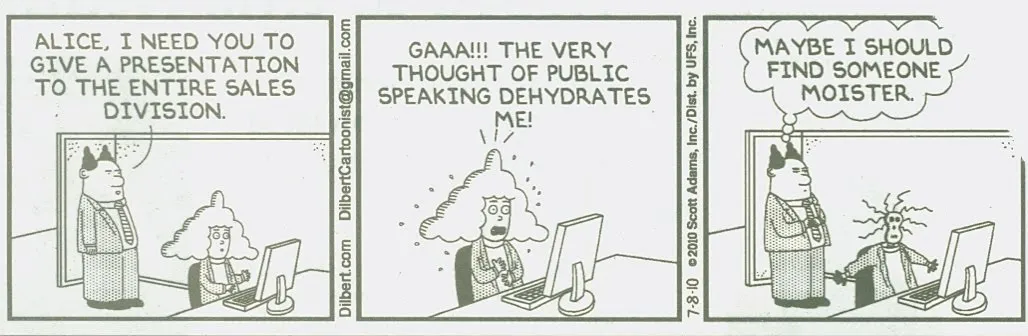
Everyone loves reading cartoons, and they can make great content for presentation slides (watch the copy right). But for an audience to get the cartoon, they need to be able to read it. And given the scribbly nature of cartoon fonts, fonts sizes in the bubbles need to be bigger than what usually works on a regular slide (i.e, font 20 or up). If the bubble text has to be 20 points, that means that the overall image needs to be pretty large, often you do not have enough space for it.

When creating slides that are meant for emailing in advance and reading on a screen, font size is less of an issue.

To get the audience to focus on the cartoon, chop out all the usual slide clutter (titles, footers, logos), just a plain page with a cartoon graphic. Cartoons are usually busy graphics.

·Advertising

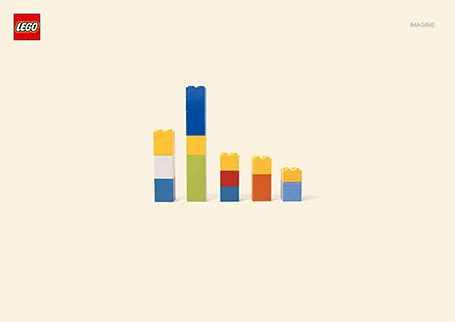
Lego Simpsons

I love Lego. The ad below looks like a PowerPoint column chart, but also like the Simpsons family. It shows the power of imagination that many of us forget about when we grow up. (More ads here on Ads of the World).

·Art

Paper, an iPad drawing app

I would love to use hand drawn graphics in my presentation, but I never got to drawing and sketching on a computer. Any tools without a direct screen feedback loop (the mouse, drawing pads, and even the Wacom Inkling) simply do not work for me, and I think a screen like this are very expensive and generate additional clutter in my workspace.

The iPad could solve this, because it has a touch-sensitive screen. As a result, hundreds of drawing apps have popped up in the app store. Drawing apps are different from note take apps. The latter require wrist protection, a good way to organize notes. Drawing apps require brushes, color, pens. Like with writing apps, most drawing apps come loaded with features that just confuse me.

Hence, I was happy to discover Paper by 53, a minimalist drawing app (one of the readers pointed it out to me in a my recent review of iPad note taking apps). Paper just cut down the drawing tools to the bare essentials, and the result is actually good I think. The app is free, but this version comes with one drawing tool: the ink pencil, if you want to get a pencil, a marker, a pen and a paint brush (water colors) it will set you back $8 in in-app purchases.

The pencil is the tool I actually use most. There is a big drawing problem with the iPad screen: it is not pressure sensitive, and varying stroke width is the key feature what makes writing with an ink pen so great. Paper solved this with adjusting the stroke with depending on your speed as you move the pen over the screen. More confident, fast strokes, will appear bolder. (The pen tool works the other way around, moving it slowly creates heavy ink, moving it fast produces a thin line). I love the simple cartoon style sketches that this app produces, and I am looking out for a first client situation where I can try out a cartoon-style presentation (like the one below) for real.


Continue reading →
·Cartoons

Not reality, not a cartoon

Have a look at these great images (on Fubiz) in the series “Enlightened Souls” by French photographer Fabrice Wittner. He uses images of people with a stencil-like effect and puts them on a background of a real photo.

This effect might be very useful in presentation design. It is very hard to a series of images with a consistent look and feel on either stock photo sites, or Flickr. Moreover, I find that using images with real people not working very well in slides. It is too personal. This slight distortion of the characters might just solve these 2 problems in one go.

·Cartoons

My friend the silhouette man

I love the simple elegance of the silhouette man. The figure can easily be constructed in PowerPoint by combining circles and rectangles and gives a lot of freedom to draw simple actions. Simple to draw, but the result does not look simplistic. If you find drawing them still to be a challenge, stock photo sites are full of ready-made files that you can use in your slides.

I recently designed a 150-page deck where he was used again and again in different situations. Here is an adaptation of one of the charts.

·Cartoons

Dilbert on PowerPoint

PowerPoint has become such a core element of corporate culture that it features often in Dilbert comic strips. These one is from yesterday for example:

Image no longer available

The full archive of Dilbert is now searchable by keyword, and you can license images for use in your presentations just like a stock photo site. For example, this search shows a whole lot more Dilbert comics on PowerPoint.

·Cartoons

Dilbert and presentations

Presentations and PowerPoint are an integral part of corporate suffering in cubicles, the reason why they get featured often in Dilbert cartoons. Here is today’s cartoon.

A reminder of the excellent post by PowerPoint Ninja back in 2009 with dozens of cartoons on the subject. In exchange for using the comic, here is an (affiliate) link to everything Dilbert on Amazon.

UPDATE. After a comment by Rowan below: the Dilbert site is now searchable, and you can actually buy comics for your PowerPoint presentation, for a reasonable price. As an example, here is a search for all PowerPoint-related Dilbert cartoons going all the way back to 1989.

·Cartoons

Google assumes you are smart enough to understand their technology

The recent post on the Google blog about an update to the search algorithm is an excellent example of how to explain technology:

  1. No apologies or “I will not bother you with the detail”, or “this is kind of complex and only an engineer (read someone more intelligent than you) will understand”. No instead, explain things clearly, but without oversimplifying.
  2. A simple graphic supports the verbal/written explanation

In case you missed, an earlier post on how Google uses cartoon characters to explain why its Chrome browser beats the competition.

·Cartoons

Drawing stick figures

The original PowerPoint stick figure (screen bean) clip art has been overused (although I miss him sometimes). Hand-drawn stick figures can be the basis for an original presentation. This small presentation by Betsy Streeter provides some useful (and funny) suggestions on how to draw them.

Anatomy of a Stick Figure

Thank you Matt Jahl for pointing me to this.

·Art

Christoph Niemann and LEGO presentations

Christoph Niemann (web site) is a highly talented artist whose illustrations have appeared on magazine covers ranging from the New Yorker to Wired. He posts on a regular basis on his blog in the New York Times, where this set of cartoons based on Google maps caught my attention.

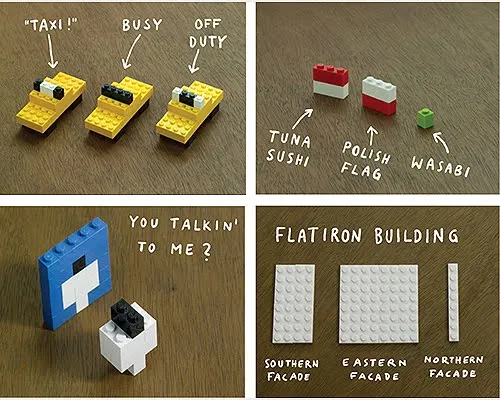
He recently published a new (board) book with snap shots of New York modeled in Lego bricks: I LEGO N.Y. (affiliate link). A sample image below.

Now here is a presentation challenge: construct your entire presentation in tiny Lego scenes, photograph them and paste them into PowerPoint. Not as crazy as it might sound.

UPDATE. One of my readers, Daniel Cabrera, used LEGO images to construct a presentation for a university project. In this case, the images were sourced from the web.

391 city workforce