

Blog post

How to recreate a realistic looking chalk board in PowerPoint

January 5, 2009 ยท by Jan Schultink
โ† all posts

After graffiti, now the less permanent graphics of the chalk board. I scribbled some suggestions on a black board below (click image for a larger picture):
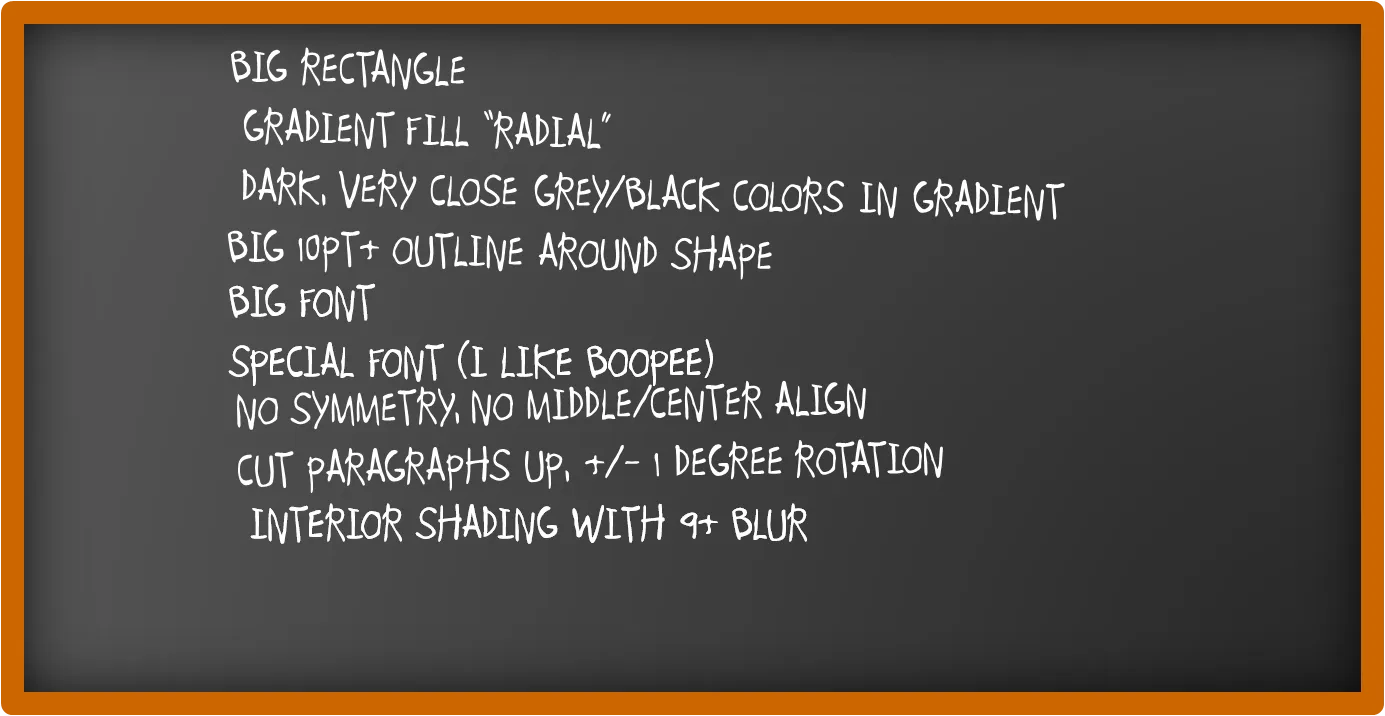
Now that we are on the subject, check out my favorite Bart Simpson chalkboard generator as well.

DesignPowerPointPresentation designPresentationShapes

About this blog

Notes on all things presentations โ€” design, storytelling, and AI workflows.

Subscribe now to never miss a post.

RSS

About SlideMagic

A platform for business presentations.

A free student plan is available.

6 comments

Peter Leather2009-01-27 11:31:00
Continuing with the blackboard theme - if you need to add basic block shapes and arrows to the slide. It looks great if these shapes are drawn freeform (and lines coloured white / maybe patterned white ) to retain the look and feel of a blackboard.
Alessandra2009-01-06 10:45:00
Yes, your blog is a treasure of ideas!
Thank you
Alessandra
Jan Schultink2009-01-10 11:55:00
Thank you for all the positive feedback!
Jan Schultink2010-08-29 10:30:11
Yes, I never posted a source file. Maybe I will do it in future posts.
Anonymous2009-01-05 20:32:00
This looks really cool. Thanks!
I check your website almost daily and every time I discover new things. And I started using "goldmail" which I believe I saw somewhere on your website.
Titus Tielens
Deependra2010-08-25 19:49:21
It is a great blog Jan but you do not provide the links for downloading the files do you...