

SlideMagic Blog

Frequent updates about all things presentations since 2008. Subscribe to never miss a post.

RSS
all posts

Search results for “powerpoint mac windows”

App update: the finish line! (well, a finish line...)

Today I reached the point where I have much improved, fully working, stand-alone version of SlideMagic running on my machine, every line of code put in by myself. That was quite a journey…

  • I started with experimenting with PowerPoint macros to automate some processes for the template store
  • Then I moved on to Windows and C# to start writing a 100% accurate conversion plugin that can read and convert SlideMagic files to native PowerPoint and was considering expanding the plugin to cover a full slide edit engine inside PowerPoint
  • I got the sense that Microsoft is not putting all its energy into C#/com plugins for Office, but rather is focusing on Javascript. At the same time, I discovered Electron (owned by Microsoft…), that would allow me to write an app that would run on both Mac (early adopters) and Windows (the market).
  • Next phase: learning JavaScript and coding a stand alone SlideMagic to PowerPoint converter, outside of PowerPoint.
  • Then came the big leap: why not write the whole app from scratch…. Writing a converter is relatively straight forward: you read the file and translate it. An app where the user can click an unlimited amount of items is a different piece of cake…
  • Bit by bit, I made progress: all app modes in one screen, live what-you-see-is-what-you-get editing, hard core image cropping and processing, drag-and-drop (tricky), shift-click selecting multiple objects (app complexity to the power n), and a complete PDF rendering engine in addition to the PowerPoint conversion.
Continue reading →

Development update

Here is where things stand with the development of SlideMagic 2.0. I am making good progress with a new presentation design app that follows the same (patented) design approach as the current web app but a lot of the small inconveniences ironed out:

  • A native app that runs both on Windows and Mac and saves and loads files to a local hard drive, allows you to work offline, and deliver much snappier editing response times
  • Built-in, instant export to PowerPoint
  • Instant conversion between 4:3 and 16:9, back and forth
  • A more integrated user interface enabling the editing of grids, shapes, and text from one screen

The prototype is coming along nicely, but still a lot of effort is required to iron out the small glitches before I can let the genie out of the bottle…

Photo by Jorge Zapata on Unsplash

Update on the development efforts

The past few weeks have been very interesting for me in my new role as a developer! I have switched platforms 3x now: first starting to explore plugins for PowerPoint (Windows Forms), then moving on to coding an application straight onto windows (Windows WPF), but now I am back in the world of Javascript that in combination with the Electron platform can produce software that runs natively on Windows, Mac, and even Linux with just one code base to maintain. The first intermediate end product will be a local presentation “presenter view” tool that does not require internet connections to deliver/show SlideMagic presentations (it is all a bit clunky still in the web app), and a 100% accurate PowerPoint conversion tool for SlideMagic presentations that runs on both Mac/Windows, and is totally independent of PowerPoint itself, my software is generating the converted files directly without the help of the rendering engines of PowerPoint (plugins).

This whole process is absolutely fascinating. Now that I go through things myself I have come to realise how important it is to master (at least part of) the actual core technology yourself as a founder.

To be continued.

Photo by Pankaj Patel on Unsplash

Looking for 2-5 beta testers

My first software product that I coded myself seems to be working and I need a handful of beta testers to work with. I want to see if there are unexpected bugs still hiding in the product, and what happens if people start installing things on a machine other than my own (full of developer privileges when it comes to accessing hard disks, etc.)

What is this product? A plug in for PowerPoint that converts SlideMagic presentations to 100% perfect PowerPoint. Extra bonus: automatic translation to and from a dark background, and flipping between 4:3 and 16:9 aspect ratio in a second without distortions. Users get sent a “.MAGIC” file that the tool can interpret.

It runs on Windows only, since I had to dive pretty deep into the Microsoft .NET libraries to get all this to work. (At the moment, I deal with Mac-originated conversion requests partly manually, you get the same quality conversion sent to you with a time zone delay, but this will not be sustainable if request volume goes up).

This product is not the final stage of SlideMagic, more a first step for me to test whether I can ship useful software. I am catching up with technology since my 1992 graduation from engineering school, now I have moved on from PowerPoint plugins to writing Windows desktop applications from scratch for a next product release. Desktop apps are a bit “1995”, but for B2B design work, “cloud” might not always be the best solution. In any way, I have to pass this station before being able to move on to web and possibly mobile app technologies. It is fascinating to see that you can basically do anything in software if you are not intimidated by technology and have the courage to leave the traditional boxes/application models and user interface approaches.

Continue reading →
·Hardware

Logitech MX Master 2S review

My recent deep dive into the writing code (More than 1000 lines and counting) forced me back on the Windows platform to make the best use of Microsoft’s development tools (see an earlier post). The biggest problem I faced with the Apple Magic mouse: wild UI swings when navigating PowerPoint slides because of the imperfect calibration of the glass touch surface in Windows 10.

So, I got myself a Logitech MX Master 2S mouse…

I burnt through many of these clunky mice in the 1990s and 2000s and actually liked them, except for the “silky” silicon covers of them that would turn sticky after a year of use.

This Master 2S version got rid of that silicon by the feel of it. Yes, it is bulky and looks nerdy but I must admit, it feels actually a lot more comfortable to have something you can rest your hand on when working all day. That resting is the big problem of the Magic Mouse: by design you cannot really rest your hand on the touch sensitive glass, your hands is always hovering above it, requiring constant energy. On Mac, the calibration works, on Windows it does not.

Instead of the glass, the Logitech mouse has scroll wheels. The vertical scroll is brilliant: you feel a clicking resistance when while moving slowly, but the wheel starts spinning smoothly when you race up and down (pages of code). Horizontal scroll is another (small) wheel on the side, which is definitely less natural than the Magic Mouse.

Continue reading →
·Software

Maps in Excel

Microsoft has been adding some new features in Excel recently (I am using the Mac version). I am so used to working with the software that I rarely look at new feature additions, unless they are staring me in the face.

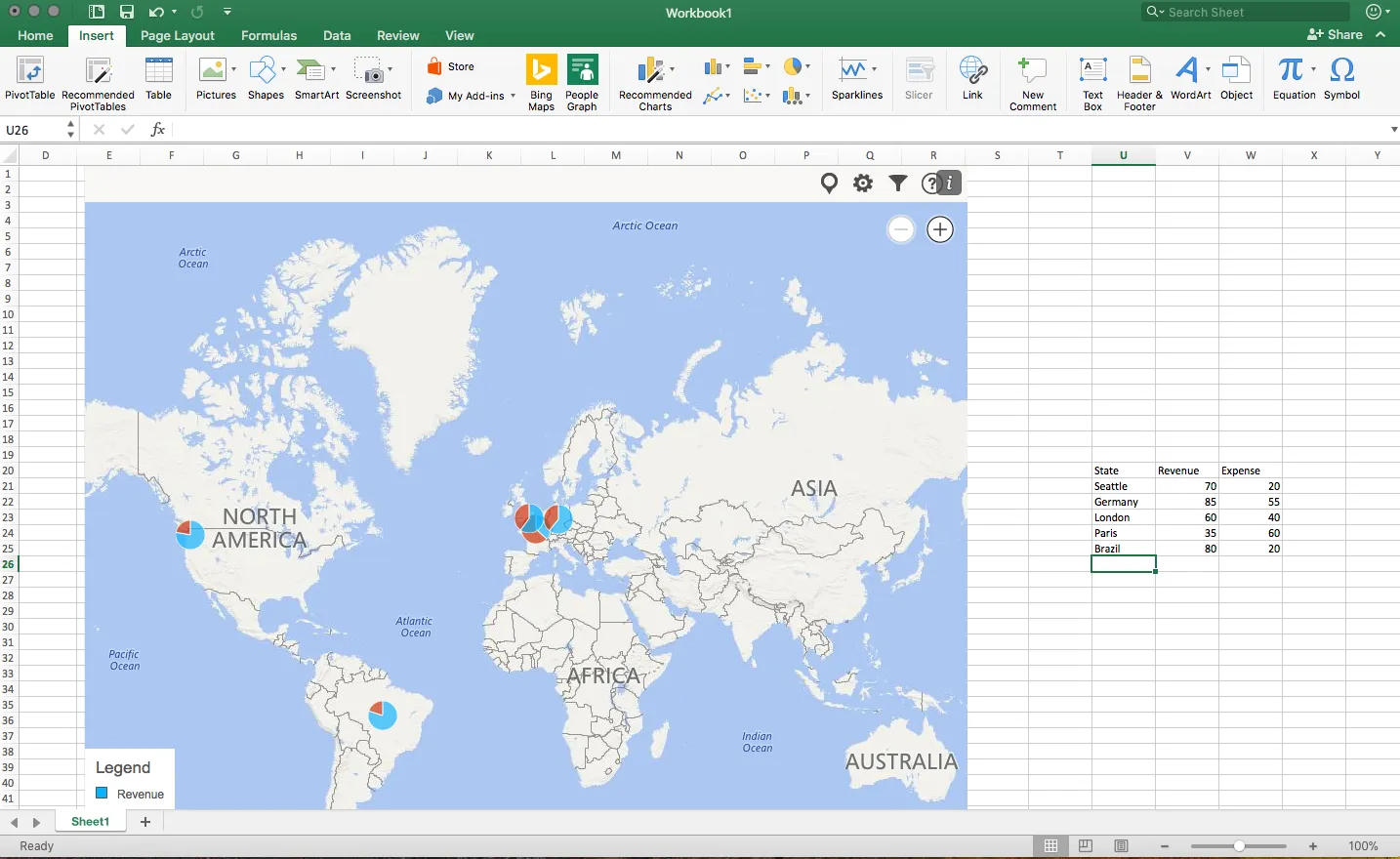
One of buttons that got my attention are Bing maps: you can now plot data on locations in a map. You enter a table with locations and a numeric value, and they get plotted in the appropriate location. The map zooms in and out. When you drag the map from Excel into PowerPoint, it becomes a static image of the last zoom level.

I think this is very useful as an analysis tool for for example a retailer who wants to visualise stock levels across its stores.

The implementation on a Mac is still a bit crude: it would be great if you could shade entire countries based on a value, conditional formatting. (I see that the Windows version is much more advanced).

Also, the graphical appearance of a Bing map is not designed with a presentation in mind. The map has lots of unnecessary clutter, and random geographical labels are displayed depending on zoom level, pretty much like the map you are staring at when the in-flight entertainment system is switched of just before your plane lands.

Hopefully the Mac version will be upgraded to the features of the Windows version soon.

·Layout

The final clean up

Some things to check once you think you have finished your presentation:

  • Are the fonts consistent throughout the presentation? Are have default Arials/Calibris managed to sneak in?
  • Are font sizes in comparable boxes the same?
  • Are the headlines all in the same place on every slide?
  • Are objects in each slide aligned, and properly distributed?
  • Are the proper colours used on every slide, including data charts, or do you still see standard PowerPoint colours anywhere?
  • Are all images in the proper aspect ratio, without distortion?
  • Did you include an attribution to creative common images?
  • In case you will be displaying the presentation on another computer, have you checked Windows/Mac rendering issues? Sometimes fonts are rendered in slightly different sizes, causing words to drop to the second line.
  • Is data properly rounded up?

Now you see why SlideMagic has 1 font, 1 accent colour, and a strict grid that makes it impossible to misalign objects or put titles in the wrong places.

Art: Berthe Morisot, Hanging the Laundry out to Dry, 1875 Subscribe to this blog, follow me on Twitter

·Typography

Designing presentations for retina displays

Typographers had big debates when Apple launched the first iPads and iPhones with retina displays (“Retina” is the marketing name for a screen with such a high pixel density that your eyes cannot see individual pixels anymore). Retina displays are obviously different from low resolution screens, but - as the typographers discovered - are also different from paper/print.

I now see similar issues with large retina monitors. A traditional PowerPoint presentation with an Arial or Calibri font looks somehow off. You need lighter, thinner, crisper fonts. Macs have Helvetica light installed, but Windows machines not. Drop shadows look “dirty”. Outlines around boxes look too heavy.

My guess is that Microsoft will fix the font issue in upcoming releases of Windows and Office products. But, if we fix the issue for computer screens, we are still left with this huge install base of crappy VGA overhead projectors in corporate conference rooms that never get replaced…

If you are working on a really important, one off, presentation find out about the screen you are going to present on and test your design.

Art: Vincent van Gogh, Starry night, drawing, 1889

Click here to subscribe to this blog about presentation design

·Keynote

New Keynote - first impressions

Together with a whole range of other product updates, Apple released a new version of iWorks (including Keynote) last night. I installed the Mac OS X Mavericks (warning, this will take your computer down for an hour) and played around with the new software. Observations in random order.

All iWorks apps are now free for people buying new Macs. iWorks was already a lot cheaper than Microsoft Office, but now the economic argument against enterprise adoption has been removed completely. Still, the huge installed base of both Windows hardware and PowerPoint with its familiar user interface will make it hard for Apple to make an inroad here.

What could help them is the cross platform compatibility. As of today, there is one file format both for desktop and mobile versions of keynote. I still do not fully understand iCloud, where my files are, where things get saved or not, but the duplication of a file when opening it on your mobile phone is gone. A step in the right direction, but not all the confusion has been removed.

Apple has also launched their suite of iWorks web apps. You can now edit and present Keynote presentations right from your browser. You can simply share a link to the presentation with your co-workers, rather than sharing heavy email attachments. More than one person can edit the live presentation. Many other services offer this feature, but personally I find it a bit scary when I loose control of how makes what edits (including deletions) in the master document. Anyway, that the feature is available does not mean that you have to use it.

Continue reading →