SlideMagic Blog

Frequent updates about all things presentations since 2008. Subscribe to never miss a post.

RSS
all posts

Category PowerPoint

·Art

Presenter backgrounds

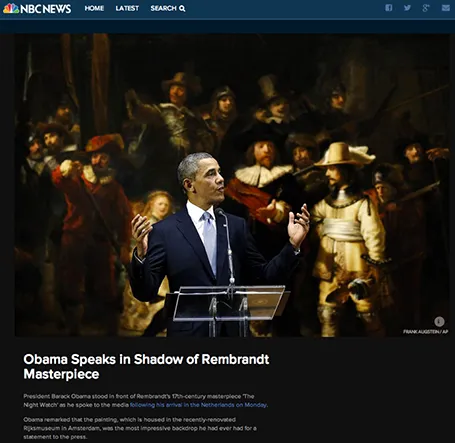
The Obama press conference yesterday in front of Rembrandt’s The Night Watch is an example of how a nice presenter background can make a big visual impact. The dark painting background looks great in close up photos, although less interesting from a distance.

Conference organisers should think beyond the curtain, blank wall, or list of sponsor logos.

·Gadgets

Two screens

There are two adjustments in my IT setup that hugely increased my productivity: 1) move to a huge monitor, 2) add another monitor making a total of 3 screens: 2 big ones, 1 small one.

In this article, it is argued that 2 screens actually reduce productivity. I agree if you use the second one to check on your email, facebook, and Twitter streams. If you use the second screen for a different version of your presentation with comments, or the directory with the images you are using, a multi screen set up is a life saver.

Employees in large companies find it difficult to be productive, and when you look at people sitting in large open plan offices staring at tiny lap top screens, you understand why.

·Keynote

Demos need a story

A series of screenshots is a better way to give a product demo than a live demonstration of your product. You can control the flow better, skip the boring bits (logging in, etc.), and eliminate technology risk.

Many demos are a list of features: the user can do this, the user can do this, the user can do this. That is pretty boring. A better way to give a demo is to invent a story, or use a real life case example.

Set up the context, with some images. Put up the questions/issues the user has, and show how your product can solve them. Throughout the demo, stick to the same use case, use the same consistent data set.

Demos can be stories to.

·Delivery

Speed up

OK, you learned how to make visual presentations and now you have a beautiful deck with lots of slides full of powerful images.

The next thing is to adjust your presentation style. In the old days: people used to present a slide: take time to read the bullets, elaborate on the graphs, go off on a tangent, improvise a story. Each slide would be up for 5 minutes or more.

With a 50 slide visual deck, you need to speed things up and be prepared. Make the point of the slide (and no other point) and - click - on you go. You are no longer presenting slides, slides are supporting your story in the background.

·Keynote

You can be a pro

I did a quick reformat of slides that a client had edited overnight this morning. Here are some of the things I fixed:

  • Recolored red boxes to the correct red
  • Re-applied the correct slide master template to all slides, zapping left overs from other PowerPoint files
  • Re-applied the correct fonts, replacing the standard Arial/Calibri where appropriate
  • Make sure all objects fit within the slide margins
  • Re-sized images so that series have the same height/width
  • Replaced title case with sentence case

These are all simple things, no need for a pro here, you can do it as well!

·Animations

European borders time lapse

This video shows how the political map of Europe has changed in 1,000 years. There is a lot of information packed in here, but the only one that gets across is: “lots of things have changed”. To bring more information to the surface, you need to slow down the pace, and add labels/stickers to highlight the key changes and go into the detail. Both visualisations work, the third option - stuck in the middle - will not.

·Delivery

Video without the audio

Short videos can fit really well into a presentation. The audio track can be a problem.

  1. Bombastic loud music can feel out of tone, especially if the sound was not set up correctly (too loud, too soft)
  2. A spoken voice over might feel out of tone with your overall presentation
  3. It is hard to edit/change video audio, maybe your message has changed over the past month, the voice over of your video has not

A good option can be to run a silent video, where you the presenter, gives live commentary in a voice the audience already has gotten used to, perfectly blended into your overall story.

·Keynote

Free quick logo design tool

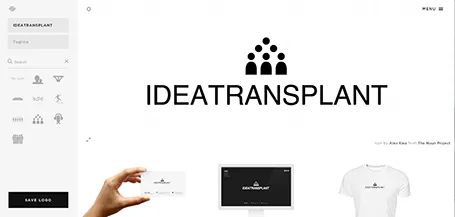
I am a big fan of the web design tool Squarespace and am currently turning a restaurant web site template into the marketing site for my presentation app. Hidden inside Squarespace is a cute free quick logo design tool that uses icons from the noun project. If you are a startup on a tight budget, it could be a good source for your first graphical identity before you are ready to pay serious designers.

·Keynote

SketchDeck - overnight slides

Most investment banks and management consultancies have the luxury of an overnight, low-cost slide production factory in countries such as India. Raw slides (even hand-drawns on the fax machine in the evening, the result in your inbox when you are back in the office the next morning.

SketchDeck is now opening this production capacity to everyone. Prices are very attractive, and they can ramp up capacity quickly to work under very tight timelines.

Not every presentation is an all-or-nothing investment pitch or TED talk, and most PowerPoint presentations are visual documents that are put together quickly to support decision making inside big corporates (Nancy Duarte calls them SlideDocs in her new book). It is for these types of presentations that SketchDeck is a good solution.

As it competition for me? Yes and no. For long-standing clients, I have done slide make-over work helping them in emergency situations, going at such a speed that I could probably be price competitive with an India operation on a s $-per-slide basis (I have the advantage tough of having the confidence/ability to edit/cut/change wording put in by very senior executives in a company, something they might not appreciate from everyone). But ultimately, my 1-man operation will not be able to keep up with the race to the bottom (as Seth Godin calls it). I will continue to focus on bespoke work that is in a different price category, and - in my spare time - am busy developing a web app that can hopefully automate a large part of the work that a mass volume slide production facility typically does.


Continue reading →
·Keynote

Slide design TV

Fellow presentation designer Nick Smith is starting a weekly series of short videos with presentation design lessons. Worth checking out and encouraging him to keep on going! Watch Advance Your Slides TV here.