

How to write your memoir using AI
A friend asked me advice on how to use AI to write a memoir. His challenge: how to make the book and get the real emotion in. A (human) ghost writer had only partly be successful. My hunch was a double approach. First, use AI to get your dry fact base right. What happened when, backed up by files, urls, etc. Then ask someone to interview you and upload that audio to provide emotional context.
When I asked AI, it came up with a similar solution. It went further, have AI interview you, not a human. Anyway, I am adding the whole result below, since it contains many useful points about how to set up your file system, where to use AI, where to use a ghostwriter, and where to do things yourself.
This mirrors what I suggest people do when writing a pitch or presentation. After having battled the content for a few weeks, take a step back, record yourself giving the elevator version of your story (no slides), and listen back to the result. What sequence did you use? What points did you emphasize. Where were you really missing a slide. The best way how to capture how a story comes natural to you.
🤖 AI-generated — the rest of this post was written by AI.
From Shoebox to Book
A complete method for writing your memoir with AI — using the machine where it helps, and staying human where it matters
Visualising quantum mechanics
That is an ambitious title to start my first blog post after my return from a summer holiday in Asia!
Through a series of coincidences I ended up reading through a number of popular science books about quantum mechanics. I remember getting all carried away in the briefing session of a presentation design project for a startup in the field of quantum computing. My academic knowledge of this field was basically high school chemistry, so I added this topic to the list of things that needed a refresh. A holiday was the perfect occasion. I am sure I was the only one at the side of the pool dusting of theoretical physics knowledge.
From a presentation perspective, the fascinating problem that quantum mechanics struggles with a the lack of either a visual or verbal language to describe concepts. The mathematics is water tight and has proven to be really useful (lasers, semiconductors, LEDs, etc. etc.). But when you try to take a step back and want to understand what it actually all means in the context of your daily routines, things get confusing.
It is all the result of some form of Anamorphosis, projections of phenomena that get scrambled when angles or dimensions no longer line up. Every scientist is looking for that ultimate simple underlying concept that can explain/visualise/link quantum on a small scale to the more traditional physics that we see everywhere around us at a human scale.
In case you are interested, here are 2 books on the subject: Beyond Weird, and What is Real?.
More creativity
Some tips on creativity from a book on music production that I recently read: Music Habits, The Mental Game, by Jason Timothy. Most of them are applicable to any creative activity, and that includes presentation design. Here are some that stuck with me (in random order):
- Have a note book / recording device at hand at any time to write down good ideas you will for sure forget 5 seconds later
- Kill social media distractions
- Learn what times of the day you are most creative, and don’t do your monthly accounting during that time
- Productive and creative are not the same thing
- When your brain wants to be distracted it could very well be that you are on to something difficult that nobody has ever done before, keep on pushing
- The genius just tried harder and for more years than you did
- Be yourself, find your own style, you can never catch up by imitating someone else’s
- Don’t blatantly steal, but instead, write down what inspired you in a piece of art, put it away for 2 weeks, then look back at it again and build on the attributes of the work, rather than the exact same thing
- Finnish your projects all the way to the end, and do lots of projects
- Watching more tutorials, reading more books, buying more tools will not really help if you are not applying what you learned/bought instantly. Get good at using the tools you have
- If you want to build a habit, you have to do it every day, no excuses, even if it is just 15 minutes
Free presentation design resources
This may sound like a link bait title, but there is a lot of useful stuff buried in the archives of my blog that is there free for you to use. Click the “3 dots” at the top right of the site to access a drop down menu with more options. Among them:
- A searchable archive of blog posts since 2008
- Places to find free images for presentations
- Other presentation design resources
And of course there is the full version of my book about presentation design that can be accessed free of charge.
Art: Jan Davidsz. de Heem, Still-Life of Books, 1628

My iBook abour presentation design is now free
I now marked down the price of my iBook “Pitch It!” down to $0. The whole iBooks experience has been an interesting one. First I thought that publishing a book through Apple’s platform would be like writing software: updates would automatically be pushed to all readers. The iBook format would also use all the interactive/touch features of the iPad.
Two and a half years later I must conclude that web design engines such as Squarespace have now become so powerful that they match iBook’s interactive capabilities. I have ported my entire book here (it is free as well). It works great on iPad, but also on other tablet devices, mobile phones, desktop screens. The source code is also easier to maintain and update.
Art: Degas, The Rehearsal, 1873
Useful presentation design tools and resources
As most of my clients outside Israel are enjoying the X-mas break, I have some time to clean up my web site further (no holiday here in Tel Aviv). I added a bunch of presentation design resources on the site.
- Presentation design books. The flurry of new presentation design book releases seems to have faded a bit over the past years. Has all that needs to be said, been said, or did I miss anything?
- Presentation design tools. A few neat software tools that can make the life of a presentation designer easier.
- Sources of presentation images. There are more and more sites out there that offer free stock images under a creative commons license. These images are free, look real, BUT the library sizes are still small, and search is limited.
- The blog search archive. Now that I moved away from Blogger, it is harder to add sidebars with search boxes, archive links, and tag clouds to the blog. Hence, the dedicated search page for access to 6.5 years of posts (more than 1700 in December 2014).
I hope you find it useful, and let me know suggestions to add more resources.
Art: Gustave Caillebotte, Les Raboteurs de Parquet, 1875
Slidedocs by Duarte
Nancy Duarte published her fourth book: Slidedocs, about how to design visual documents in PowerPoint (or Keynote) that are meant for reading rather than presenting.
She is on to something. Business communication is getting shorter and shorter, and the role of word processors that used to write long boring memos is taken over by presentation design software that is used to create more visual documents.
Slidedocs is a free download (it is actually a PowerPoint file) that talks you through an approach to make these documents better. Most useful might actually be the file itself, that can serve as a template for your next Slidedoc!
Become a great graphics designer
I am reading the book How to Think Like a Great Graphic Designer (affiliate link) by Debbie Millman (picked up at Rizzoli in New York, a great place to find design books). The book comprises of a series of interviews with famous graphics designers. Here are some common themes in all the discussions.
- The process to getting to a good design is messy: you try, try, try, and then all of a sudden it happens (or not). Different from churning out analysis and data charts one after the other.
- The standard career path for a graphics designer (start at the bottom in a big studio) inhibits success later on. Multiple designers spoke about finding a career setup that frees you from a big corporate structure in your formative years (a financial challenge).
- You need to find time to do work away from the day-to-day pressure of a client. Again, this is a financial issue. Designers quoted lucky family situations and/or a large steady client as the enabler for creative freedom.
- Pro-bono work often brings out the best in a designer, since “the client who is not paying has no right to interfere with the work”
- Many designers are introverts, like to work by themselves, and stay in the front line of design work, i.e., they do not move into the management ranks.
- Almost every designer talks about art versus design. I think deep in their hearts they regret not having made it as an artist.
Practical typography book
Here is a nice about typography: Practical Typographyby Matthew Butterick. As the title says: very practical (Typography in 10 minutes, Summary of key rules), and in a nice format: simple HTML pages that look great on any device.
New book by Duarte
Nancy Duarte is probably the only person in the world that has managed to create a very large business in the presentation design market. As a result, she is a true authority on the subject because of here experience with designing presentations ranging from the high profile money-no-issue keynote presentations to the day-to-day high volume make-overs of slides for internal management meetings.
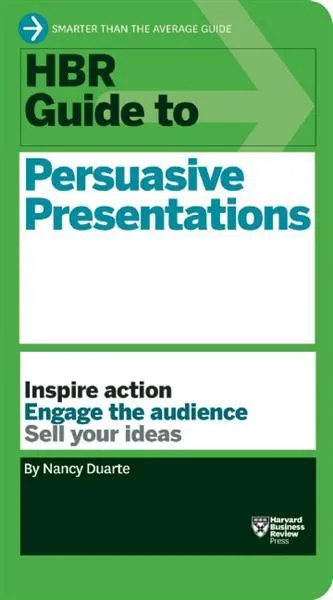
Her new book HBR Guide to Persuasive Presentations is different from the previous two (Slide:ology and Resonate): it is far more practical. Out goes the glossy paper, the beautiful diagrams, the client case examples, and instead we have a highly useful list of tips and tricks that can help you make better presentations the moment you put the book down. Almost every paragraph starts with an action verb, a recommendation of something that you can do better.
The book covers a wide range of subjects related to presentation design, from analysing your audience to building an online social media following for your decks, but the core of the book is in story and slide design. Some new ideas that I got out of the book:
- Create two endings in your presentation, if you run out of time you can always stop at the first one
- Pick the right type of slide: walk-in slide, title slide, navigation slide, bullet slide, big word slide, quote slide, data slide, diagram slide, conceptual slide, video slide, walk out slide
- Ideas how to translate words into diagrams.
One point of disagreement, the book advocates using a 10% rule for executive summary slides, so a 50 slide deck needs 5 summary slides (5 minutes), and 45 appendix slides. Pretty much what we tried to do at McKinsey. I increasingly try to shorten that executive summary to one super short summary, and follow it to a slightly longer story that encapsulates the entire story, hoping to be able to hang on to senior management attention for maybe 10 or 15 minutes instead of 5 when the cross fire of questions begins and your slide presentation in the conference room basically ends.