Here is how you make 3D balls used in these images, or these images. Click on the chart for a larger picture.
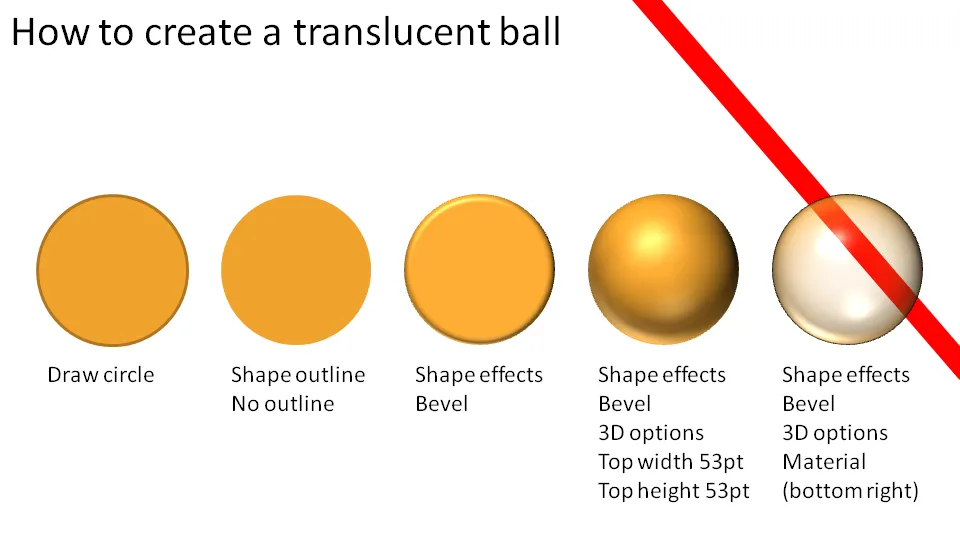
You should experiment with the “top height” and “top width” to find a value that best fits the size of the object you are working on.


Blog post
Here is how you make 3D balls used in these images, or these images. Click on the chart for a larger picture.
You should experiment with the “top height” and “top width” to find a value that best fits the size of the object you are working on.
About this blog
Notes on all things presentations — design, storytelling, and AI workflows.
Subscribe now to never miss a post.
About SlideMagic
A platform for business presentations.
A free student plan is available.
12 comments
Draw a rectangle or a square
Give it some 3D rotation
Do not use a bevel
Instead in 3D options: give it depth, a lot to create the 3rd dimension
Change the material to translucent
Thank you for asking, I might create a separate blog post about this.
I don't understand the last step, what do you mean by "Material (bottom right)"?