SlideMagic Blog

Frequent updates about all things presentations since 2008. Subscribe to never miss a post.

RSS
all posts

Category Keynote

·Keynote

Romanticising without apologies

After you told a story, try to avoid downplaying it: “Well, maybe I romanticised things a bit”, it is like a cold bucket of water for the audience. Decide the level of romanticising beforehand, and then stick to your choice without apologising and/or blushing.

·Delivery

The nose is a lie detector

When people make big statements in a presentation they get a bit nervous (“we are the cheapest solution in the market”) and often cannot suppress the urge to touch their nose to get rid of that subtle itchy feeling. Train yourself to be strong and do not touch your face when making big claims.

·Keynote

PowerPoint for iPad review

Yesterday, Microsoft finally released a full version of Office for iPad, including PowerPoint. Unlike a previous release for iPhone, this version allows you to create and edit documents.

I blogged before about the strategic mistake of Microsoft restricting its Office products for its own operating systems, and I think the recent change in CEO might have something to do with the sudden release of the iPad app which was rumoured to have been ready for a long time.

So what do I think? First of all, the design looks great. It is a good blend of the iOS environment with Microsoft-specific UI elements (ribbon). The app works fast/snappy and is intuitive to use.

The best thing is that finally PowerPoint will look normal when opening them on an iPad. Fonts work, no need for PDF-ing, or using specific apps such as SlideShark. This takes an important uncertainty out of business meetings. I had many instances where I needed to pull out a deck quickly and unexpectedly, and if an iPad is the only devices you have on you, you keep on apologising for the horrible look of your slides.

And I think this will be the main use of PowerPoint for iPad: showing presentations plus the occasional last minute text edit, or slide show re-order. Serious slide design work is not possible, first of all due to the small screen that is not comfortable to work on for a long time, and secondly because critical functions are missing when compared to the desktop app.


Continue reading →
·Delivery

From 90 to 100 percent

Sometimes I work with really good presenters that already have a really good presentation. How to get from 90 to 100%?

My approach would be to sit in the audience of a real live presentation, or watch an entire presentation from start to finish on video. Then, create a series of slides that exactly mimic the story. Take out slides that do not really add anything and are just a prompt for the presenter to tell a story. Add black slides to switch off the projector all together. Use very simple graphics and words to support a story. Be a movie director and look at each frame of presenter and slide together.

·Art

Presenter backgrounds

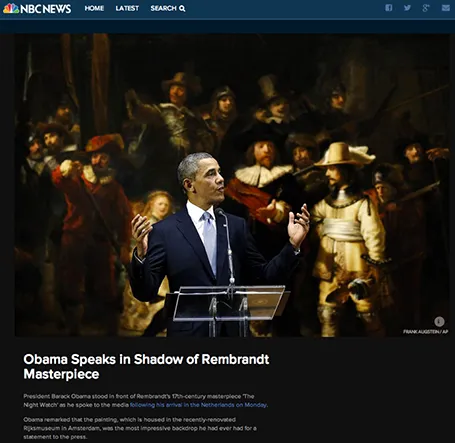
The Obama press conference yesterday in front of Rembrandt’s The Night Watch is an example of how a nice presenter background can make a big visual impact. The dark painting background looks great in close up photos, although less interesting from a distance.

Conference organisers should think beyond the curtain, blank wall, or list of sponsor logos.

·Keynote

Demos need a story

A series of screenshots is a better way to give a product demo than a live demonstration of your product. You can control the flow better, skip the boring bits (logging in, etc.), and eliminate technology risk.

Many demos are a list of features: the user can do this, the user can do this, the user can do this. That is pretty boring. A better way to give a demo is to invent a story, or use a real life case example.

Set up the context, with some images. Put up the questions/issues the user has, and show how your product can solve them. Throughout the demo, stick to the same use case, use the same consistent data set.

Demos can be stories to.

·Delivery

Speed up

OK, you learned how to make visual presentations and now you have a beautiful deck with lots of slides full of powerful images.

The next thing is to adjust your presentation style. In the old days: people used to present a slide: take time to read the bullets, elaborate on the graphs, go off on a tangent, improvise a story. Each slide would be up for 5 minutes or more.

With a 50 slide visual deck, you need to speed things up and be prepared. Make the point of the slide (and no other point) and - click - on you go. You are no longer presenting slides, slides are supporting your story in the background.

·Keynote

You can be a pro

I did a quick reformat of slides that a client had edited overnight this morning. Here are some of the things I fixed:

  • Recolored red boxes to the correct red
  • Re-applied the correct slide master template to all slides, zapping left overs from other PowerPoint files
  • Re-applied the correct fonts, replacing the standard Arial/Calibri where appropriate
  • Make sure all objects fit within the slide margins
  • Re-sized images so that series have the same height/width
  • Replaced title case with sentence case

These are all simple things, no need for a pro here, you can do it as well!

·Animations

European borders time lapse

This video shows how the political map of Europe has changed in 1,000 years. There is a lot of information packed in here, but the only one that gets across is: “lots of things have changed”. To bring more information to the surface, you need to slow down the pace, and add labels/stickers to highlight the key changes and go into the detail. Both visualisations work, the third option - stuck in the middle - will not.

·Delivery

Video without the audio

Short videos can fit really well into a presentation. The audio track can be a problem.

  1. Bombastic loud music can feel out of tone, especially if the sound was not set up correctly (too loud, too soft)
  2. A spoken voice over might feel out of tone with your overall presentation
  3. It is hard to edit/change video audio, maybe your message has changed over the past month, the voice over of your video has not

A good option can be to run a silent video, where you the presenter, gives live commentary in a voice the audience already has gotten used to, perfectly blended into your overall story.