

A remote control is an essential tool for any presenter. You do not have to go back to your computer all the time to look for the arrow keys to change the slide. This is especially important if you adopt a “Zen”-style presentation: lots and lots of images that change at a very high pace. I finally got one.
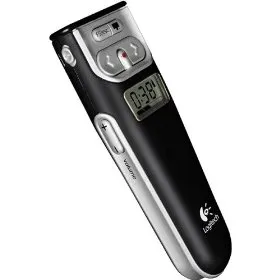
The Logitech 2.4 GHz Cordless Presenter does the job perfectly.
- Minimalist design, only the keys you really need: slide up/down, volume, screen “F5” and a button to black out the screen to talk to your audience without the distraction of slides.)
- The USB computer connection can be stored inside the device
- It has a stop watch to keep track of time
- It does (partly) work on the Mac (I run the latest Mac OS). Flipping through slides in both PowerPoint and Keynote, and changing volume is OK. The black screen and “F5” keys do not produce meaningful results (the opposite, they start inserting characters into your Keynote slides)
The device also has a built in laser pointer (although I am not a big fan of that nervously moving red dot on my slides).
4 comments
I love the tactile "click" I feel each time I click a transition or animation. It really helps keep me from double-clicking and skipping over a slide.
A black-screen button is handy, too, for when you want to turn off the pretty visuals and just talk to your audience.
And the volume control is a lifesaver. If you've used sound or video in a presentation, you've probably also made the mistake of not testing your levels before the event (I have!). And that's no fun when your laptop is across the room.
Finally, the timer is well-designed. I always set it for my target stop time, then glance it from time to time during the presentation. No need to do math in my head; it just tells me exactly how many minutes I have left. AND it gives me a little nudge (vibrate) a few minutes before my time's up.
Best. Remote. Ever.
Apparently they won't sell you replacement dongles.