SlideMagic Blog

Frequent updates about all things presentations since 2008. Subscribe to never miss a post.

RSS
all posts

Search results for “windows”

·SlideMagic

Windows app close issue fixed

V37 of SlideMagic had an issue on Windows: closing the last window with the top right ‘X’ did not completely close the app process and as a result, SlideMagic would not reopen again. This issue has been patched in V39 which should automatically install.

You can force an installation in 2 ways

  1. Reboot your machine to close V37. Run SlideMagic V37, wait for 5 seconds until the ‘update available’ notification appears. Close SlideMagic V37 via the ‘Exit’ command in the file dropdown manu. Restart SlideMagic which should now start as V39.
  2. Or download and install the latest version from slidemagic.com

This issue does not apply to Mac users.
·Software

Windows on Mac 2022

Another software-related post after my computer swap. SlideMagic is an app that runs both on Mac OSX and Windows machines, so I need a Windows computer to compile and build the software (luckily from one code base). Some observations:

  • Desktop operating systems are very mature pieces of software, and sliding more and more in the background. On my old Mac, I did not even bother to upgrade to Monterrey as of now, because of compatibility issues of some very old music production software that I use. Having used Monterrey for a week now, I still hardly notice the difference.
  • I used the opportunity to upgrade to Windows 11. Windows is now totally at par with the Mac when it comes to look and feel. The whole experience looks great and works well.
  • On Macs with an Intel chip, I would install Windows using Bootcamp. Starting the machine with Windows would leave no trace of anything Mac: you are working on a pure Intel-based Windows machine. Now that Apple switches to different chips, I have opted again for a virtual machine. Windows 11 runs nicely inside a window alongside my Mac software. It is easy to exchange files, very quick going back and forth between the systems, and most importantly, it is easy to adjust the hard disk space your Windows machine takes on your Mac, nothing is set in stone.
  • More and more software is written like SlideMagic, one code base creates identical looking apps for both Windows and Mac.
  • With the differences in software / UI disappearing, the main differentiator between Mac and Windows is actually the hardware: build quality, design, and most importantly the quality of the screen. Macs are usually great, but in the world of Windows, there is a huge range of machines, from really poor/cheap to fantastic/expensive.
Continue reading →

App update - multiple windows

Over the past week I have been stress testing SlideMagic 2.0, and added 2 important features:

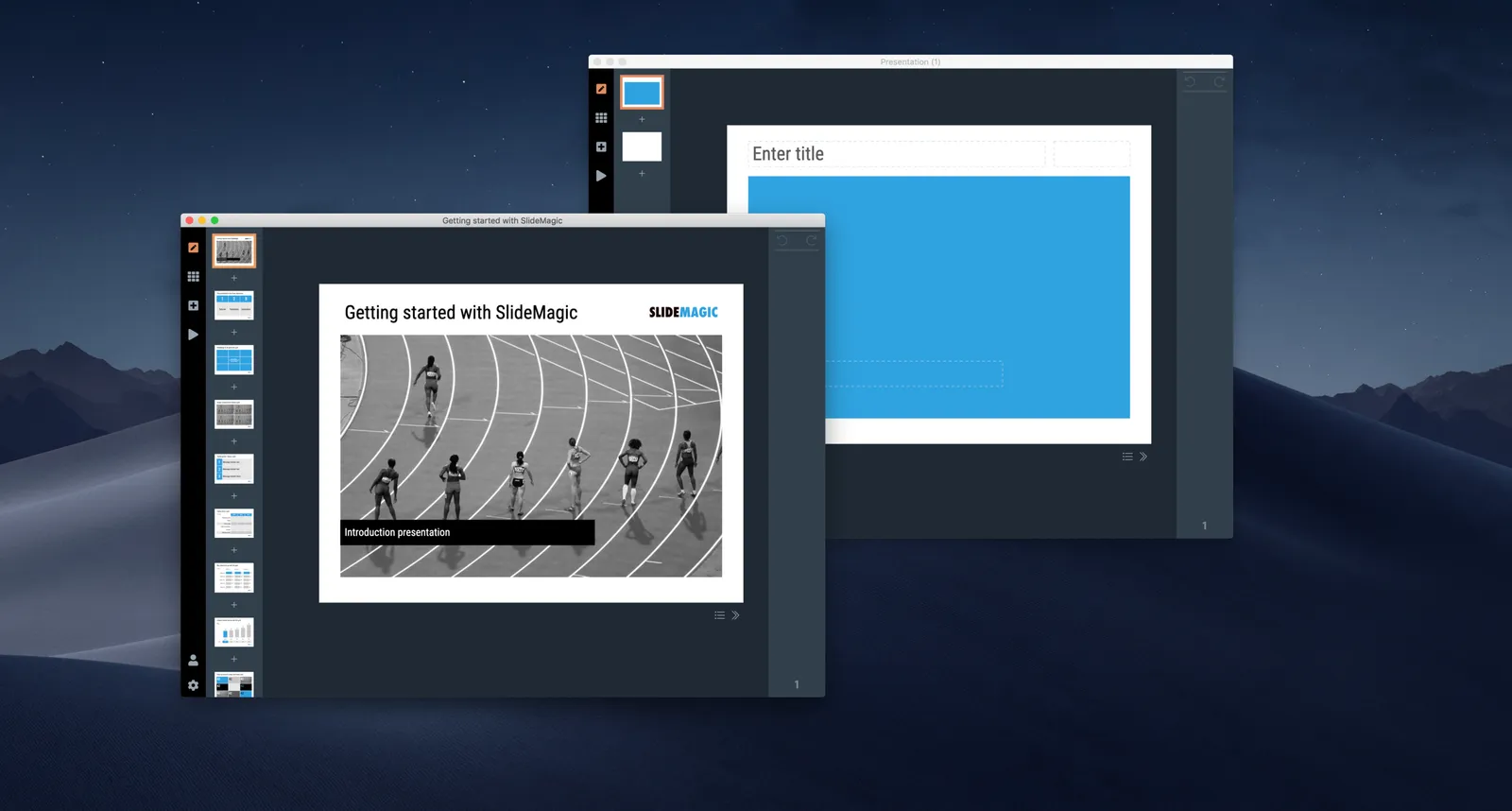
  • Support for multiple windows. Open presentations side-by-side and copy elements back and forth. This is a strong advance of desktop app over browser-based software. Copy-pasting is still fragile here and there, work in progress.
  • The ability to split a grid row or column in 2, which allows you to change the layout of a slide quickly without rebalancing the grid. Grid manipulations now work super-fast and intuitive.
  • I have installed in-app analytics to see where beta users get stuck. As a beta user, you automatically opt-in to usage data gathering, the commercial version will have the opt-out option.

Beta users can simply go the cloud.slidemagic.com, log in, and download a new version of the app.

·SlideMagic

(Careful) beta test for both Mac and Windows

I am ready to release a useable version of SlideMagic 2.0 to a very small group of users. There is an app for both Windows and Mac. If you are interested, you can sign up here: http://cloud.slidemagic.com/beta/apply, and I will let you know in the coming days (maybe week) if you made it to the very first beta test group.

In the not too distant future, there will be a broad/no application beta test program, but at the moment I am keeping things small to make sure I have the bandwidth to support early users.

Photo by Abbie Bernet on Unsplash

App update: Windows!

Yesterday I managed to get the Windows version of SlideMagic 2.0 running, generated by a script that eats the same code as the Mac version, but now saving a .EXE file instead of a .app. This means that I can soon open a limited beta testing program across all platforms.

The next challenge is to get certified as a reliable developer, Apple in particular puts up all kind of barriers to installation of apps that have not been vetted.

Windows on a Mac - 2018

For my SlideMagic development efforts, I need to dive deep into the bowels of Microsoft’s .NET architecture and there was no other option but to install a Windows machine on my Mac. I am running a 2015 iMac and here are my observations of using this set up as a production environment:

  • In general

    • Windows 10 is great and at par with MacOS
    • PowerPoint 365 on Windows is better (has more feature and UI updates) than PowerPoint 365 on Mac which in turn is better than Keynote (2018)
    • The CTRL-C/V vs CMD-C/V is an absolute productivity disaster, after a few days of coding I am used to CTRL, which I then need to unlearn when working on a Mac (design, music) before I have to unlearn it again.
  • There are some glitches with running Windows 10 on my machine (presumably these do not happen when you buy a “proper” PC)

    • I had to do some pretty hard core registry entry hacking to get my mouse to behave properly (direction flipping), even after tweaks the sensitivity of the Apple Magic Mouse is too strong. Especially when resting your finger on the glass surface, this immediately triggers the wildest switches between slides in PowerPoint for example. I am considering investing in a Microsoft mouse in the hope that these are properly calibrated
    • The video graphics card is acting a bit strange here and there (this could be a problem of my specific iMac generation). In some cases, after the computer wakes from sleep, the mouse pointer is a blurry vertical line. Also, hardware acceleration has a tendency to mess up text in Google Chrome (switching acceleration of kills the user experience). As result, I am one of the 500 people in the world who run the Microsoft Edge browser, which is actually pretty good for consumer browsing, but less suited for coding. I Googled extensively to find solutions for these problems but always hit a dead end where someone discovered that these are actually graphics card drivers bugs that have not been fixed yet.
Continue reading →

Working with Windows full time

I am starting to get my head around building applications for Microsoft Office / PowerPoint, and this can be done easier on a Windows machine, so I am now pretty much all day working in a Microsoft environment on Apple hardware. (Don’t worry, the result of the effort will run on Windows and Mac).

The whole Windows experience is fantastic and completely at par with a Mac. As I said in a post before, I now consider PowerPoint to be a better presentation program than Keynote, and PowerPoint for Windows is better than PowerPoint for Mac.

The only issue for me is to get the Apple keyboard and mouse properly integrated with the workflow (scroll directions, knowing where certain keys are, and getting used to the difference between CMD and CTRL). (And… the Logic Pro X music software does not run on Windows).

Cover image by Timothy Eberly on Unsplash

·Software

Windows is at par

Every couple of years I am installing a Windows machine on my Mac, either to check how SlideMagic looks on corporate computers, and now, because I need access to Microsoft Office development features that are not available on a Mac. I went through Windows 8, then Windows 7, and now Windows 10. This time, I am not using the Parallels virtual machine, which allows you to run Mac and Windows applications side-by-side. I always found it slow, cumbersome, and oh boy, if you double clicked the wrong file your virtual machine would boot up, start the Microsoft update process, etc.

I must say, the whole Windows experience is fantastic (I mainly use Chrome, and Microsoft Office). If you need to work a lot with the file manager, you still see some left overs from past designs, but speaking of design, the overall look & feel might actually be better than Mac OS X.

Most hardware for Windows are still low cost / ugly corporate laptops or machines for home use. But, the combination of Apple hardware and Windows is a pretty nice one. I think there is a market opportunity for a super beautiful, super powerful, Windows machine aimed at creatives / designers, priced above Apple.

·Software

Organising application windows

Yesterday I wrote about how difficult it is to keep your application windows organised across two very large monitors. Colleague Nick Smith pointed me to this neat utility: Divvy. It creates a pop up grid that allows you to position windows quickly. Available for both Windows and Mac OSX. This features should be baked into operating systems as a standard feature.

·Software

The shortcomings of application windows

The main reason to design a new presentation app that is an alternative to PowerPoint (SlideMagic) is the flaw in the windows/mouse-based user interface design that has been with us since the end of the 1980s. Users can drag, move, place, distort, objects as they see fit. Inexperienced designers will get it wrong and put things in the wrong places.

Over my holiday, I have been listening to this Andreessen Horowitz podcast that discusses whether tablets are finally ready to eliminate the laptop:

Some other interesting points that came up:

  • “Where is my mouse?”, the mouse pointer is actually not the most logical computer input device. After 2 decades we have gotten used to it, but is not perfect. In the 1980s, engineers combined multi-tasking and windows as one user interface concept. They are different.
  • Arranging and resizing application windows as actually not that user friendly. Most of the time, you want 1, 2, maybe 3 applications open in a convenient grid. (Similar to placing objects on a slide).
  • One of the big shortcomings of tablets today is the ability to create presentation slides (making small edits is not a problem). Maybe it is time to expand SlideMagic to work with touch screens :-)

Image from WikiPedia