SlideMagic Blog

Frequent updates about all things presentations since 2008. Subscribe to never miss a post.

RSS
all posts

Search results for “windows”

Development update

Here is where things stand with the development of SlideMagic 2.0. I am making good progress with a new presentation design app that follows the same (patented) design approach as the current web app but a lot of the small inconveniences ironed out:

  • A native app that runs both on Windows and Mac and saves and loads files to a local hard drive, allows you to work offline, and deliver much snappier editing response times
  • Built-in, instant export to PowerPoint
  • Instant conversion between 4:3 and 16:9, back and forth
  • A more integrated user interface enabling the editing of grids, shapes, and text from one screen

The prototype is coming along nicely, but still a lot of effort is required to iron out the small glitches before I can let the genie out of the bottle…

Photo by Jorge Zapata on Unsplash

Update on the development efforts

The past few weeks have been very interesting for me in my new role as a developer! I have switched platforms 3x now: first starting to explore plugins for PowerPoint (Windows Forms), then moving on to coding an application straight onto windows (Windows WPF), but now I am back in the world of Javascript that in combination with the Electron platform can produce software that runs natively on Windows, Mac, and even Linux with just one code base to maintain. The first intermediate end product will be a local presentation “presenter view” tool that does not require internet connections to deliver/show SlideMagic presentations (it is all a bit clunky still in the web app), and a 100% accurate PowerPoint conversion tool for SlideMagic presentations that runs on both Mac/Windows, and is totally independent of PowerPoint itself, my software is generating the converted files directly without the help of the rendering engines of PowerPoint (plugins).

This whole process is absolutely fascinating. Now that I go through things myself I have come to realise how important it is to master (at least part of) the actual core technology yourself as a founder.

To be continued.

Photo by Pankaj Patel on Unsplash

Mac OSX after all

My development work initially focused on Windows computers, while Mac users are likely to be the ones that are early adopters of new technology (big corporates with big IT departments usually run Windows and are less flexible to try something new), the market eventually will be Windows users.

I stumbled on a new software development platform that probably allows me to write one code base and use it to deploy software on Windows, Mac, and yes even Linux at the press of a button. This will cause some delay to the development, but can still work at the stage where I am at. I need to see whether this solution grants me the deep access to the operating system I need.

To be continued.

Photo by Claudio Schwarz on Unsplash

·PowerPoint

PowerPoint on iPad review (2018)

Microsoft is on a roll, and now that I am turning temporarily into a developer, I appreciate them even more with very powerful code editors, and repeated decisions to open source their software (the entire Windows platform engine is going open source), and make other sensible decisions (moving to the Chromium browser rendering engine inside Edge).

The office apps are no exception, and I took some time to play around with PowerPoint on my new iPad.

The app looks and feels fantastic (I have something to aspire to), and all the basic design features work flawlessly. I find it easier to find my way around coming in “cold” then the keynote app for iPad. The small screen encourages you to design simpler slides, and spend less time adding stuff that is not essential to your story.

In 2018, things are still not perfect though. But most shortcomings are to blame on the iPad form factor, not Microsoft:

  • Presentation design is a creative process that needs space, a big screen, accurate placing of objects (fingers are less good here than a mouse). An iPad is just not a focussed design interface.
  • File management is still cumbersome on an iPad. Finding that deck from last week, opening a spreadsheet side by side, copying an image from the web browser, things that take a second on a computer are not intuitive on an iPad.
  • Because of the form factor Microsoft has cut down the features for PowerPoint on iPad. In itself, this is great (I am also focusing the features in my app), but, once the genie is out of the bottle, it is very hard to have the same application on different platforms with different feature sets, especially if you are working with collaborators on different devices. “Please create this bar chart”, is emailed to the analyst working on an iPad in the taxi who then discovers that data charts are not really supported. It also hard to create custom themes and colour schemes.
Continue reading →

Looking for 2-5 beta testers

My first software product that I coded myself seems to be working and I need a handful of beta testers to work with. I want to see if there are unexpected bugs still hiding in the product, and what happens if people start installing things on a machine other than my own (full of developer privileges when it comes to accessing hard disks, etc.)

What is this product? A plug in for PowerPoint that converts SlideMagic presentations to 100% perfect PowerPoint. Extra bonus: automatic translation to and from a dark background, and flipping between 4:3 and 16:9 aspect ratio in a second without distortions. Users get sent a “.MAGIC” file that the tool can interpret.

It runs on Windows only, since I had to dive pretty deep into the Microsoft .NET libraries to get all this to work. (At the moment, I deal with Mac-originated conversion requests partly manually, you get the same quality conversion sent to you with a time zone delay, but this will not be sustainable if request volume goes up).

This product is not the final stage of SlideMagic, more a first step for me to test whether I can ship useful software. I am catching up with technology since my 1992 graduation from engineering school, now I have moved on from PowerPoint plugins to writing Windows desktop applications from scratch for a next product release. Desktop apps are a bit “1995”, but for B2B design work, “cloud” might not always be the best solution. In any way, I have to pass this station before being able to move on to web and possibly mobile app technologies. It is fascinating to see that you can basically do anything in software if you are not intimidated by technology and have the courage to leave the traditional boxes/application models and user interface approaches.


Continue reading →

Switching to the new PowerPoint conversion

In the coming days, I will switch SlideMagic PowerPoint conversions to the new software that I have written: no more imperfect renderings but a perfect 1-to-1 translation. The conversion still involves processing centrally, but ultimately, I will release a DIY plugin for Windows users, I am still stress testing it.

In the future, this feature might become the premium offering of SlideMagic, the ability to save “.magic” files to your computer, translate them to PowerPoint freely to collaborate with your colleagues, and present decks offline.

Cover image by rawpixel on Unsplash

·Hardware

Macbook Pro 2018

I am now working with my new MacBook Pro computer set up for 2 weeks. In 2015, I got an iMac because it was the only option to enjoy that huge 5k screen back then. Some observations:

  • I am happy to have the option of mobility again. If your work consists of replying to emails, mobile devices are OK to work outside your office, but for design and coding, that is a different story.
  • While the LG 5K monitor is less sturdy than the iMac, it is easier to adjust and has a much smaller footprint. The screen quality is exactly the same (it is probably the same hardware panel as the iMac), some might perceive the glossy finish of the iMac to produce deeper black tints.
  • Having worked for a number of years on 1 monitor, I rarely switch back to a 2 monitor set up (laptop + monitor). I tend to use that second screen for distractions (email, Twitter), and life is actually better and more productive without these. (I do need those 2 monitors to test my “presenter mode” feature of my app, pulling my hairs out over how hard it still is to coordinate 2 application windows in 2018…)
  • The monitors have become so good today that there is no longer the issue of “compromise”: working on the desktop monitor is better because the screen is better. Now there are 2 different work modes with equally good monitor options: laptop screen at close range with trackpad, fixed monitor and mouse at longer range. Both are good.
  • There are a number of 13” screens in the family, and I must say I much prefer my 15”.
  • People have been bashing the MBP in reviews, but I must say it actually works fine. (Contrary to popular taste, I got the silver one and not space grey for that retro feel).
  • USB-C dongle hell is hidden, after some trial and error with USB hubs, I now have my entire office (plus music studio) feed of one single charging/monitor/USB cable, easy connecting and disconnecting in my office.
  • I am not using the touch bar that much. The ESC key could as well have been a real key. It is baffling that the volume slider is not present as the default option, but requires an extra click. Touch ID is great.
Continue reading →

Business presentation market

A series of tweets that got me thinking, as someone who is still arguing about Windows versus Mac in 2018

I am definitely in the 10% category, and I think my target audience is as well. Professionals making stuff on PCs is a pretty old/stable market. Many other presentation apps are aiming for the 900m and many of them branch out to other types of content than just business presentations. But 100m is still a big number. I am working hard on making those pro apps a bit less “pro”.

Cover image by Vincent Botta on Unsplash

PowerPoint conversion is working!

I managed to implement the conversion of all SlideMagic features, including the tricky ones (data charts, image cropping and positioning, speaker notes, etc.) into a razor sharp PowerPoint deck with all shapes, data charts, objects completely editable if you created them yourself from scratch.

(This as opposed to the current PPT conversion that makes a rendering that works as you as you do not touch/edit any of the shapes inside the deck)

Now it is on to debugging and making everything super robust in every possible user (ab)use scenario.

The current setup is in a lab environment and not yet kosher enough for public release. If you are curious, are have a SlideMagic deck that you are desperate to convert, email me your SlideMagic presentation ID and I can apply the new technology for you. The conversion software only runs on Windows, but since it is me doing the conversion on my machine (for now), both Windows and Mac users can submit their decks.

Cover image by Rob Bye on Unsplash

SlideMagic to PowerPoint - update

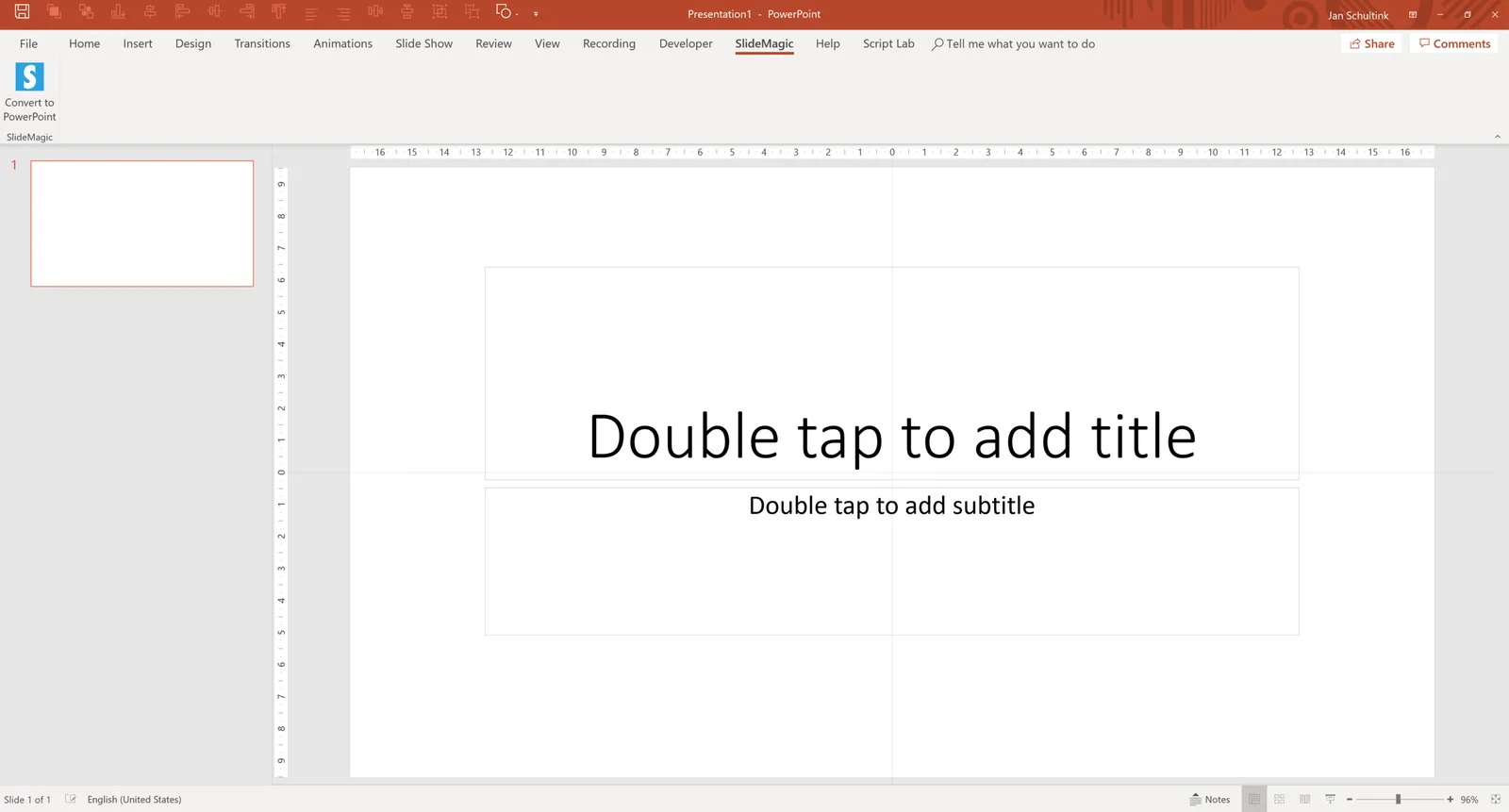
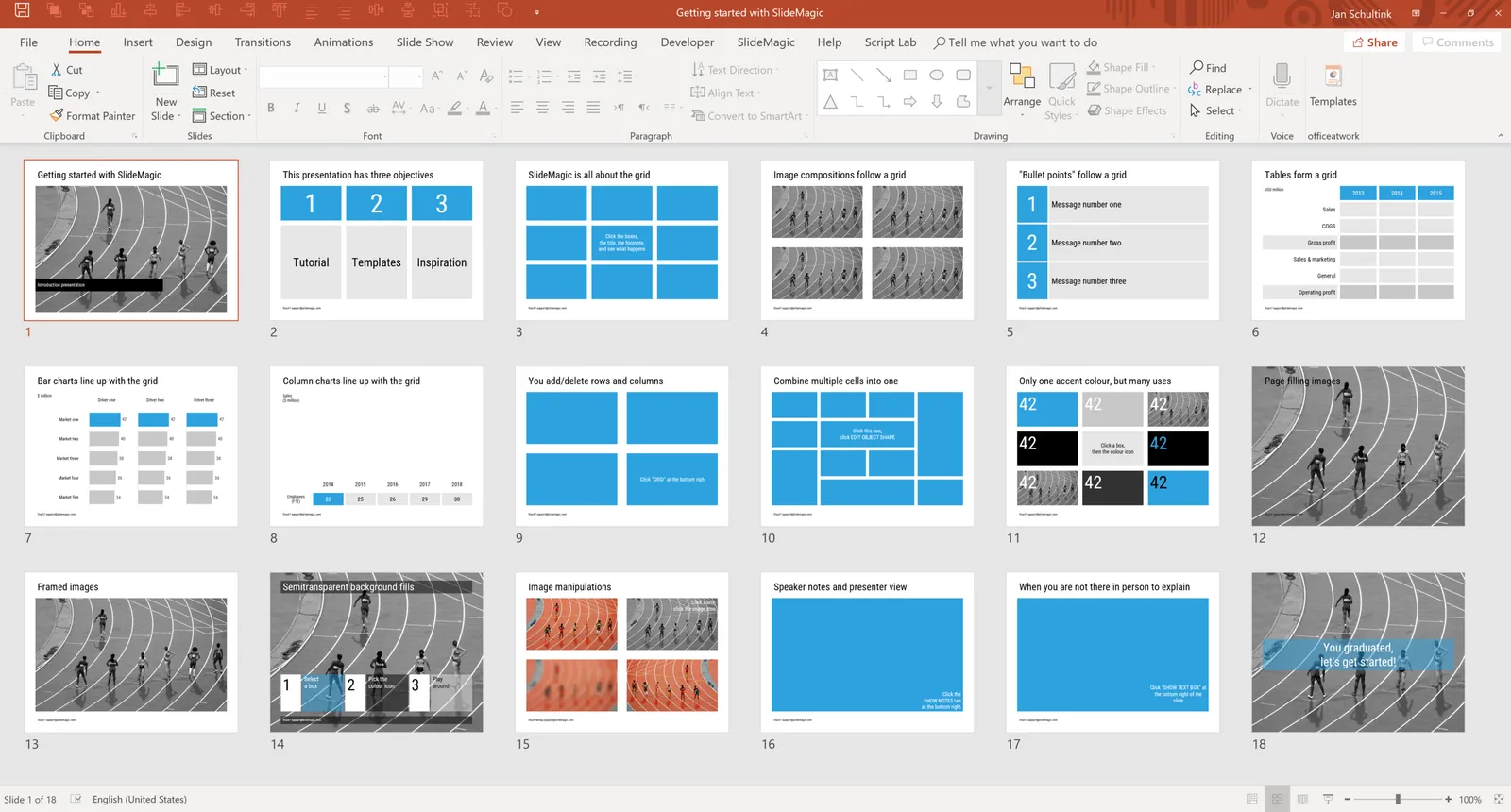
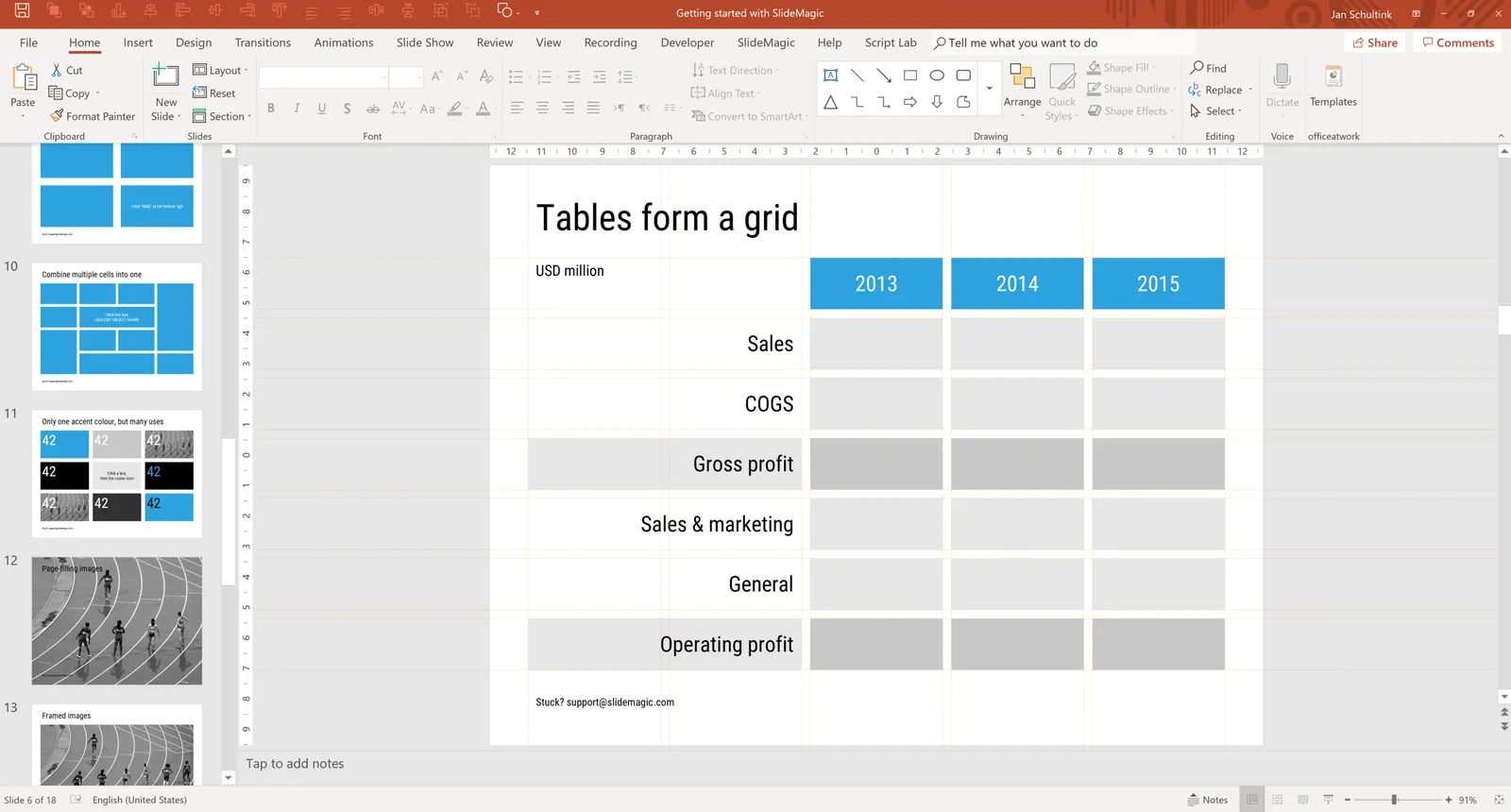
I made a lot of progress over the past weeks with getting the conversion of SlideMagic files to PowerPoint sorted. Below are some of the first screen shots. All shapes are fully editable, have the exact/perfect sizing, and sit on a slide that has the grid lines as guides added to them, so it is easy to make correction if you want. Note how this also applies to data charts.

All this took some figuring out since the PowerPoint object model is incredibly complex. The pay off is that I start to understand not only PowerPoint file structures very well, but am also getting a deep understanding of my own software (the development of which I outsourced). This is sparking all kind of ideas where I can take things next.

At some stage over the next few weeks I will invite beta testers for the new software. Let me know if you are interested to join. Things will run only on Windows at the moment, and either you or your IT manager need to happy that you install all kind of plugins that have permission to write on your hard disk etc…

 A new SlideMagic tab will added to your PowerPoint ribbon

A new SlideMagic tab will added to your PowerPoint ribbon

 Making progress, the column charts will get done today

Making progress, the column charts will get done today

 The grid will be reflected in the guide lines on the converted slides

The grid will be reflected in the guide lines on the converted slides

Continue reading →