SlideMagic Blog

Frequent updates about all things presentations since 2008. Subscribe to never miss a post.

RSS
all posts

Search results for “prezi”

·Design

HTML5 and presentations

HTML5 is a major revision of the HTML language that powers web pages (Wikipedia link for the details). You can find an example of a presentation designed entirely in HTML5 here. Use the cursor left and right keys to navigate between slides. The presentation does not have a good design, but it gives a flavor of the capabilities of HTML5.

Could HTML5 become the default file format for all presentations, decoupling software that creates presentations, environments that display them, and sites that build a social infrastructure for sharing on the web?

  • As file sizes become larger, and internet connections become always available, a “in the cloud” file format for presentations becomes more likely
  • I expect the position of Microsoft PowerPoint to go down somewhat, as smaller niche presentation design tools make inroads (Prezi, etc.)
  • New devices with touch interfaces will add a whole new dimension to animations in presentations, HTML5 seems very well suited to deal with those.

I am curious to hear the perspectives of readers which a stronger technical background than mine.

Thank you Eyal Sela for suggesting this link.

·Design

Presentations versus spreadsheets in the cloud

I am making radical shifts to the way I work with my IT infrastructure. Over the past week, I have moved many of the software tools I use “in the cloud”.

  1. I stopped using Outlook and are now managing email through gmail with a custom domain (tagging, search, excellent spam management and the Outlook PST files simply became to big to manage locally)
  2. My client invoicing is now run via Freshbooks (affiliate link), enabling clients to log in directly into my system
  3. I am experimenting with Google Docs and Microsoft Office Live to set up shared workspaces with clients
  4. And last but not least, I started to experiment with spreadsheet and presentation software in the cloud.

I am learning a lot here, and get lots of inspiration for new blog posts, but let’s talk about one thing at a time: how likely is it that presentation software such as PowerPoint will move into the cloud. Unlike spreadsheets and databases, I am not that optimistic.

At first sight, it seems like the benefits of going into the cloud should apply to presentation software as well: access from anywhere, group collaboration, easy sharing, no more file size issues with storage and email.

There are two aspects to cloud processing: online storage and collaborating with shared files using online tools. Online storage is incredibly useful for presentations, files get increasingly big/harder to email. It is the online collaboration that is the problem.

  • Unlike a spreadsheet, the design and look and feel of a presentation are paramount. If the fonts are a bit off, if you cannot position the object exactly as you want it, if you cannot use all the colors you would like to use, you are in trouble. Moving back and forth between PowerPoint and online editing tools will drop a few formats here and there.
  • Collaboration on presentations is different than collaboration on a spreadsheet. Presentations are very personal. Having someone else edit my slide, add a bullet here and there, change the title disrupts the design process. I welcome input, but like to keep control of the pen. (To contradict myself: the one exception might be the slideument, where slideware is used as a vehicle to write a document rather than prepare graphics for a presentation.
  • The number of toolbars, shortcuts, functions you use in a presentation program is far greater than you use in a spreadsheet tool. At least, that’s the case for me. I have created incredibly large and complex Excel files basically using “+” “-” “*” “/”“sum” and some basic formating. A presentation design interface is more complex, and people will find it more difficult to migrate. This is why Prezi is having trouble taking off.
  • After a presentation, the slide document often starts to live its second life, becoming a source for “Frankensteined” follow-on presentations. 99.9% of people who Frankenstein use PowerPoint.
  • The sharing element is different for presentations and spreadsheets. Some presentations are aimed at getting the widest possible audience, just uploading them to a tool like SlideShare (without group editing capabilities) is enough, while this is almost never the case with a spreadsheet, that needs to be edited in a small group that can access the confidential data.

Continue reading →
·Animations

The sort of animations we need in slideware: zooming

Most of the animations and slide transition effects currently available in PowerPoint do more damage than good to a presentation (an earlier post on the subject). The video below is guilty of some of these mistakes, but it also contains some effects that would be very useful to have in PowerPoint 2010 (preview in an earlier post):

  • Very slow moving zoom
  • Extreme image zooming
  • Image blurring
  • Zooming inside data charts

See how often I used the word “zoom” here. In the current version of PowerPoint you cannot control zooming enough: effects are blunt. Either via devices like the iPad, or via a breakthrough by software innovators like Prezi, or via improvements in Microsoft’s/Apple’s slideware, eventually we will get to advanced zooming capabilities in presentation software.

Video credit: Dan Meyer’s 2009 Annual Report from Dan Meyer on Vimeo. Found via Fubiz

Further reading: an excellent post by Garr Reynolds about slow zooming and photographer Ken Burns.

·Design

First thoughts on the Apple iPad and presentations

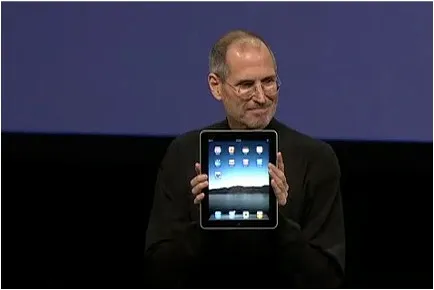
Apple launched the iPad yesterday (watch Steve Jobs present here): a device positioned in between a smart phone and a laptop computer. The big differentiator is a very large screen and a user interface that can be manipulated using the touch of a finger, exactly the same way you interact with an iPhone.

Would could this new device mean for presentations? My first thoughts:

  • The iPad runs the iPhone operating system, which means that you cannot simply port PC or Mac applications on it. Apple announced a version of iWorks (including Keynote) for the iPad, but for now it is impossible to run Microsoft PowerPoint on it.
  • The devices seems like a great presentation tool for one-on-one meetings. A bright, big screen and an informal user interface enable a dialogue-style presentation.
  • The need for an application like Prezi becomes more urgent. Prezi seems made for the iPad: easy zooming in and out of slides, and a non-linear way to move between slides. I have not seen the details of iWorks for iPad, but I assume that Apple is going down the track of creating a Prezi-style user interface for office productivity applications.
  • It would be great if you could use a virtual marker during your iPad presentation: drawing circles to emphasize elements, adding comments, pretty much in the style of the napkin presentation I talked about a while ago.

I am very excited about the iPad. The geek reviews might have found technical imperfections (no multi-tasking for example), but the fundamental revolution is the big touch-based user interface that have brought computing in general and presentations specifically a bit closer to a natural human interaction.

·Design

Zooming in down to cell-level

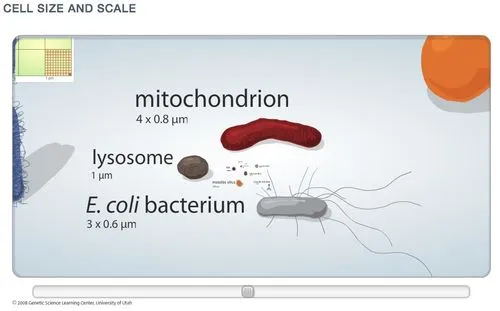
I really like zooming presentation formats such as Prezi, but I am still struggling to find useful application areas. Steve Johnson pointed me to one: to put proportions in perspective. Have a look at this amazing visualization of the relative size of biological cells.

·Design

Video-preview of PowerPoint 2010 - my thoughts

Robert Scoble posted a number of videos with previews of the upcoming Microsoft Office 2010 release. Here is the one about PowerPoint 2010 (speaking is Chris Bryant, product manager on the Office 2010 team): Here are the main points covered in this video (which does not mean that these are the major new features in PowerPoint 2010)

  1. More “cinematic” transitions. More spectacular slide transitions. I never use any form of slide transition, they distract the audience, or worst case: makes them laugh while you are presenting a very serious subject
  2. Animation painter. Copy and paste animation effects from one object to another, not essential
  3. Better video integration. I like this, I think that video will be used increasingly in presentations. Today, integrating rich media into your presentation is a high-risk activity that is likely to result in things going wrong (technically) in the middle of your presentation. PowerPoint 2010 allows you edit videos and sync them with animations
  4. Backstage view: an elaborate screen to control file protection, compression, etc.

Here is my (partial) wish list of features for a new PowerPoint release. Some of them are probably impossible to implement for the moment…

  • A powerful 3D engine to control where to put shapes on a surface, where to put light sources, pretty much like professional design programs like AutoCAD. The third dimension is only used to add some effects to a PowerPoint slide, it could be so much more. It would literally open a whole new design dimension to slide design
  • Fully integrated canvas zooming a la PowerPoint plex or Prezi, enabling you to work on one big interactive slide that you can zoom in and out of
  • A powerful animation control engine, not more flashy effects, but a clear sequence editor to move objects across a slide to exact locations, including a good solution to deal with and edit layers of overlapping objects.
  • Tight cloud integration. Files are getting bigger, collaboration changes. This video about PowerPoint 2010 did not address these “workflow” issues, but I think they are being addressed in the overal Microsoft Office 2010 release.
Continue reading →