

Handouts or regular hardcopies (“napkins”) of a PowerPoint presentation come out OK on a laser printer, the device will shrink the slides to leave a white band around them.
Although less common now, sometimes a napkin-style hard copy is not enough. Especially investment bankers like to hand out high-quality prints of a presentation. If you haven’t set up your presentation for this properly, you wil be faced with a lot of re-design work hours before your presentation. The image below (click for a larger picture) contains the essentials that can save time and stress.
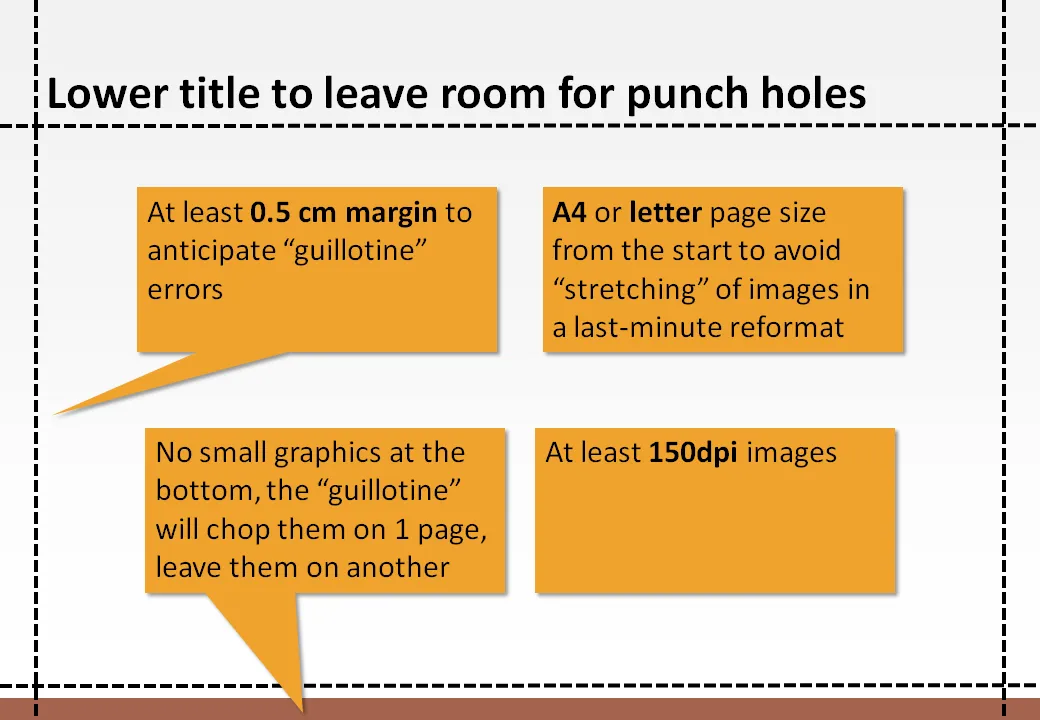
Some more advice. All of this probably makes perfect sense to the graphics design professional working in Adobe InDesign, but PowerPoint “amateurs” (including me) have figured this out by experience (unfortunately).
- Dark background colors are high risk with professional printing
- Budget time for a printer disaster and a possible re-run
- In case of double-sided printing, remember that the punch holes will also appear at the bottom of the pages (leave more white space there as well)
- Think hard whether you need those print outs, instead of relaxing and preparing for that important presentation, you are going to be stressing around with printers, carrying kilos of paper, preventing yourself form making last-minute edits to slides.
- Heavier, or more expensive paper is not always better. Children’s books are printed on cardboard to prevent pages from being torn out.
- A related point: the “dip” (to use a Seth Godin term) of print quality. Everyone appreciates a nice-looking laser-printed hand out. Everyone loves that “annual report-style” glossy brochure. If you’re stuck in the middle (and as a PowerPoint amateur you are likely to be), the result might actually not look that good.