

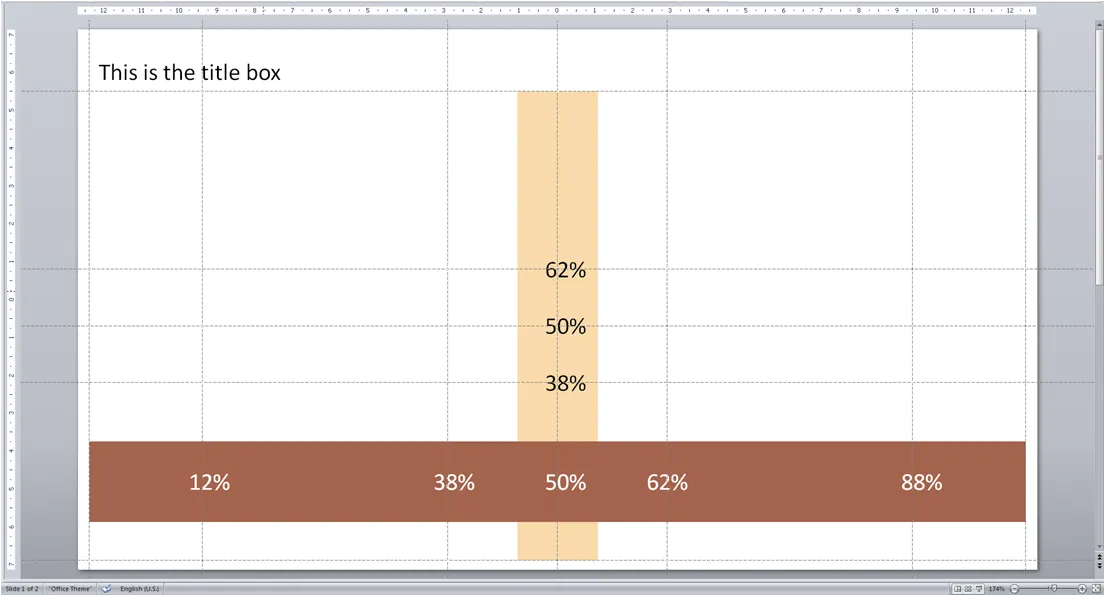
Drawing guides are very useful to keep your pages consistent. I always put ones in such a way that I get a grid similar to the rule of 3:
- Left and right, bottom
- Top, under the title line
- Middle (not at 0, but in the middle between top and bottom guide)
- Two vertical, at 61.8% of the page width (golden proportion)
- Two horizontal, also at the magic 61.8%
Below an illustration of a typical gird I would use for a 16:9 wide-screen presentation.
The big issue with drawing guides is when you accidentally move them: how to put them back in the right place?
- To display drawing guides go to home/drawing/arrange/allign/grid settings and tick the box
- Now use the same menu to set the grid spacing to a round number, for example 0.1 cm, instead of “8 grids per cm” which will give you a spacing of 0.125 cm, making it very difficult to bring a guide line back in its original position.
- You can drag/move grid lines around
- To create a new one: press CTRL, click an existing guide, and drag it to the new location
- To delete a line move it off the page
- Write down the grid positions on a piece of paper, with a nice, round, grid spacing number it is easy to move guides back to their original position if moved by accident
2 comments