SlideMagic Blog

Frequent updates about all things presentations since 2008. Subscribe to never miss a post.

RSS
all posts

Category AI

·AI

AI Mental Drift

AI is very poor at navigating context history. “Go back to the previous version”, “change this”, “replace that”, will almost always lead to confused, diluted responses. You need to “freeze” progress in your work. You got to a good version. Asked for an improvement but did not get it: open a new chat windows and start fresh without the last message exchange.

I am sure it is a matter of months before this issue gets resolved in most AI applications.

·AI

When not to use AI...

Triggered by a post by Nate Jones on Substack (might be paywalled).

I am working on a next big update for SlideMagic, where I am trying to push AI-supported slide generation to the next level. Especially when it comes to layouts with data and text in them, AI is not there yet. The more I start experimenting, the more I realize that AI should not be used everywhere: hallucinations, unpredictable (non-repeatable) outcomes, long wait times, LLM model changes that can completely trip up the tool you have written on top of it.

Nate identifies 4 use cases:

  1. Traditional data processing (adding up last month’s sales by product)
  2. Traditional machine learning (predicting machine failure base on historical data)
  3. Generative AI (summarizing stuff using a chatbot)
  4. AI agents (planning your holiday by optimizing and matching lots of constraints)

Work in progress.

·AI

More Nano Banana

I worked with Google’s Nano Banana a bit more over the past days, and I think I understands what it is doing under the hood.

“Regular” imaging LLMs predict pixels, you give a prompt, the prompt gets translated into a series of tokens, and the model predicts the best matching pixels given the token input. A flat “soup of pixels” is the result. And because of that, it is hard to make small adjustments to an image, editing one particular aspect and leaving everything else as is.

I suspect Nano Banana works with layers. The model tries to understand what aspect of it refers to the bottom of the pile (the background) and what elements go on top. As a result, it is possible to make very precise edits to individual objects in the overall composition of the image.

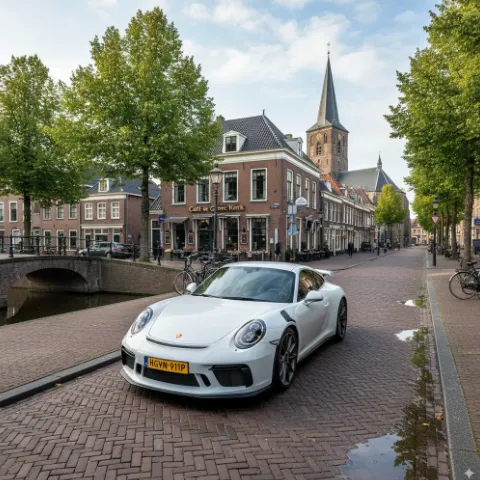
In order to make a coherent image, the model needs to have a good understanding of the 3D perspective of the background, and all the objects above it. Like the example about the Porsche in a Dutch town in my previous post, the car gets rotated, and pasted back into the background image with the correct vanishing point in mind.
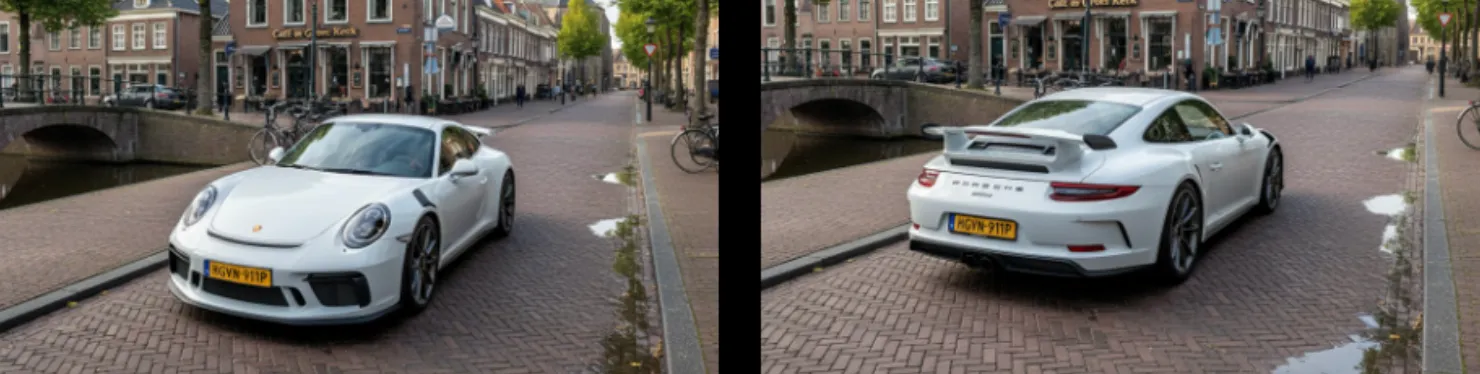
 Vanishing point is preserved when making edits to the image

Vanishing point is preserved when making edits to the image

What the model cannot do is change camera position. view the entire image from a completely different angle. Zooming in and zooming out works. An example is the cover image of this post, where I took an image from the band of my son (Project71) and put them on a big stage. I could not get the model to produce a view from the audience given the image it already produced. (Starting from scratch with an explicit prompt for an audience view would have worked of course).


Continue reading →
·AI

Nano Banana

I just played around with Google’s “Nano Banana” AI image generator, and it is incredibly good and useful for presentation design.

Current AI image generators take a prompt and predict pixels. Ask for a modification, and a whole new bunch of pixels get generated, redoing the entire image. Nano Banana (we need a better/shorter name), seems to work with layers and objects, and keeps things consistent.

Below 2 quick examples:

 “White Porsche in Hoogeveen”

“White Porsche in Hoogeveen”

 “Turn it around”

“Turn it around”

Some observations:

  • Super fast, the first image was an almost instant response
  • Hyper realistic image, does not look cartoonish
  • Correct text: the name of the cafe, the license plate, the branding of the car
  • (That town looks Dutch, but it is not Hoogeveen)
  • But most importantly: isolated editing, changing one thing and leave everything else the same

Photoshop, it was nice meeting you…

I will study the API structure of Nano Banana and see whether I can swap out the image generator in SlideMagic.

Impressive! You can try it out in Google AI Studio

·AI

SlideAudit - Academic research to improve slide layouts

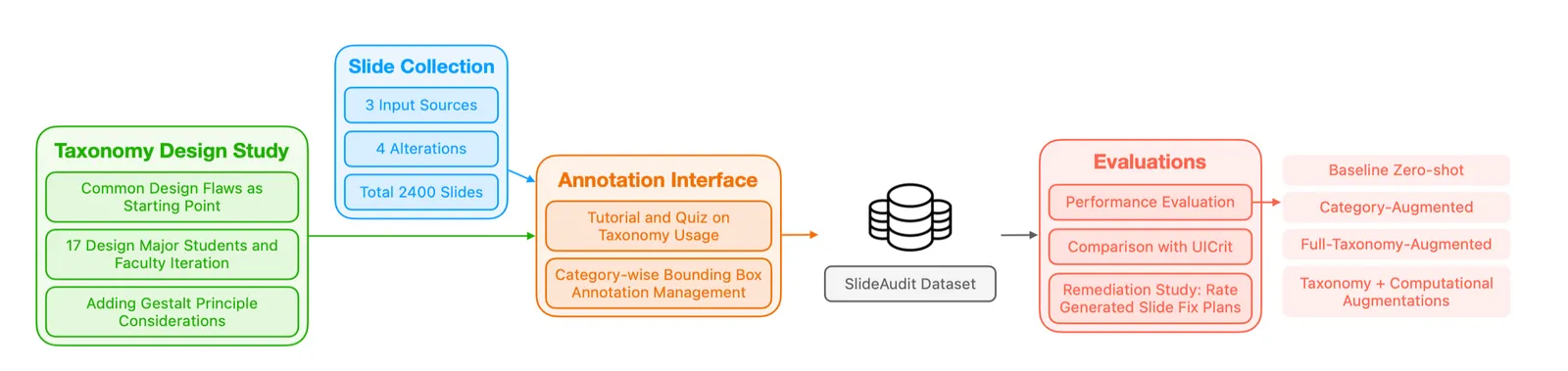
I am following academic efforts to use LLMs to improve / automate slide design with great interest. Each takes a slightly different approach. SlideAudit was recently published by Zhuohao Jerry Zhang and others.

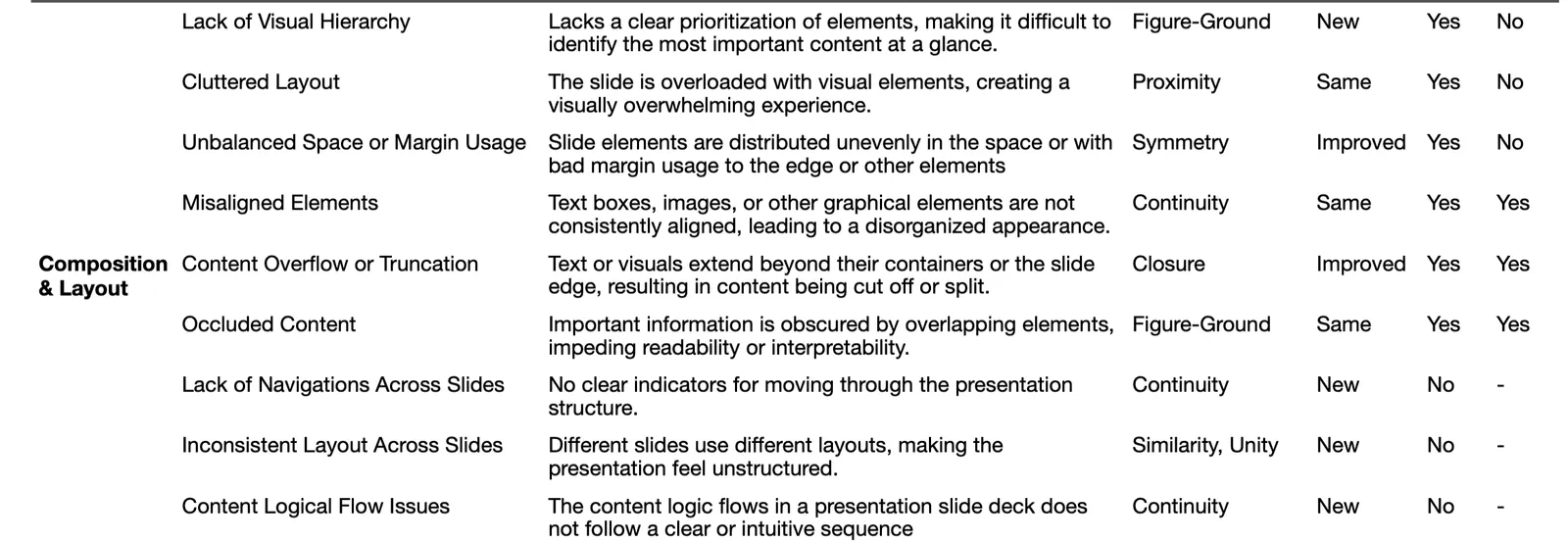
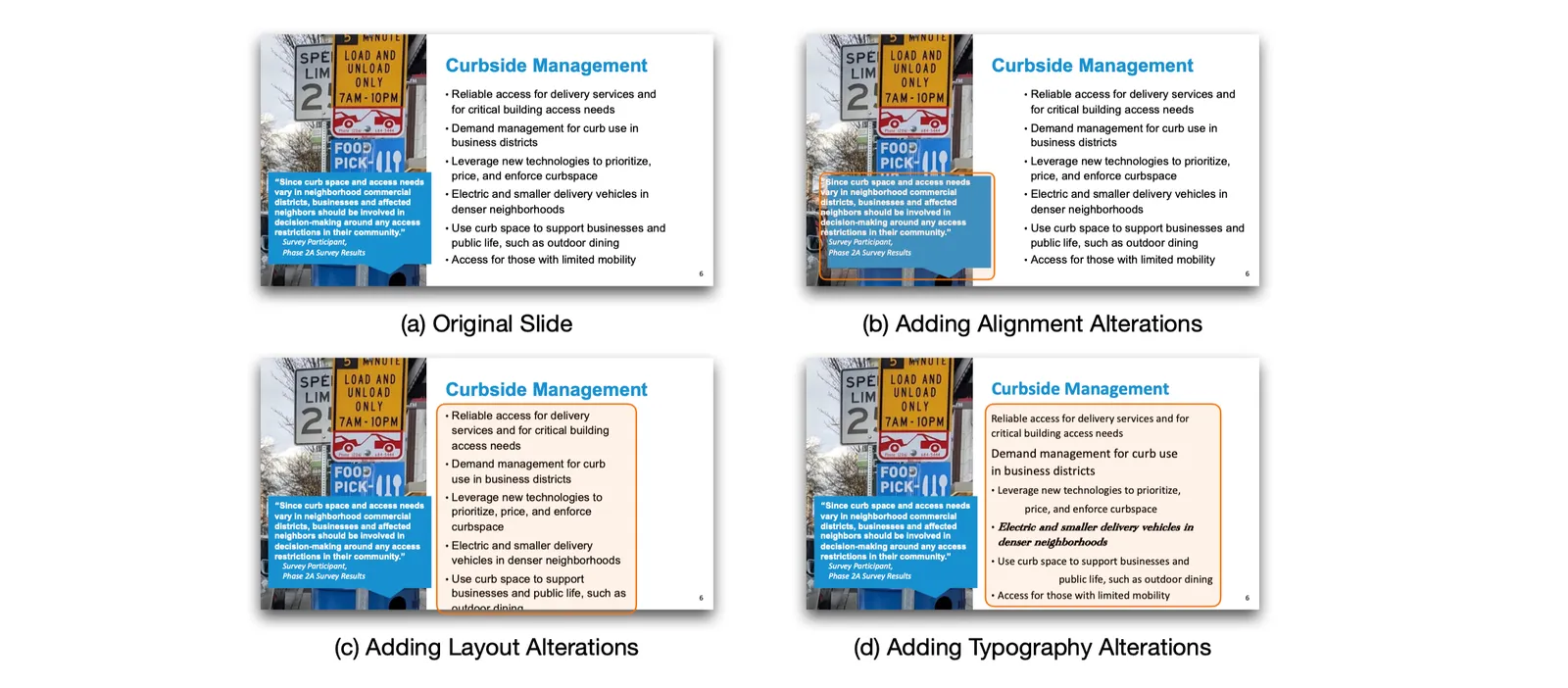
SlideAudit teach LLMs what good design is by teaching it rules and principles. A lot of effort goes into building a bank of slides, identifying design flaws for training, synthetically introducing slides, letting the model run and evaluate the results.

I think this approach can work well for publications that resemble print: designs with lots of text in smaller fonts, and images / graphics that are placed in some sort of grid. Books, magazines, newspapers, but also web sites.

Presentation slides are trickier. It is harder to describe what makes a slide a good slide. You know when it when you see a good one (or a bad one), but pinpointing and automating the steps to go from bad to good is tricky.

·AI

AI is good at reading data from charts

Need to make over a slide but don’t have access to the data in a graph? AI to the rescue. Upload a screen shot to an LLM and you get back pretty good estimates of the data values in the chart. It might not be scientifically 100% accurate, but good enough to recreate the graph in your own presentation software.

·AI

AI to clean up text tables

One of my big slide puzzles is usually a messy table of pros/cons of a product, or a competitive comparison. How to highlight the right dimensions. Make sure that one is not a sub point of another. Make sure that cells have short text in them. Make sure that text is roughly equally long in each cell.

GPT-5 is very good at this. Copy-paste the messy table into the interface, and the output is pretty useful. Something to integrate in SlideMagic at some stage.

·AI

No more disguised examples?

Many confidential presentations often use disguised case examples of clients, potential investments, drugs in development. AI has become incredibly good at uncovering even the most vague ones. Before sending your deck, double-check them in an LLM to see what comes up…

·AI

The end of the presentation?

Apologies for the click bait…

I have not been writing here for a while now as I am focusing on 9xc/9vc. But recently, as I am pushing further into the world of AI, all my pas experiences seems to be coming together: computer science, company analysis, presentation design, and hardcore biopharma science…So I might occasionally come back here.

The majority of “presentations” are documents that are used make decisions inside companies. They happen to have graphs and other visuals inside them, hence the word “presentation”. Most humans are not very skilled in writing a concise memo to make a point: hence bullet points in large font and visuals to the rescue.

AI could change that: boiling down these big slide decks to a few paragraphs with a decision that needs to be taken, pros/cons of alternatives, and the recommended way forward. No slides needed.